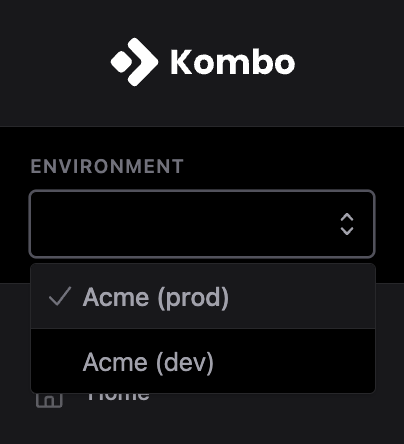
In Kombo, you will have access to two environments; a production environment (prod) and a development environment (dev). You can switch between these in the sidebar:
Only your tenant name (“Acme” in the case of the screenshot above) is shared
across environments. That means that all your other configurations, including
scopes, enabled tools, webhooks, custom fields, and secrets,
will be different per environment.
This is where you should create integrations with your customers. We are stricter
in this environment about default privacy settings and data retention.
When connecting customers via your production environment, their connection flow
input is saved in session storage.
This is done so that while the same tab/window is open, your customer will not
have to enter the same data for the same input if they move back and forth
through the connection flow. When the tab/window is closed, the credentials
are forgotten. This differs from the development credential storage,
as described below.
The development environment is meant to be used with
your sandbox environments during
development and testing. This environment is less strict about privacy settings
and data retention.
In the development environment, the connection flow input is saved
in local storage.
This is a quality-of-life feature meant for developers to prevent having
to enter the same inputs when creating multiple connections to the same
sandbox. Local storage will persist between browser sessions until it
is manually cleared.
You have access to our built-in Kombo Sandbox tool in the development
environment. You can create a new integration with this sandbox as you would
with any other integration, and instantly start reading data without having
to connect a HR system.
In the development environment only, integrations that did not receive an
API requests in the past two weeks will automatically
become inactive. If you want to continue
using the integration, you can activate it again.
Full access to the Development environment only, including API keys and all configuration within that environment. Cannot access Production or manage users.
Read access to the Production environment plus the ability to create integrations, reconnections, and provisioning links, edit integration settings, and map custom fields. Cannot manage API keys, scopes, audit logs, or users.
Kombo’s dashboard authentication supports SSO (SAML and OIDC) and MFA for users who want additional security. These are not available on all plans — contact the Kombo team to check availability and configure them for your tenant.
Was this page helpful?
Assistant
Responses are generated using AI and may contain mistakes.