

What is concurrency limiting?
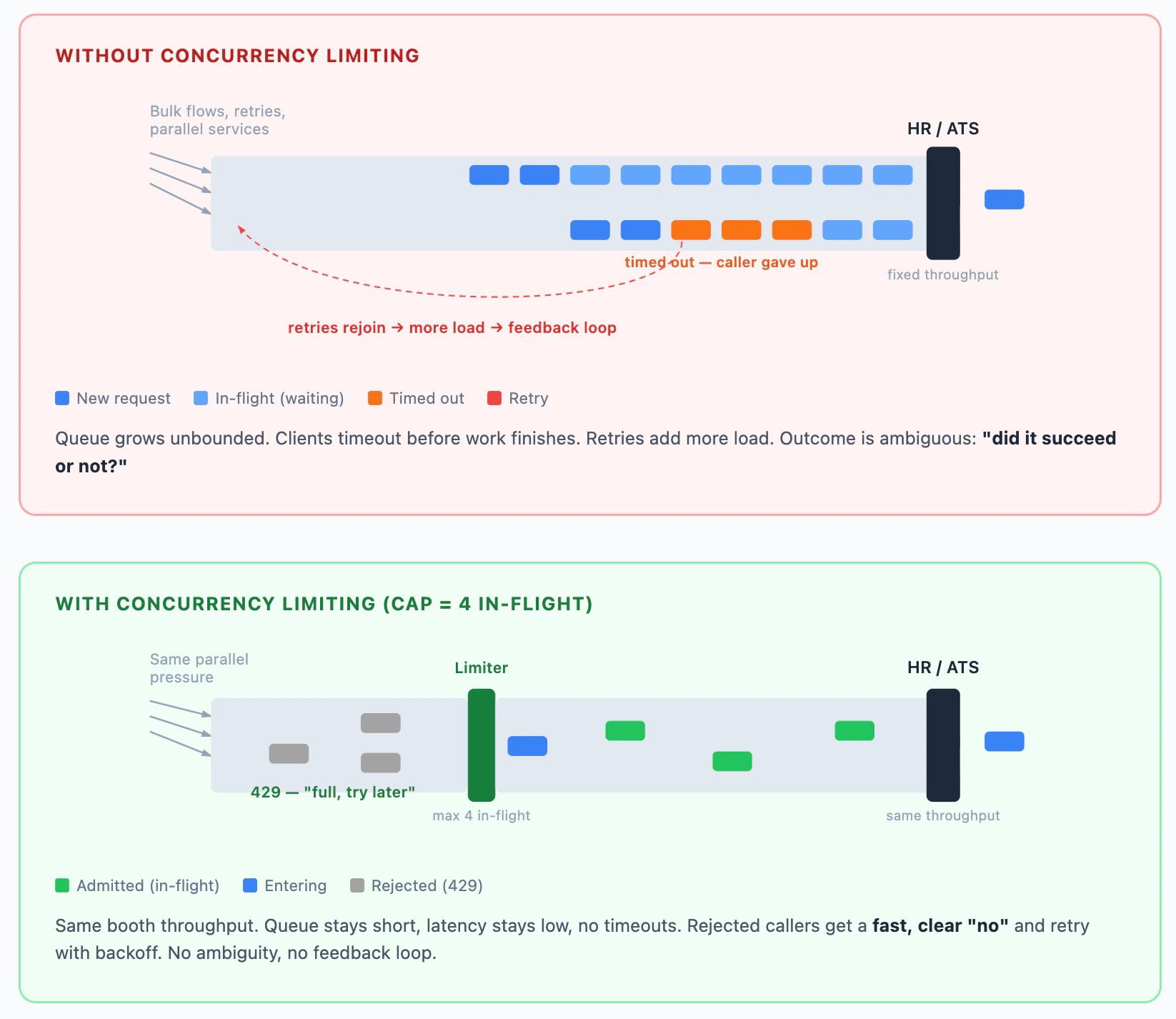
When you invoke unified actions in Kombo (e.g., creating a candidate, moving an application, reading attachments), each call is forwarded to the underlying HR or ATS tool. These tools have their own rate limits, which are often significantly lower than what Kombo allows. If many unified actions run in parallel, they all compete for limited downstream throughput. Completion times grow, your HTTP clients may hit timeouts while work is still in flight, and retries can overlap with operations that are still running. Concurrency limiting solves this by capping how many unified actions can be processed simultaneously per integration. When the cap is reached, additional requests are immediately rejected with a429 status code.
This gives you a fast, clear signal to retry with backoff instead of stacking
unbounded in-flight work that might eventually time out on your side.
Concurrency limiting only applies to unified actions (calls that run work
against the underlying tool). Model endpoints for reading synced data are not
affected.
How it differs from rate limiting
For Kombo-wide request volume over time, see Rate limiting.
Both return HTTP
429, but with different error codes and headers.
Response headers
When concurrency limiting is active, every unified action response includes two headers:
The limit may vary per integration. Sensitive integrations (e.g.,
reverse-engineered APIs) may have significantly lower limits. Use the response
headers to discover the actual limit rather than assuming a specific number. The
default limit is 30.
These headers appear on both successful responses and
429 rejections, so you can monitor utilization proactively.
Handling concurrency limit errors
When you exceed the concurrency limit, you receive a429 response with the error code PLATFORM.CONCURRENCY_LIMIT_EXCEEDED. The response includes both concurrency and rate limit headers:
ratelimit-remaining: 834) while the concurrency headers show no remaining slots (concurrency-remaining: 0). This tells you:
- The underlying tool is at capacity for this integration, not Kombo itself.
- You still have rate limit quota, so waiting for
ratelimit-resetis unnecessary. - Slots free up quickly as in-flight requests complete, so a short retry is effective.
How to retry
ForPLATFORM.CONCURRENCY_LIMIT_EXCEEDED, retrying the same request is
expected and does not run the unified action twice. Kombo rejects the call
before the unified action runs (no concurrency slot was acquired). That differs
from failures where the outcome is unclear, e.g., a timeout after a write may
still have succeeded, so retries need extra care.
- Retry the failed request with exponential backoff: start with a short delay (e.g., 1s) and increase on repeated
429s (2s, 4s, 8s, …). - Optionally, throttle proactively: check
Concurrency-Remainingon successful responses to slow down before hitting the limit.
What this means for your integration
Concurrency limiting does not cap steady-state throughput below what the downstream tool can sustain. The integrated system still bounds how fast work completes. The limit turns that constraint into immediate429 responses
instead of long waits and unbounded in-flight unified actions.