

How it works
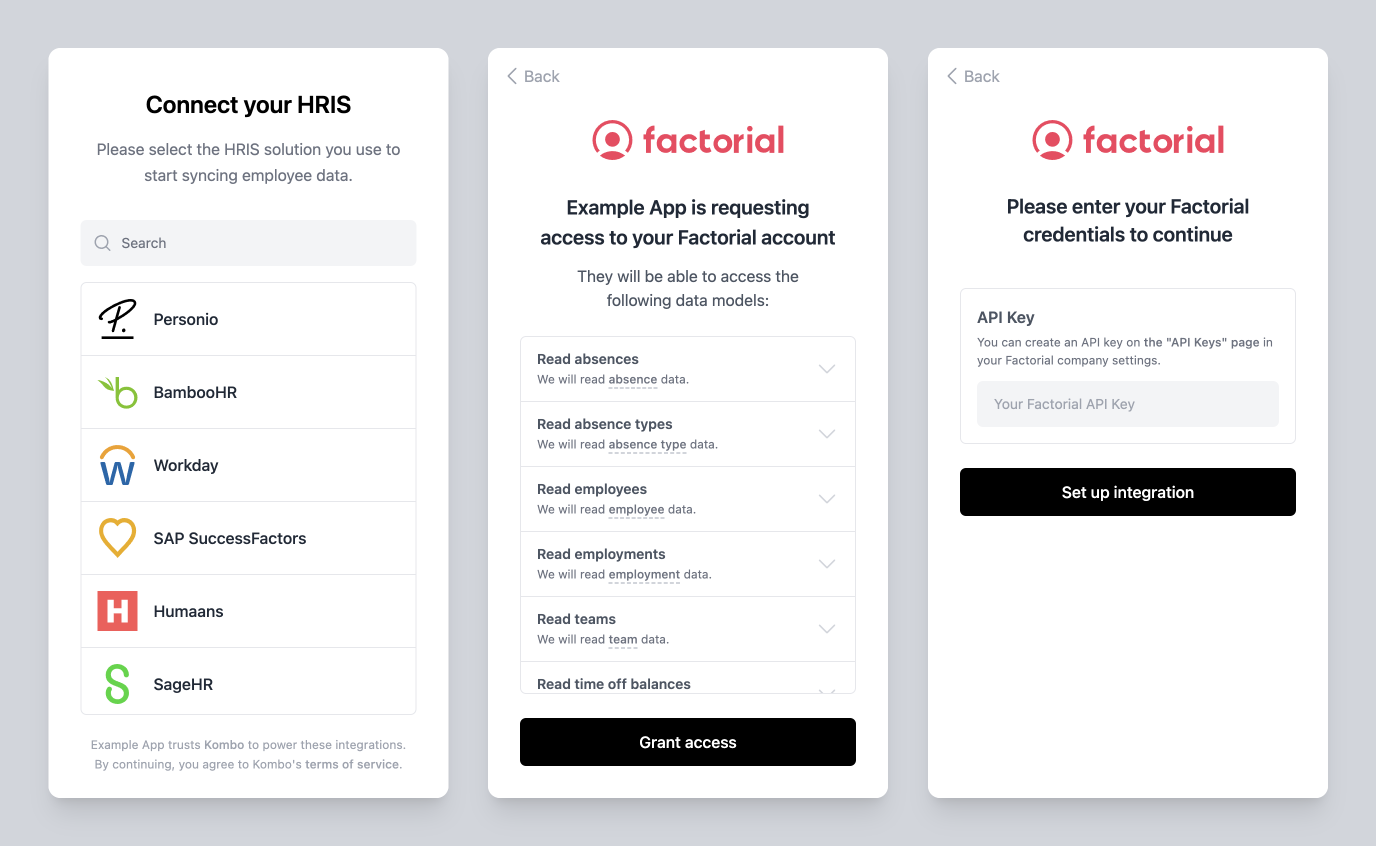
To get a better idea of how Kombo Connect fits into your application, let’s take a look at the typical flow a customer will go through:- They initiate the flow within your app (e.g., through a “Connect HRIS” button)
- They are presented with the Kombo Connect UI where they can:
- Select the tool they want to connect (e.g., Factorial)
- Get an overview of the requested data points (see Scopes)
- Grant access to the requested data points
- See which credentials are required to set up the tool and how to get them
- Enter the necessary credentials (e.g., an API key)
- They return to your app, and their integration has been set up
Getting started
The flow described above applies to the situation where you’ve embedded the Kombo Connect flow into your own app. This provides the most seamless experience but isn’t the quickest way to get started. If you just want to try out Kombo quickly and onboard selected customers, consider these other options that don’t require any changes to your app:Manual setup
Perfect when you already have the relevant credentials from your customer
and just want to add the integration to Kombo
Magic links
Similar in that they also don’t require any code, but they still allow your
customers to go through the flow and enter the credentials themselves.