> ## Documentation Index
> Fetch the complete documentation index at: https://docs.kombo.dev/llms.txt
> Use this file to discover all available pages before exploring further.
# Connection setup
The first part of the implementation is the setup of the connection. Your customer needs to generate and share their API credentials so that we can make the necessary API calls for the integration.
There are [multiple ways of implementing this step](/lms/guides/connect/introduction), but during your development and for the first customers we highly recommend just using the Magic Link feature that we provide. This guide will therefore assume that you are using the magic links for setting up the connection.
For your customer-facing implementation, we highly recommend embedding Kombo
into your product for the best results.
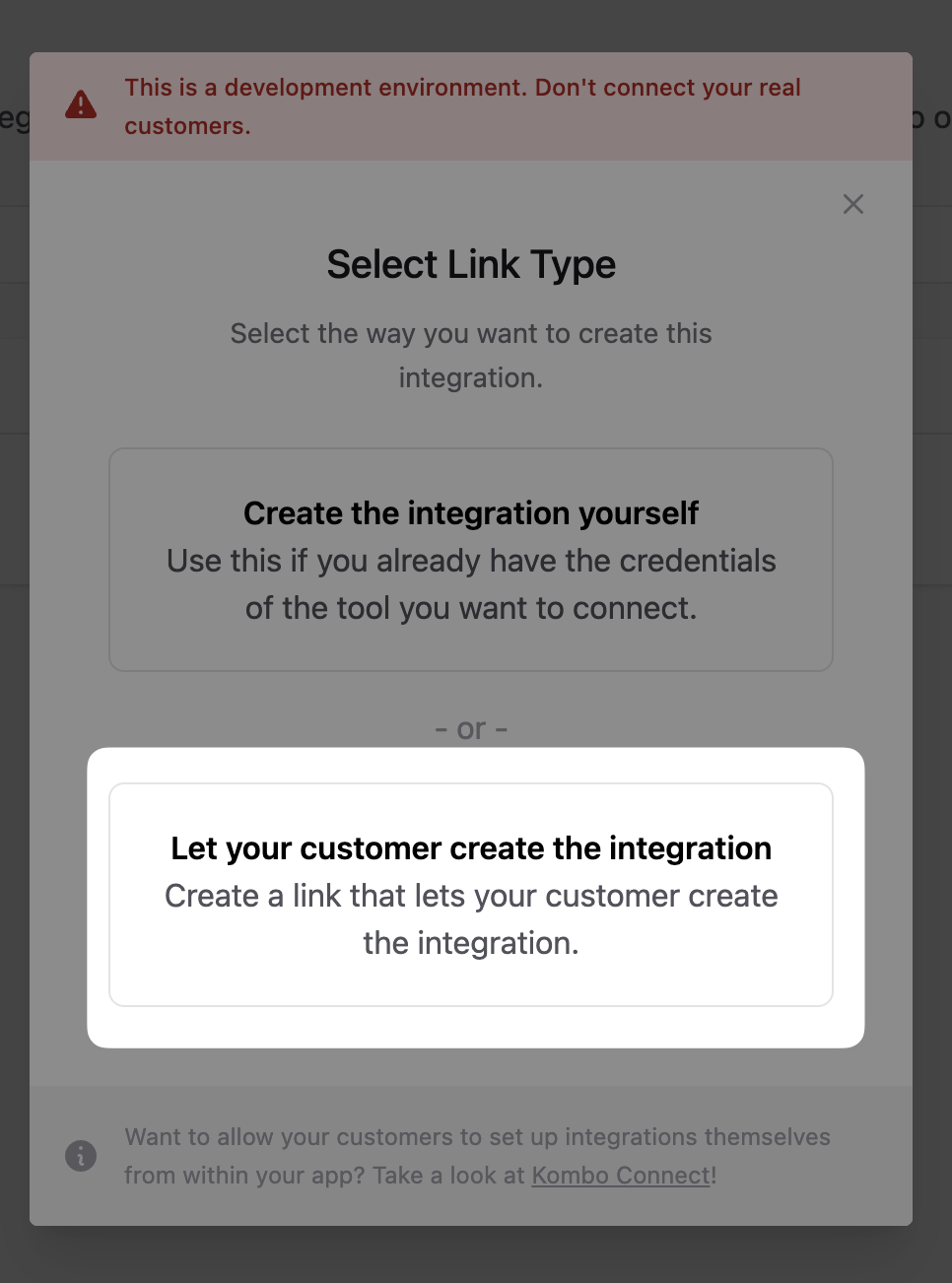
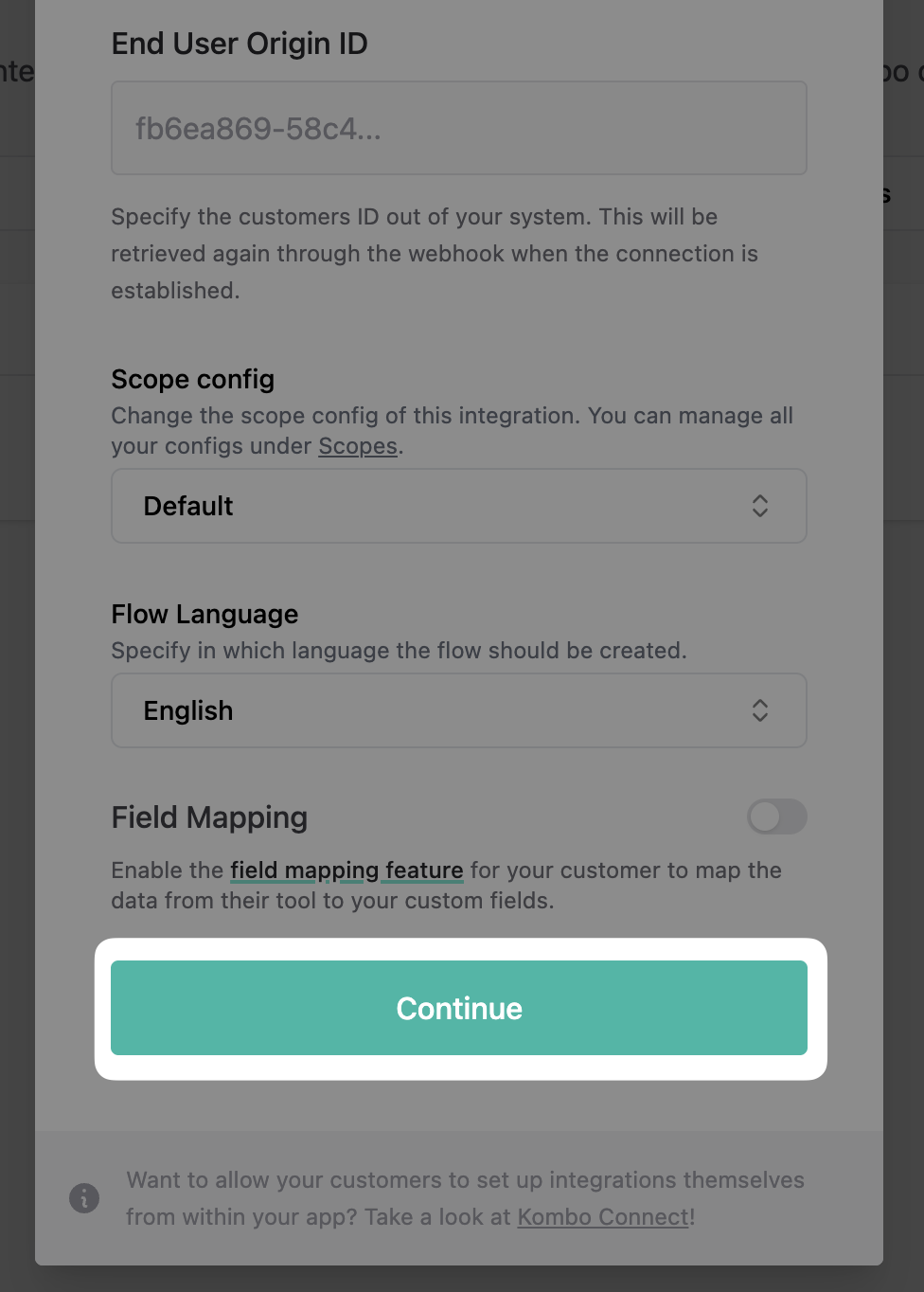
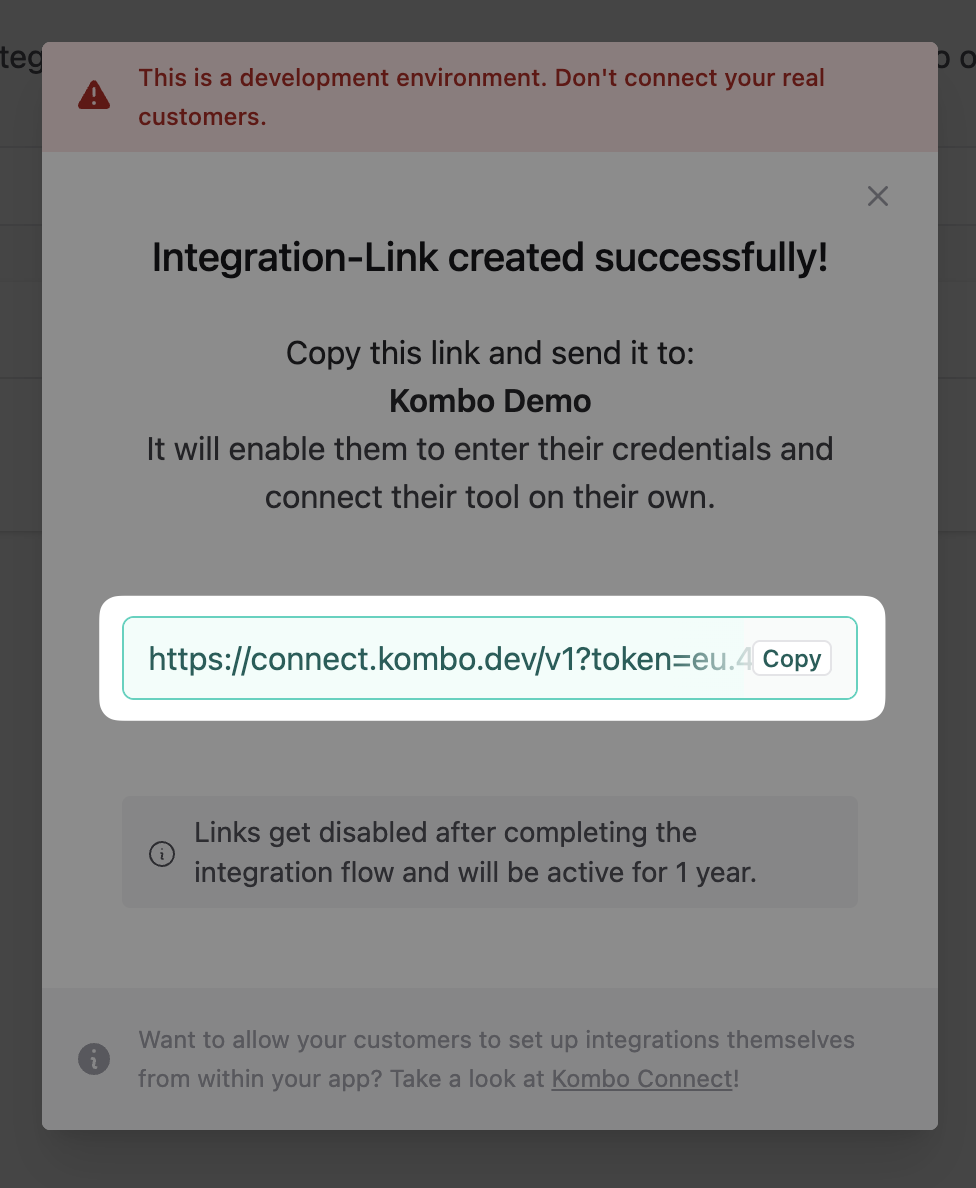
1. Generate a link for your customer. You only have to go into the [dashboard](https://app.kombo.dev/integrations) and:
* Click on New integration
 * Click on "Let your customer create the integration" (during development, you can also use the first option).
 * Click on "Continue".
 * Copy the link.
 2. Wait for your customer to generate and enter their API credentials. You can see the status of any sent-out connection link in the [Kombo dashboard](https://app.kombo.dev/pending-connections).
Setting up the credentials for an integration can be tricky for your
non-technical users. That's why we highly recommend sharing our
[step-by-step connection
guides](https://help.kombo.dev/hc/en-us/sections/14349683218961-Connection-Guides)
with them or guiding them through the process on a short call.
3. Receive the `integration-created` [webhook](/lms/guides/webhooks#integration-created). We send this webhook every time one of your customers creates a new integration.
```json theme={null}
{
"id": "5gjAtURLPbnTiwgkaBfiA3WJ",
"type": "integration-created",
"data": {
"id": "successfactors:CBNMt7dSNCzBdnRTx87dev4E",
"tool": "successfactors",
"category": "LMS",
"end_user": {
"origin_id": "36123",
"creator_email": "user@example.com",
"organization_name": "Acme, Inc."
}
}
}
```
The `end_user.origin_id` [is submitted by you](/lms/v1/post-connect-create-link) when creating a connection link and should represent the ID of your customer in your database. You need to store this ID in your database so that you'll know which LMS system belongs to which customer. For example, if you have two customers with the IDs "42" and "43", then your database could look as follows after the integrations have been created:
| end\_user.origin\_id | kombo\_integration\_id |
| -------------------- | ----------------------------------------- |
| 42 | `workday:8d1hpPsbjxUkoCoa1veLZGe5` |
| 43 | `successfactors:B1hu5NGyhdjSq5X3hxEz4bAN` |
**This ID is not for public display** and should only be accessible to your
backend. The ID is not a secret as such but it's one of two things needed
alongside the API key. There is no way to list all integration IDs via the
API key so even in the case of an accidental API key leak, the data would
still be safe.
## Alerting for customer problems
We will send you a `connection-flow-failed` [webhook](/lms/guides/webhooks#connection-flow-failed) every time a customer is running into an issue. You should set up some sort of alerting based on this webhook so that you can be fast to offer help to your customer, should they have an error when setting up an integration.
```json theme={null}
{
"id": "5gjAtURLPbnTiwgkaBfiA3WJ",
"type": "connection-flow-failed",
"data": {
"integration_tool": "workday",
"integration_category": "LMS",
"end_user": {
"origin_id": "36123",
"creator_email": "user@example.com",
"organization_name": "Acme, Inc."
},
"log_url": "https://app.kombo.dev/env/production/logs/C3xUo6XAsB2sbKC7M1gyXaRX"
}
}
```
## Handling deleted integrations
It is of course also possible to delete integrations. This can be done in two ways:
* via the ["delete integration"-endpoint](/lms/v1/delete-integrations-integration-id). If you are calling this endpoint you should also take care of deleting the `kombo_integration_id` from your database.
* via the `integration-deleted` [webhook](/lms/guides/webhooks#integration-deleted). This will be sent to you if someone goes into the Kombo dashboard and deletes an integration manually. Also then you'll have to remove the `kombo_integration_id` from your database.
```json theme={null}
{
"id": "5gjAtURLPbnTiwgkaBfiA3WJ",
"type": "integration-deleted",
"data": {
"id": "workday:CBNMt7dSNCzBdnRTx87dev4E",
"tool": "workday",
"category": "LMS",
"end_user": {
"origin_id": "36123",
"creator_email": "user@example.com",
"organization_name": "Acme, Inc."
},
"deleted_at": "2022-11-02T10:50:10.242Z"
}
}
```
2. Wait for your customer to generate and enter their API credentials. You can see the status of any sent-out connection link in the [Kombo dashboard](https://app.kombo.dev/pending-connections).
Setting up the credentials for an integration can be tricky for your
non-technical users. That's why we highly recommend sharing our
[step-by-step connection
guides](https://help.kombo.dev/hc/en-us/sections/14349683218961-Connection-Guides)
with them or guiding them through the process on a short call.
3. Receive the `integration-created` [webhook](/lms/guides/webhooks#integration-created). We send this webhook every time one of your customers creates a new integration.
```json theme={null}
{
"id": "5gjAtURLPbnTiwgkaBfiA3WJ",
"type": "integration-created",
"data": {
"id": "successfactors:CBNMt7dSNCzBdnRTx87dev4E",
"tool": "successfactors",
"category": "LMS",
"end_user": {
"origin_id": "36123",
"creator_email": "user@example.com",
"organization_name": "Acme, Inc."
}
}
}
```
The `end_user.origin_id` [is submitted by you](/lms/v1/post-connect-create-link) when creating a connection link and should represent the ID of your customer in your database. You need to store this ID in your database so that you'll know which LMS system belongs to which customer. For example, if you have two customers with the IDs "42" and "43", then your database could look as follows after the integrations have been created:
| end\_user.origin\_id | kombo\_integration\_id |
| -------------------- | ----------------------------------------- |
| 42 | `workday:8d1hpPsbjxUkoCoa1veLZGe5` |
| 43 | `successfactors:B1hu5NGyhdjSq5X3hxEz4bAN` |
**This ID is not for public display** and should only be accessible to your
backend. The ID is not a secret as such but it's one of two things needed
alongside the API key. There is no way to list all integration IDs via the
API key so even in the case of an accidental API key leak, the data would
still be safe.
## Alerting for customer problems
We will send you a `connection-flow-failed` [webhook](/lms/guides/webhooks#connection-flow-failed) every time a customer is running into an issue. You should set up some sort of alerting based on this webhook so that you can be fast to offer help to your customer, should they have an error when setting up an integration.
```json theme={null}
{
"id": "5gjAtURLPbnTiwgkaBfiA3WJ",
"type": "connection-flow-failed",
"data": {
"integration_tool": "workday",
"integration_category": "LMS",
"end_user": {
"origin_id": "36123",
"creator_email": "user@example.com",
"organization_name": "Acme, Inc."
},
"log_url": "https://app.kombo.dev/env/production/logs/C3xUo6XAsB2sbKC7M1gyXaRX"
}
}
```
## Handling deleted integrations
It is of course also possible to delete integrations. This can be done in two ways:
* via the ["delete integration"-endpoint](/lms/v1/delete-integrations-integration-id). If you are calling this endpoint you should also take care of deleting the `kombo_integration_id` from your database.
* via the `integration-deleted` [webhook](/lms/guides/webhooks#integration-deleted). This will be sent to you if someone goes into the Kombo dashboard and deletes an integration manually. Also then you'll have to remove the `kombo_integration_id` from your database.
```json theme={null}
{
"id": "5gjAtURLPbnTiwgkaBfiA3WJ",
"type": "integration-deleted",
"data": {
"id": "workday:CBNMt7dSNCzBdnRTx87dev4E",
"tool": "workday",
"category": "LMS",
"end_user": {
"origin_id": "36123",
"creator_email": "user@example.com",
"organization_name": "Acme, Inc."
},
"deleted_at": "2022-11-02T10:50:10.242Z"
}
}
```