> ## Documentation Index
> Fetch the complete documentation index at: https://docs.kombo.dev/llms.txt
> Use this file to discover all available pages before exploring further.
# KomboAI
> Get account-aware technical support in your shared channel
KomboAI is Kombo's account-aware support agent in your shared Slack or Microsoft
Teams channel. It combines technical knowledge about Kombo and supported
providers with read-only context from your Kombo account to give answers that
reflect your setup.
## See KomboAI in action
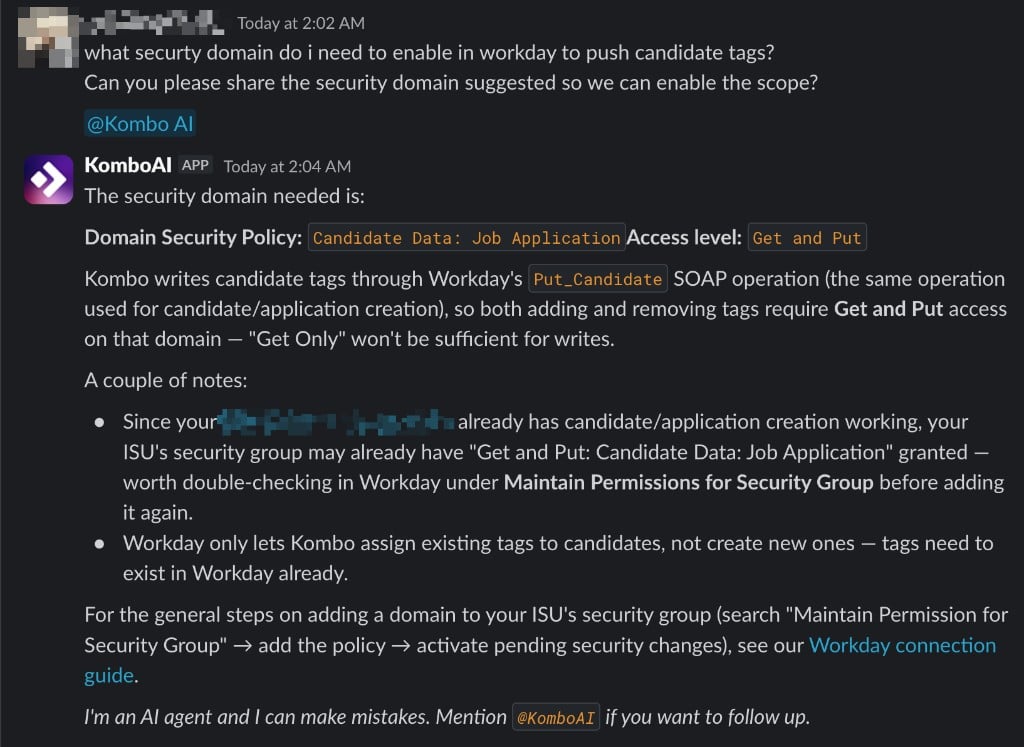
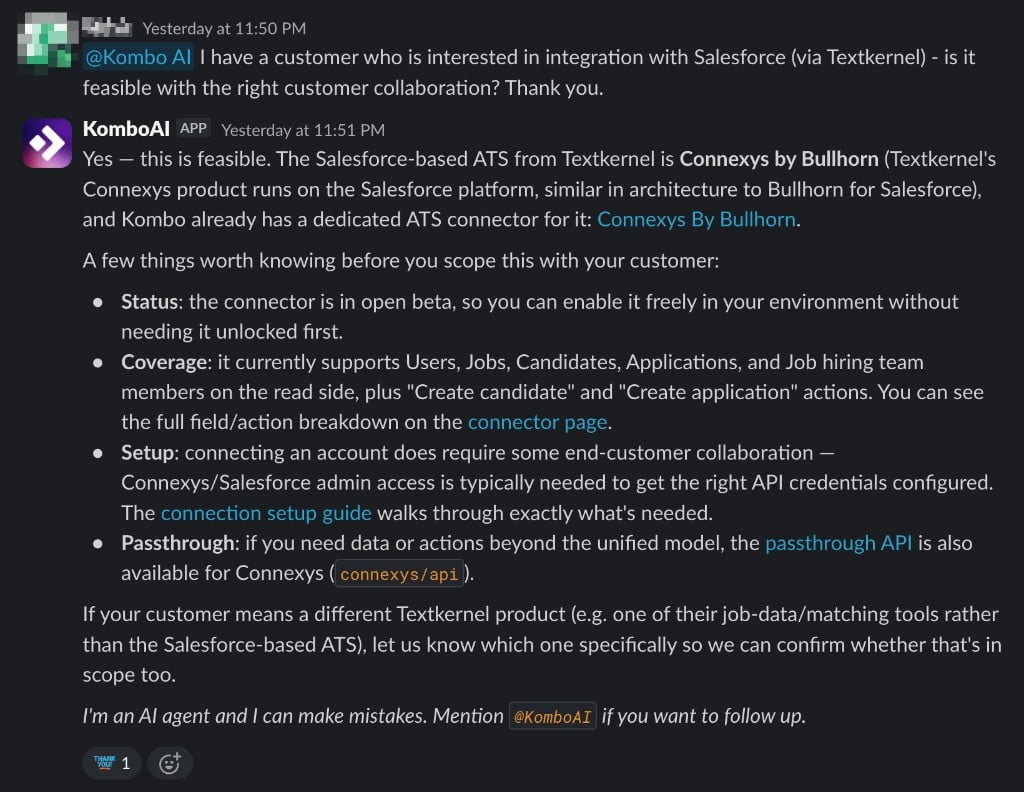 ## What KomboAI can help with
### Assess feasibility
Determine whether a provider supports the data, actions, and workflows your
product needs. KomboAI can also explain setup requirements such as permissions,
scopes, credentials, certificates, sandbox access, and provider partnerships.
### Explain provider behavior
Understand provider-specific APIs, permissions, field mappings, IDs, filters,
normalization, sync behavior, and known limitations.
### Troubleshoot account-specific issues
Investigate linked accounts, effective scope configurations, and recent
interactions to help narrow down missing fields, failed syncs, actions,
webhooks, and connection issues.
## Use KomboAI
KomboAI must be enabled for your account by Kombo support. Ask our team in
your shared support channel to activate it.
Once enabled, mention `@KomboAI` in a message to ask a question or follow up on
an answer. Some support channels are configured for proactive responses, where
KomboAI considers new messages and responds when it can usefully contribute.
For the most useful answer, include the provider or linked account, what you
expected, what happened instead, and any relevant error, screenshot, or
dashboard link.
## Account access and limits
KomboAI uses the current support thread and supported image attachments. It
draws on a broad, curated body of knowledge spanning Kombo implementation,
product usage, and provider behavior.
Its live account access is read-only and restricted to the Kombo tenant
associated with your support account. It can inspect your environments, linked
accounts, scope configurations, and recent interactions.
KomboAI cannot change configuration, perform actions, or modify provider data.
It also does not have unrestricted access to individual synced records, complete
request and response payloads, every log, or every setting. When a change is
needed, it can explain how to make it.
## Faster answers, backed by humans
KomboAI is designed to make Kombo support faster, not replace the people behind
it. For many technical questions, it can research the issue and respond within
20 to 60 seconds, often giving you enough information to continue immediately.
Our support team remains responsible for helping you succeed with Kombo. We
continuously review KomboAI's answers to improve how it understands questions,
researches the relevant context, and explains its findings. When a question
requires a better answer, our team will take over.
KomboAI can make mistakes. If an answer seems inaccurate, incomplete, or based
on a misunderstanding, please tell us in the thread. Your feedback helps us
correct the answer and improve KomboAI.
## What KomboAI can help with
### Assess feasibility
Determine whether a provider supports the data, actions, and workflows your
product needs. KomboAI can also explain setup requirements such as permissions,
scopes, credentials, certificates, sandbox access, and provider partnerships.
### Explain provider behavior
Understand provider-specific APIs, permissions, field mappings, IDs, filters,
normalization, sync behavior, and known limitations.
### Troubleshoot account-specific issues
Investigate linked accounts, effective scope configurations, and recent
interactions to help narrow down missing fields, failed syncs, actions,
webhooks, and connection issues.
## Use KomboAI
KomboAI must be enabled for your account by Kombo support. Ask our team in
your shared support channel to activate it.
Once enabled, mention `@KomboAI` in a message to ask a question or follow up on
an answer. Some support channels are configured for proactive responses, where
KomboAI considers new messages and responds when it can usefully contribute.
For the most useful answer, include the provider or linked account, what you
expected, what happened instead, and any relevant error, screenshot, or
dashboard link.
## Account access and limits
KomboAI uses the current support thread and supported image attachments. It
draws on a broad, curated body of knowledge spanning Kombo implementation,
product usage, and provider behavior.
Its live account access is read-only and restricted to the Kombo tenant
associated with your support account. It can inspect your environments, linked
accounts, scope configurations, and recent interactions.
KomboAI cannot change configuration, perform actions, or modify provider data.
It also does not have unrestricted access to individual synced records, complete
request and response payloads, every log, or every setting. When a change is
needed, it can explain how to make it.
## Faster answers, backed by humans
KomboAI is designed to make Kombo support faster, not replace the people behind
it. For many technical questions, it can research the issue and respond within
20 to 60 seconds, often giving you enough information to continue immediately.
Our support team remains responsible for helping you succeed with Kombo. We
continuously review KomboAI's answers to improve how it understands questions,
researches the relevant context, and explains its findings. When a question
requires a better answer, our team will take over.
KomboAI can make mistakes. If an answer seems inaccurate, incomplete, or based
on a misunderstanding, please tell us in the thread. Your feedback helps us
correct the answer and improve KomboAI.