> ## Documentation Index
> Fetch the complete documentation index at: https://docs.kombo.dev/llms.txt
> Use this file to discover all available pages before exploring further.
# Reading employees
 ## Before you can read data
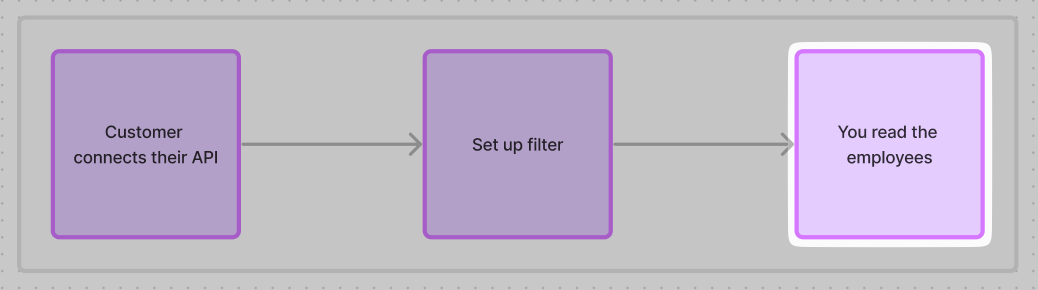
Data will start automatically syncing once your customer has successfully completed the connection flow to connect their HRIS.
To prevent returning incomplete data while it's still running, you will not get any data until the *first sync* completes.
If you send a request before that, the API responds with an [error `code`](/guides/errors) like `INTEGRATION.SETUP_SYNC_PENDING`:
```json theme={null}
{
"status": "error",
"error": {
"code": "INTEGRATION.SETUP_SYNC_PENDING",
"title": "The integration's setup sync is still running.",
"message": "The first sync of this integration didn't finish successfully yet! You can keep polling this until you get a successful response or react to our webhooks."
}
}
```
| Code | When it appears | What to do |
| --------------------------------------------------------------------------------- | -------------------------------------------- | --------------------------------------------------------------------------- |
| [`INTEGRATION.SETUP_SYNC_PENDING`](/guides/errors#integration-setup-sync-pending) | Initial sync is still running. | Keep polling or listen to data-changed. |
| [`INTEGRATION.SETUP_INCOMPLETE`](/guides/errors#integration-setup-incomplete) | Some steps have not been completed yet. | Please finish the setup. Then keep polling or listen to data-changed. |
| [`INTEGRATION.QA_FAILED`](/guides/errors#integration-qa-failed) | Incomplete data triggered Quality Assurance. | Wait for Kombo support to fix this. Keep polling or listen to data-changed. |
If you receive one of these error `code`s keep requesting the endpoint until you get a successful response.
Alternatively listen to our `data-changed` webhook, as described in [setting up your webhook](/hris/implementation-guide/setup#set-up-webhooks).
🦉 The first data sync could **take a few seconds up to multiple hours**, depending on your scope config, the system itself (some are heavily rate-limited), and how much data is in your customer's system.
The UX for your customer should therefore be designed around some delay/waiting time.
## Getting employees
Once the first sync is finished, you must [fetch the data](/hris/getting-started/querying-api) from the Kombo API and store it in your system so that you can show it to your customer without having to call the API again.
When querying data from the Kombo API, you should consider the following things:
* We recommend setting the `page_size` query param to the maximum batching (250 elements) to minimize the number of API calls and maximize API response size.
* Our API is optimized to serve a few calls with large payloads at comparatively low latencies. That makes our API perfect for batch-requesting large amounts of data in a few seconds.
* Make sure to implement [pagination](/hris/getting-started/querying-api#pagination), by using the `next` key in our API response and passing it in the `cursor` query param
A request to the [get employees endpoint](/hris/v1/get-employees) could therefore look like this:
```shell theme={null}
curl --request GET \
--url 'https://api.kombo.dev/v1/hris/employees?cursor=26vafvWSRmbhNcxJYqjCzuJg&page_size=250' \
--header 'Authorization: Bearer ' \
--header 'X-Integration-Id: '
```
Once you have the data, you can perform your specific business logic. Most customers in HRIS define their behavior like this:
* **Users to add:** These are all of the records that, until now, did not appear in your query. They need to be inserted into your database and probably should get an invitation in case it’s the first time they are onboarded to your product.
* **Users to update:** These are users that already have access but were changed in any given property (e.g. changed address, bank details, etc.). Those users can just be updated in the database.
* **Users to remove:** These are users that you currently have in your database but that don’t show up in the API response anymore. This means you should notify the user that their access will be removed and mark them as deleted. It can happen that a user will lose access and get onboarded at a later time. Therefore you should keep track of off-boarded employees so that you can distinguish them from the ones that get access to the product for the first time. Just storing the ID in the HRIS system is a GDPR-compliant and relatively robust way to do so.
## Understanding Organizational Hierarchy
Kombo exposes organizational structure through two complementary data models that you can combine to reconstruct reporting lines and department trees.
### Manager Reporting Lines
Each employee has a `manager_id` field (and an expanded `manager` object) that references another employee in the same dataset. You can use this to build a reporting-line tree:
```json theme={null}
{
"id": "26vafvWSRmbhNcxJYqjCzuJg",
"first_name": "Jane",
"last_name": "Smith",
"manager_id": "7E2gyuv6TmvtByzBxW9Sxt53",
"manager": {
"id": "7E2gyuv6TmvtByzBxW9Sxt53",
"first_name": "John",
"last_name": "Doe",
"work_email": "john.doe@example.com"
}
}
```
To build a full reporting tree, collect all employees and build an adjacency list keyed by `id` with edges from `manager_id`. Employees where `manager_id` is `null` are at the top of the hierarchy.
### Group Hierarchy
The [GET Groups endpoint](/hris/v1/get-groups) returns departments, teams, cost centers, and other organizational units. Each group has a `parent_id` field that references another group, allowing you to build a department or team tree. Each employee's `groups` array (on the GET Employees response) tells you which groups they belong to.
To reconstruct the full organizational picture:
1. Fetch all groups via [GET Groups](/hris/v1/get-groups) and build a tree using `parent_id`
2. Use employee `groups` memberships to place employees into the tree
3. Use `manager_id` chains for reporting lines within or across groups
Coverage for `manager_id` and group `parent_id` varies by HRIS system. Some
tools expose rich hierarchies while others may return `null` for these fields.
Design your implementation to handle missing hierarchy data gracefully.
## Fetching only updated data
Instead of reading the entire dataset, we highly recommend reading only employees that have been updated since you last read them. We have implemented change tracking to make this as easy as possible.
The change-tracking of Kombo (which you can learn more about [here](/hris/getting-started/fetching-data)) centers around the `updated_after` query parameter, which you can use in the following way:
1. Store the timestamp at which you start ingesting the data from the first fetch in your own database. This field should probably be called something like this:
| customer\_id | kombo\_integration\_id | last\_fetched\_from\_kombo\_at |
| ---------------------- | ----------------------------------- | ------------------------------ |
| `` | `personio:8d1hpPsbjxUkoCoa1veLZGe5` | `1970-01-01T00:00:00.000Z` |
| `` | `hibob:B1hu5NGyhdjSq5X3hxEz4bAN` | `1970-01-01T01:13:24.000Z` |
2. Whenever Kombo detects a change, we send you a `data-changed` [webhook](../guides/webhooks#data-changed) that looks like this:
```json theme={null}
{
"id": "FhghqjnCi9WuAoLT8Z75CFcs",
"type": "data-changed",
"data": {
"integration_id": "personio:8d1hpPsbjxUkoCoa1veLZGe5",
"integration_tool": "personio",
"integration_category": "HRIS",
"changed_models": [{ "name": "hris_employees" }]
}
}
```
3. You should make a lookup in your database, finding the `last_fetched_from_kombo_at` for this specific integration and then pass it again in the `updated_after` query param of the get endpoint, like this:
```bash theme={null}
curl --request GET \
--url 'https://api.kombo.dev/v1/hris/employees?updated_after=1970-01-01T00:00:00.000Z' \
--header 'Authorization: Bearer ' \
--header 'X-Integration-Id: '
```
4. We will return all records that have been altered in one of the following ways:
* property changed (i.e. `employment_status` property of an employee)
* relation property changed (`name` of a group the employee is part of)
## Implementing Kombo in an existing system (Matching users)
When fetching employees from Kombo, you will encounter three possibilities:
For the case of onboarding a customer that already has some employees onboarded to your system, you need to implement a way to match the existing user records in your database with the ones you’re getting from the Kombo API.
You basically want to have an upsert that finds existing employees and persists the Kombo ID of those employees and creates new entries for employees that are not yet in your database.
Before diving into the matching logic, let’s look at the different values that you can use to identify an employee contained in an API response:
* `id`: This is a unique, Kombo-specific id that is randomly generated and not present in any other system
* `remote_id`: This is the id of the record in the “remote” system (the HRIS, e.g. Personio). The ID is always a string but the format will vary widely across tools. This is a fairly robust value to use as an identifier but it will change in case the employee is deleted and re-created in the HRIS.
* `work_email`: The email address of the employee. While this *should* be guaranteed to be unique, it could be that the email address of people changes over time (e.g. bc the email naming convention is changed [john@example.com](mailto:john@example.com) → [john.d@example.com](mailto:john.d@example.com) or the email domain changes [john@example.com](mailto:john@example.com) → [john@new-example.com](mailto:john@new-example.com)). It could also be that an employee's `work_email` is added 2+ to a tool because they left a company and returned OR moved from a temporary to a full time position. You should make sure you are aware and ready to handle these cases if and when they come up.
Now for the matching logic. You should try to match the incoming records based on those values (in order of reliability):
* `remote_id`: if you are already storing the external ID of a user in your system, you should use this as much as possible
* `work_email`: the next best option is using the email to match. Please note above that emails will not always be unique and you should be ready to handle edge cases (e.g someone leaves a company and returns later on) for duplicate emails when matching. For some tools temporary workers will all have the same email making matching on `work_email` not possible.
* `work_email` but with a changed domain: there might be cases in which the email differs only by the domain. You can probably match based on the “prefix” of the email, but it’s not a 100% reliable operation and should be done cautiously.
* Edge cases:
* In case you cannot match all employees between the API response and your own database, you should ask your user to match the remainder of the employees.
* A possible solution is showing a UI with two sides (the new data on the left, and your current data on the right) that displays the mismatched records.
* You should suggest a mapping based on the full name / private email of the employee but let your customer confirm that those mappings are correct.
* If after the manual mapping, there are still some mismatched records, you should consider those employees to be removed/added to your system.
Once you match an employee you should persist both the id and remote\_id in your database. This could look like this:
| user\_id | hris\_id | kombo\_id |
| ----------------- | -------------------- | -------------------------- |
| `` | `` | `` |
| `1234` | `1239463` | `7E2gyuv6TmvtByzBxW9Sxt53` |
## Handling failing syncs
It is possible that a sync fails, and if that happens, you will still be able to access the data based on the latest successful sync. Once the sync succeeds again, you will be able to get all updates that have happened since the last time.
When a sync fails, the `sync-finished` has a `data.sync_state` property that is not `"SUCCEEDED"`:
```json theme={null}
{
"id": "5gjAtURLPbnTiwgkaBfiA3WJ",
"type": "sync-finished",
"data": {
"sync_id": "B89SCXXho7Yw8PGo8AKJxLn4",
"sync_state": "AUTHENTICATION_FAILED",
"sync_started_at": "2021-09-01T12:00:00.000Z",
"sync_ended_at": "2021-09-01T12:30:00.000Z",
"sync_duration_seconds": 1800,
"integration_id": "personio:CBNMt7dSNCzBdnRTx87dev4E",
"integration_tool": "personio",
"integration_category": "HRIS",
"log_url": "https://app.kombo.dev/env/production/logs/C3xUo6XAsB2sbKC7M1gyXaRX"
}
}
```
If you receive these values it means the **sync went through** and you’ll get updates on the data
| `sync_state` | Explanation | Next Steps |
| ------------------ | ------------------------------- | --------------------------------------------------- |
| `SUCCEEDED` | Everything went fine | |
| `PARTIALLY_FAILED` | Succeeded with non-fatal errors | Kombo will be notified and look into the issue asap |
These values mean the sync failed and the **problem is only fixable by Kombo**
| `sync_state` | Explanation | Next Steps |
| ------------ | ----------------------------------------------------------------------- | -------------------------------------------------------------------------------------------------------------------------------------- |
| `CANCELLED` | The sync was actively canceled by Kombo | This happens very rarely, has no negative side-effects, and if it does happen, we will schedule a new sync shortly after |
| `FAILED` | There was a critical error during the sync and the sync did not finish. | If this happens, we get an alert and will look into the issue to fix it ASAP |
| `TIMED_OUT` | The sync timed out before completion | This happens rarely and will cause an immediate and automatic restart of the sync. Kombo will be notified and look into the issue ASAP |
These values mean the sync failed because we were not able to authenticate. We will try to sync 3 more times. Afterwards we will send the `integration-state-changed` webhook with state `INVALID` and you / your customer will have to re-connect.
| `sync_state` | Explanation | Next Steps |
| ----------------------- | -------------------------------------------------------------------------------------------------------------------------- | --------------------------------------------------------------------------------------------------------------------------------- |
| `AUTHENTICATION_FAILED` | The sync couldn’t complete because the API credentials are invalid or don’t allow requesting all data points in your scope | This can only be fixed by your customer adding additional permissions to the credentials or updating the credentials all-together |
## Before you can read data
Data will start automatically syncing once your customer has successfully completed the connection flow to connect their HRIS.
To prevent returning incomplete data while it's still running, you will not get any data until the *first sync* completes.
If you send a request before that, the API responds with an [error `code`](/guides/errors) like `INTEGRATION.SETUP_SYNC_PENDING`:
```json theme={null}
{
"status": "error",
"error": {
"code": "INTEGRATION.SETUP_SYNC_PENDING",
"title": "The integration's setup sync is still running.",
"message": "The first sync of this integration didn't finish successfully yet! You can keep polling this until you get a successful response or react to our webhooks."
}
}
```
| Code | When it appears | What to do |
| --------------------------------------------------------------------------------- | -------------------------------------------- | --------------------------------------------------------------------------- |
| [`INTEGRATION.SETUP_SYNC_PENDING`](/guides/errors#integration-setup-sync-pending) | Initial sync is still running. | Keep polling or listen to data-changed. |
| [`INTEGRATION.SETUP_INCOMPLETE`](/guides/errors#integration-setup-incomplete) | Some steps have not been completed yet. | Please finish the setup. Then keep polling or listen to data-changed. |
| [`INTEGRATION.QA_FAILED`](/guides/errors#integration-qa-failed) | Incomplete data triggered Quality Assurance. | Wait for Kombo support to fix this. Keep polling or listen to data-changed. |
If you receive one of these error `code`s keep requesting the endpoint until you get a successful response.
Alternatively listen to our `data-changed` webhook, as described in [setting up your webhook](/hris/implementation-guide/setup#set-up-webhooks).
🦉 The first data sync could **take a few seconds up to multiple hours**, depending on your scope config, the system itself (some are heavily rate-limited), and how much data is in your customer's system.
The UX for your customer should therefore be designed around some delay/waiting time.
## Getting employees
Once the first sync is finished, you must [fetch the data](/hris/getting-started/querying-api) from the Kombo API and store it in your system so that you can show it to your customer without having to call the API again.
When querying data from the Kombo API, you should consider the following things:
* We recommend setting the `page_size` query param to the maximum batching (250 elements) to minimize the number of API calls and maximize API response size.
* Our API is optimized to serve a few calls with large payloads at comparatively low latencies. That makes our API perfect for batch-requesting large amounts of data in a few seconds.
* Make sure to implement [pagination](/hris/getting-started/querying-api#pagination), by using the `next` key in our API response and passing it in the `cursor` query param
A request to the [get employees endpoint](/hris/v1/get-employees) could therefore look like this:
```shell theme={null}
curl --request GET \
--url 'https://api.kombo.dev/v1/hris/employees?cursor=26vafvWSRmbhNcxJYqjCzuJg&page_size=250' \
--header 'Authorization: Bearer ' \
--header 'X-Integration-Id: '
```
Once you have the data, you can perform your specific business logic. Most customers in HRIS define their behavior like this:
* **Users to add:** These are all of the records that, until now, did not appear in your query. They need to be inserted into your database and probably should get an invitation in case it’s the first time they are onboarded to your product.
* **Users to update:** These are users that already have access but were changed in any given property (e.g. changed address, bank details, etc.). Those users can just be updated in the database.
* **Users to remove:** These are users that you currently have in your database but that don’t show up in the API response anymore. This means you should notify the user that their access will be removed and mark them as deleted. It can happen that a user will lose access and get onboarded at a later time. Therefore you should keep track of off-boarded employees so that you can distinguish them from the ones that get access to the product for the first time. Just storing the ID in the HRIS system is a GDPR-compliant and relatively robust way to do so.
## Understanding Organizational Hierarchy
Kombo exposes organizational structure through two complementary data models that you can combine to reconstruct reporting lines and department trees.
### Manager Reporting Lines
Each employee has a `manager_id` field (and an expanded `manager` object) that references another employee in the same dataset. You can use this to build a reporting-line tree:
```json theme={null}
{
"id": "26vafvWSRmbhNcxJYqjCzuJg",
"first_name": "Jane",
"last_name": "Smith",
"manager_id": "7E2gyuv6TmvtByzBxW9Sxt53",
"manager": {
"id": "7E2gyuv6TmvtByzBxW9Sxt53",
"first_name": "John",
"last_name": "Doe",
"work_email": "john.doe@example.com"
}
}
```
To build a full reporting tree, collect all employees and build an adjacency list keyed by `id` with edges from `manager_id`. Employees where `manager_id` is `null` are at the top of the hierarchy.
### Group Hierarchy
The [GET Groups endpoint](/hris/v1/get-groups) returns departments, teams, cost centers, and other organizational units. Each group has a `parent_id` field that references another group, allowing you to build a department or team tree. Each employee's `groups` array (on the GET Employees response) tells you which groups they belong to.
To reconstruct the full organizational picture:
1. Fetch all groups via [GET Groups](/hris/v1/get-groups) and build a tree using `parent_id`
2. Use employee `groups` memberships to place employees into the tree
3. Use `manager_id` chains for reporting lines within or across groups
Coverage for `manager_id` and group `parent_id` varies by HRIS system. Some
tools expose rich hierarchies while others may return `null` for these fields.
Design your implementation to handle missing hierarchy data gracefully.
## Fetching only updated data
Instead of reading the entire dataset, we highly recommend reading only employees that have been updated since you last read them. We have implemented change tracking to make this as easy as possible.
The change-tracking of Kombo (which you can learn more about [here](/hris/getting-started/fetching-data)) centers around the `updated_after` query parameter, which you can use in the following way:
1. Store the timestamp at which you start ingesting the data from the first fetch in your own database. This field should probably be called something like this:
| customer\_id | kombo\_integration\_id | last\_fetched\_from\_kombo\_at |
| ---------------------- | ----------------------------------- | ------------------------------ |
| `` | `personio:8d1hpPsbjxUkoCoa1veLZGe5` | `1970-01-01T00:00:00.000Z` |
| `` | `hibob:B1hu5NGyhdjSq5X3hxEz4bAN` | `1970-01-01T01:13:24.000Z` |
2. Whenever Kombo detects a change, we send you a `data-changed` [webhook](../guides/webhooks#data-changed) that looks like this:
```json theme={null}
{
"id": "FhghqjnCi9WuAoLT8Z75CFcs",
"type": "data-changed",
"data": {
"integration_id": "personio:8d1hpPsbjxUkoCoa1veLZGe5",
"integration_tool": "personio",
"integration_category": "HRIS",
"changed_models": [{ "name": "hris_employees" }]
}
}
```
3. You should make a lookup in your database, finding the `last_fetched_from_kombo_at` for this specific integration and then pass it again in the `updated_after` query param of the get endpoint, like this:
```bash theme={null}
curl --request GET \
--url 'https://api.kombo.dev/v1/hris/employees?updated_after=1970-01-01T00:00:00.000Z' \
--header 'Authorization: Bearer ' \
--header 'X-Integration-Id: '
```
4. We will return all records that have been altered in one of the following ways:
* property changed (i.e. `employment_status` property of an employee)
* relation property changed (`name` of a group the employee is part of)
## Implementing Kombo in an existing system (Matching users)
When fetching employees from Kombo, you will encounter three possibilities:
For the case of onboarding a customer that already has some employees onboarded to your system, you need to implement a way to match the existing user records in your database with the ones you’re getting from the Kombo API.
You basically want to have an upsert that finds existing employees and persists the Kombo ID of those employees and creates new entries for employees that are not yet in your database.
Before diving into the matching logic, let’s look at the different values that you can use to identify an employee contained in an API response:
* `id`: This is a unique, Kombo-specific id that is randomly generated and not present in any other system
* `remote_id`: This is the id of the record in the “remote” system (the HRIS, e.g. Personio). The ID is always a string but the format will vary widely across tools. This is a fairly robust value to use as an identifier but it will change in case the employee is deleted and re-created in the HRIS.
* `work_email`: The email address of the employee. While this *should* be guaranteed to be unique, it could be that the email address of people changes over time (e.g. bc the email naming convention is changed [john@example.com](mailto:john@example.com) → [john.d@example.com](mailto:john.d@example.com) or the email domain changes [john@example.com](mailto:john@example.com) → [john@new-example.com](mailto:john@new-example.com)). It could also be that an employee's `work_email` is added 2+ to a tool because they left a company and returned OR moved from a temporary to a full time position. You should make sure you are aware and ready to handle these cases if and when they come up.
Now for the matching logic. You should try to match the incoming records based on those values (in order of reliability):
* `remote_id`: if you are already storing the external ID of a user in your system, you should use this as much as possible
* `work_email`: the next best option is using the email to match. Please note above that emails will not always be unique and you should be ready to handle edge cases (e.g someone leaves a company and returns later on) for duplicate emails when matching. For some tools temporary workers will all have the same email making matching on `work_email` not possible.
* `work_email` but with a changed domain: there might be cases in which the email differs only by the domain. You can probably match based on the “prefix” of the email, but it’s not a 100% reliable operation and should be done cautiously.
* Edge cases:
* In case you cannot match all employees between the API response and your own database, you should ask your user to match the remainder of the employees.
* A possible solution is showing a UI with two sides (the new data on the left, and your current data on the right) that displays the mismatched records.
* You should suggest a mapping based on the full name / private email of the employee but let your customer confirm that those mappings are correct.
* If after the manual mapping, there are still some mismatched records, you should consider those employees to be removed/added to your system.
Once you match an employee you should persist both the id and remote\_id in your database. This could look like this:
| user\_id | hris\_id | kombo\_id |
| ----------------- | -------------------- | -------------------------- |
| `` | `` | `` |
| `1234` | `1239463` | `7E2gyuv6TmvtByzBxW9Sxt53` |
## Handling failing syncs
It is possible that a sync fails, and if that happens, you will still be able to access the data based on the latest successful sync. Once the sync succeeds again, you will be able to get all updates that have happened since the last time.
When a sync fails, the `sync-finished` has a `data.sync_state` property that is not `"SUCCEEDED"`:
```json theme={null}
{
"id": "5gjAtURLPbnTiwgkaBfiA3WJ",
"type": "sync-finished",
"data": {
"sync_id": "B89SCXXho7Yw8PGo8AKJxLn4",
"sync_state": "AUTHENTICATION_FAILED",
"sync_started_at": "2021-09-01T12:00:00.000Z",
"sync_ended_at": "2021-09-01T12:30:00.000Z",
"sync_duration_seconds": 1800,
"integration_id": "personio:CBNMt7dSNCzBdnRTx87dev4E",
"integration_tool": "personio",
"integration_category": "HRIS",
"log_url": "https://app.kombo.dev/env/production/logs/C3xUo6XAsB2sbKC7M1gyXaRX"
}
}
```
If you receive these values it means the **sync went through** and you’ll get updates on the data
| `sync_state` | Explanation | Next Steps |
| ------------------ | ------------------------------- | --------------------------------------------------- |
| `SUCCEEDED` | Everything went fine | |
| `PARTIALLY_FAILED` | Succeeded with non-fatal errors | Kombo will be notified and look into the issue asap |
These values mean the sync failed and the **problem is only fixable by Kombo**
| `sync_state` | Explanation | Next Steps |
| ------------ | ----------------------------------------------------------------------- | -------------------------------------------------------------------------------------------------------------------------------------- |
| `CANCELLED` | The sync was actively canceled by Kombo | This happens very rarely, has no negative side-effects, and if it does happen, we will schedule a new sync shortly after |
| `FAILED` | There was a critical error during the sync and the sync did not finish. | If this happens, we get an alert and will look into the issue to fix it ASAP |
| `TIMED_OUT` | The sync timed out before completion | This happens rarely and will cause an immediate and automatic restart of the sync. Kombo will be notified and look into the issue ASAP |
These values mean the sync failed because we were not able to authenticate. We will try to sync 3 more times. Afterwards we will send the `integration-state-changed` webhook with state `INVALID` and you / your customer will have to re-connect.
| `sync_state` | Explanation | Next Steps |
| ----------------------- | -------------------------------------------------------------------------------------------------------------------------- | --------------------------------------------------------------------------------------------------------------------------------- |
| `AUTHENTICATION_FAILED` | The sync couldn’t complete because the API credentials are invalid or don’t allow requesting all data points in your scope | This can only be fixed by your customer adding additional permissions to the credentials or updating the credentials all-together |