> ## Documentation Index
> Fetch the complete documentation index at: https://docs.kombo.dev/llms.txt
> Use this file to discover all available pages before exploring further.
# Webhooks
> Kombo sends you webhooks so that you don't have to poll our API for changes.
Please be aware that this page covers downstream webhooks. These are webhooks
that Kombo sends to your system for events like new integrations or finished
syncs. If you try to understand webhooks that Kombo receives from the
connected ATS/HRIS such as Personio or Recruitee, check out [this
page](./upstream-webhooks).
## Enable Webhooks
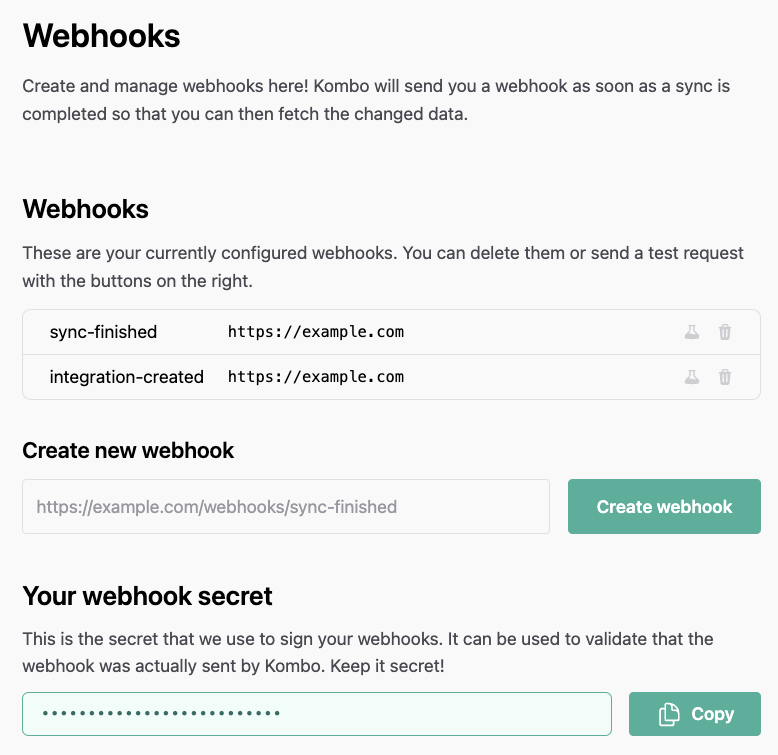
You can configure your Kombo webhooks in the dashboard directly in the
[webhooks tab](https://app.kombo.dev/configuration/webhooks). After creating the first
webhook, a random webhook secret will be generated and shown. You can learn
how to use it in [Validate the data](#validate-the-data).
 ## Available webhooks
### Data changed
We send a `data-changed` webhook every time data changes in Kombo. This includes
changes from regular syncs as well as updates from upstream webhooks.
Read more about fetching data [here](../getting-started/fetching-data).
We trigger this webhook, when we receive a change. To speed up delivery of
changes to Kombo, ensure that upstream webhooks are enabled for the
integration. If upstream webhooks are not enabled or not supported,
notifications are sent after the next scheduled sync (latency equals the sync
frequency).
You can use this webhook to keep your database up to date by fetching only
the updated data using the `updated_after` filter.
This webhook is useful to fetch data from Kombo into your system. Read more
[here](../getting-started/fetching-data).
We will only ever send you a `data-changed` webhook if there are changes to the data.
```json data-changed theme={null}
{
"id": "FhghqjnCi9WuAoLT8Z75CFcs",
"type": "data-changed",
"data": {
"integration_id": "bombohr:ats-dev",
"integration_tool": "bombohr",
"integration_category": "ATS",
"changed_models": [
{
"name": "ats_applications"
}
]
}
}
```
We are debouncing `data-changed` with a 30-second window by default. This means
that you will at most receive one `data-changed` webhook every 30 seconds.
When the webhook is triggered for the first time, we send it out immediately.
After that, we will wait 30 seconds, during which we will collect all events and
send them as a single webhook, thereby starting another 30-second cooldown
window. We do not wait for syncs to finish before sending out the webhook;
instead, we may send you multiple webhooks during a single sync to ensure you
receive changes as soon as possible.
### Sync finished
The `sync-finished` webhook is deprecated and replaced by the [data-changed
webhook](#data-changed). It is still available for existing setups, but should
not be implemented in new setups. Use `data-changed` instead for [fetching
data updates](../getting-started/fetching-data).
The `sync-finished` webhook is sent every time a sync finishes, regardless of
the sync state. Possible values for `sync_state` are:
* `SUCCEEDED` The sync finished successfully.
* `PARTIALLY_FAILED` The sync succeeded but had non-fatal errors. Kombo will
take care of it.
* `FAILED` There was a critical error during the sync and the sync did not
finish. If this happens, we get an alert and will look into the issue to fix
it ASAP.
* `TIMED_OUT` The sync timed out before completion. This happens rarely and will
cause an immediate and automatic restart of the sync. Kombo will be notified
and look into the issue ASAP.
* `CANCELLED` The sync was actively canceled by Kombo. This happens very rarely,
has no negative side-effects, and if it does happen, we will schedule a new
sync shortly after.
* `AUTHENTICATION_FAILED` The authentication of the connection is incorrect.
Please check the Kombo dashboard for further steps.
This webhook is useful for informing customers about when the last sync ran or if
user intervention is required due to authentication issues. This should **not** be
used to trigger data refreshes. Use the [data-changed webhook](#data-changed) for that.
The `sync_started_at` field represents when Kombo started syncing data from
the connected system, not when you should start fetching from Kombo. Do not
use this field as your `updated_after` parameter when fetching data.
Otherwise, you might risk missing data that was created/updated via webhooks
before the sync started.
```json sync-finished theme={null}
{
"id": "5gjAtURLPbnTiwgkaBfiA3WJ",
"type": "sync-finished",
"data": {
"sync_id": "B89SCXXho7Yw8PGo8AKJxLn4",
"sync_state": "SUCCEEDED",
"sync_started_at": "2021-09-01T12:00:00.000Z",
"sync_ended_at": "2021-09-01T12:30:00.000Z",
"sync_duration_seconds": 1800,
"integration_id": "personio:CBNMt7dSNCzBdnRTx87dev4E",
"integration_tool": "personio",
"integration_category": "HRIS",
"end_user": {
"origin_id": "36123",
"creator_email": "user@example.com",
"organization_name": "Acme, Inc."
},
"log_url": "https://app.kombo.dev/env/production/logs/C3xUo6XAsB2sbKC7M1gyXaRX"
}
}
```
### Integration created
The `integration-created` webhook is sent for every integration that is created.
Please react to this webhook event by adding the integration to your database
or by performing any other business logic that is required when an integration is
created.
```json integration-created theme={null}
{
"id": "5gjAtURLPbnTiwgkaBfiA3WJ",
"type": "integration-created",
"data": {
"id": "personio:CBNMt7dSNCzBdnRTx87dev4E",
"tool": "personio",
"category": "HRIS",
"end_user": {
"origin_id": "36123",
"creator_email": "user@example.com",
"organization_name": "Acme, Inc."
}
}
}
```
### Integration deleted
The `integration-deleted` webhook is sent when an integration is deleted.
Please react to this webhook event by removing the integration from your database
or by performing any other business logic that is required when an integration is
deleted.
```json integration-deleted theme={null}
{
"id": "5gjAtURLPbnTiwgkaBfiA3WJ",
"type": "integration-deleted",
"data": {
"id": "personio:CBNMt7dSNCzBdnRTx87dev4E",
"tool": "personio",
"category": "HRIS",
"end_user": {
"origin_id": "36123",
"creator_email": "user@example.com",
"organization_name": "Acme, Inc."
},
"deleted_at": "2022-11-02T10:50:10.242Z"
}
}
```
### Connection flow failed
The `connection-flow-failed` webhook is sent whenever an error occurs during the
connection flow. These errors could, for example, originate from a user entering
incorrect credentials or from a mismatch between the required and supplied API
permissions.
This is not an alert-type webhook, but should instead be used to collect data
and get insights into user behavior. **The connection flow can still be
successfully completed after this webhook is sent.**
You can check whether the connection flow ended successfully by following the
link under `log_url`. Additionally, the log will display the exact errors your
customer ran into, which you can use to provide support if needed.
```json connection-flow-failed theme={null}
{
"id": "5gjAtURLPbnTiwgkaBfiA3WJ",
"type": "connection-flow-failed",
"data": {
"integration_tool": "personio",
"integration_category": "HRIS",
"end_user": {
"origin_id": "36123",
"creator_email": "user@example.com",
"organization_name": "Acme, Inc."
},
"log_url": "https://app.kombo.dev/env/production/logs/C3xUo6XAsB2sbKC7M1gyXaRX"
}
}
```
### Assessment order received
The `assessment:order-received` webhook is sent every time an assessment is
ordered for a candidate from within an end-customer's tool.
```json assessment:order-received theme={null}
{
"id": "Cbfk5sHtDxrSrJBRjsDtbaN9",
"type": "assessment:order-received",
"data": {
"id": "B5KQKhAgTv6ZwzrfAbqbhipd",
"integration_id": "workday:CBNMt7dSNCzBdnRTx87dev4E",
"package_id": "typescript_test",
"status": "OPEN",
"candidate": {
"remote_id": "12345",
"email": "john.doe@gmail.com",
"first_name": "John",
"last_name": "Doe",
"phone": "+1 123 456 7890"
},
"application": {
"remote_id": "54321"
},
"job": {
"remote_id": "67890",
"name": "Engineering Manager",
"location": {
"city": "Berlin",
"country": "DE",
"raw": "Berlin, Germany",
"state": "Berlin",
"street_1": "Lohmühlenstraße 65",
"street_2": null,
"zip_code": "12435"
},
"hiring_team": [
{
"first_name": "Jane",
"last_name": "Doe",
"remote_id": "78901",
"email": "jane.doe@gmail.com",
"hiring_team_roles": ["RECRUITER"]
}
]
}
}
}
```
### Integration state changed
The `integration-state-changed` webhook is sent when the status of the
integration changes. Use this to detect stale credentials and to reconnect your
customer.
Possible values for the `"state"` key include:
* `ACTIVE` The integration is active and working.
* `INVALID` The connection [requires reconnection](./connect/reconnection) in order to work again.
* `INACTIVE` The integration has been paused, either via the [dashboard or API](./integration-states#inactive). No syncs will run until it is re-enabled.
The payload also includes `qa_status` (`PENDING`, `PASSED`, or `FAILED`) and `setup_status` (`INCOMPLETE`, `FINAL_SYNC_PENDING`, or `COMPLETED`). Together these tell you whether the integration is fully ready to serve data — see [integration states](./integration-states) for details.
```json integration-state-changed theme={null}
{
"id": "5gjAtURLPbnTiwgkaBfiA3WJ",
"type": "integration-state-changed",
"data": {
"integration_tool": "personio",
"integration_category": "HRIS",
"integration_id": "personio:CBNMt7dSNCzBdnRTx87dev4E",
"end_user": {
"origin_id": "36123",
"creator_email": "user@example.com",
"organization_name": "Acme, Inc."
},
"state": "ACTIVE",
"qa_status": "PASSED",
"setup_status": "COMPLETED"
"updated_at": "2021-09-01T12:00:00.000Z"
}
}
```
## Validate the data
Anyone could post data to your webhook URL. That's why we're signing each
request with a secret specific to your Kombo account. This secret is called the
**Kombo Webhook Secret** and you can find it [on the Kombo
dashboard](https://app.kombo.dev/configuration/webhooks).
Each valid webhook `POST` request from us will include the `X-Kombo-Signature`
header. To validate it, carefully follow these steps:
1. Decode the `X-Kombo-Signature` header from [`base64url`
encoding](https://base64.guru/standards/base64url) (without padding) to raw
bytes.
2. Compute the HMAC-SHA256 over the **raw** JSON request body (Kombo encodes
this using two-space indentation) with your **Kombo Webhook Secret** as raw
bytes.
3. Compare the decoded signature bytes to the computed HMAC bytes using a
constant-time comparison function (like [Node.js's
`timingSafeEqual`](https://nodejs.org/docs/latest-v22.x/api/crypto.html#cryptotimingsafeequala-b))
to protect against timing attacks.
If you're stuck trying to get the signatures to match, please verify that:
1. You're using the Webhook Secret of the **correct Kombo environment** (e.g.,
production or development).
2. You're using the **raw JSON request body**. If your framework already parses
the JSON body for you, make sure to re-encode it with two-space indentation
(e.g., `JSON.stringify(body, null, 2)` in JavaScript).
3. You're decoding the signature header from `base64url` (not standard `base64`)
and comparing raw bytes (not re-encoding the computed HMAC for string
comparison).
Here are some examples of how you could achieve this in a few different languages:
```ts TypeScript theme={null}
import { createHmac, timingSafeEqual } from 'node:crypto'
const signatureHeader = req.headers['x-kombo-signature']
// Get the raw UTF-8-encoded string body because this was used for signing
const body = request.body
// Or if you use a framework that parses the body for you, you can use this.
// Note: This is not the same as JSON.stringify(request.body)
const body = JSON.stringify(request.body, null, 2)
const expected = createHmac('sha256', KOMBO_WEBHOOK_SECRET)
.update(body, 'utf8')
.digest()
// Decode and compare in constant time
const provided = Buffer.from(signatureHeader, 'base64url')
const isValidRequest =
provided.length === expected.length && timingSafeEqual(expected, provided)
```
```python Python theme={null}
import base64
import hmac
import hashlib
provided_signature = request.headers.get('X-Kombo-Signature')
secret = KOMBO_WEBHOOK_SECRET.encode()
expected = hmac.new(secret, request_body, hashlib.sha256).digest()
# Decode the provided signature and compare in constant time
try:
provided = base64.urlsafe_b64decode(provided_signature + '==')
is_valid_request = hmac.compare_digest(expected, provided)
except Exception:
is_valid_request = False
return is_valid_request
```
```kotlin Kotlin theme={null}
val providedSignature = request.getHeader("X-Kombo-Signature")
// CharStreams is from com.google.guava:guava library
val requestBodyAsString = request.reader.use { CharStreams.toString(it) }
// Calculate the signature
val algorithm = "HmacSHA256"
val encoding = Charsets.UTF_8
val secret = KOMBO_WEBHOOK_SECRET.toByteArray(encoding)
val signingKey = SecretKeySpec(secret, algorithm)
val mac = Mac.getInstance(algorithm)
mac.init(signingKey)
val expected = mac.doFinal(requestBodyAsString.toByteArray(encoding))
// Decode and compare in constant time
val isValidRequest = try {
val provided = Base64.getUrlDecoder().decode(providedSignature)
MessageDigest.isEqual(expected, provided)
} catch (e: Exception) {
false
}
return isValidRequest
```
## Testing webhooks
The list of all created webhooks has two buttons on the right. One is for
deleting the webhook, the other is for sending a test request. This test request
will contain dummy data but will use the correct data schema.
Be careful when using this feature in production! It will send invalid data to
your webhook.
### Testing locally
For local development, you can use a service like [localtunnel](https://theboroer.github.io/localtunnel-www/)
or [ngrok](https://ngrok.com/). These tools allow you to expose a local port
through a public URL provided by them. The setup is very straightforward: Once
you've started a tunnel, simply add the provided URL as a webhook in the Kombo
dashboard. You can then send test requests to validate that your endpoint is
working properly.
## Retry behavior
If your webhook endpoint does not acknowledge the webhook (returns an error or
does not respond), Kombo will automatically retry the delivery. This ensures
reliable webhook delivery even when your endpoint is temporarily unavailable.
### Retry attempts
Kombo will retry failed webhook deliveries up to **5 times** before giving up.
Each retry uses exponential backoff with the following delays:
* After 1st failure: 1 second
* After 2nd failure: 2 seconds
* After 3rd failure: 4 seconds
* After 4th failure: 8 seconds
* After 5th failure: 16 seconds
### Error conditions that trigger retries
Kombo will retry webhook deliveries for the following error conditions:
* **Rate limit errors** (HTTP 429): Retries respect `Retry-After` headers when
provided
* **Server errors** (HTTP 5xx): Temporary server errors that may resolve on retry
* **Connection errors**: Network timeouts, connection resets, DNS failures, and
other transient network issues
* **Cloudflare errors** (HTTP 409 with Cloudflare 1018 error): Temporary
Cloudflare blocking errors
### Error conditions that do not trigger retries
The following errors will **not** trigger retries, as they indicate permanent
failures:
* **Client errors** (HTTP 4xx, except 429): These typically indicate issues with
the webhook configuration or request format
* **DNS not found** (ENOTFOUND): The webhook URL cannot be resolved
### Best practices
To ensure reliable webhook delivery:
1. **Respond quickly**: Return a 2xx status code as soon as you've received and
validated the webhook, even if you process it asynchronously
2. **Handle idempotency**: Webhooks may be delivered multiple times due to
retries, so ensure your webhook handler is idempotent
3. **Monitor webhook logs**: Check the Kombo dashboard for webhook delivery
failures and retry attempts
## Automatic deactivation of webhooks
If we are unable to find your webhook endpoint for more than 7 days (HTTP status
code 404 or 410), we will automatically disable the webhook. You can always
re-enable it in the dashboard.
## Available webhooks
### Data changed
We send a `data-changed` webhook every time data changes in Kombo. This includes
changes from regular syncs as well as updates from upstream webhooks.
Read more about fetching data [here](../getting-started/fetching-data).
We trigger this webhook, when we receive a change. To speed up delivery of
changes to Kombo, ensure that upstream webhooks are enabled for the
integration. If upstream webhooks are not enabled or not supported,
notifications are sent after the next scheduled sync (latency equals the sync
frequency).
You can use this webhook to keep your database up to date by fetching only
the updated data using the `updated_after` filter.
This webhook is useful to fetch data from Kombo into your system. Read more
[here](../getting-started/fetching-data).
We will only ever send you a `data-changed` webhook if there are changes to the data.
```json data-changed theme={null}
{
"id": "FhghqjnCi9WuAoLT8Z75CFcs",
"type": "data-changed",
"data": {
"integration_id": "bombohr:ats-dev",
"integration_tool": "bombohr",
"integration_category": "ATS",
"changed_models": [
{
"name": "ats_applications"
}
]
}
}
```
We are debouncing `data-changed` with a 30-second window by default. This means
that you will at most receive one `data-changed` webhook every 30 seconds.
When the webhook is triggered for the first time, we send it out immediately.
After that, we will wait 30 seconds, during which we will collect all events and
send them as a single webhook, thereby starting another 30-second cooldown
window. We do not wait for syncs to finish before sending out the webhook;
instead, we may send you multiple webhooks during a single sync to ensure you
receive changes as soon as possible.
### Sync finished
The `sync-finished` webhook is deprecated and replaced by the [data-changed
webhook](#data-changed). It is still available for existing setups, but should
not be implemented in new setups. Use `data-changed` instead for [fetching
data updates](../getting-started/fetching-data).
The `sync-finished` webhook is sent every time a sync finishes, regardless of
the sync state. Possible values for `sync_state` are:
* `SUCCEEDED` The sync finished successfully.
* `PARTIALLY_FAILED` The sync succeeded but had non-fatal errors. Kombo will
take care of it.
* `FAILED` There was a critical error during the sync and the sync did not
finish. If this happens, we get an alert and will look into the issue to fix
it ASAP.
* `TIMED_OUT` The sync timed out before completion. This happens rarely and will
cause an immediate and automatic restart of the sync. Kombo will be notified
and look into the issue ASAP.
* `CANCELLED` The sync was actively canceled by Kombo. This happens very rarely,
has no negative side-effects, and if it does happen, we will schedule a new
sync shortly after.
* `AUTHENTICATION_FAILED` The authentication of the connection is incorrect.
Please check the Kombo dashboard for further steps.
This webhook is useful for informing customers about when the last sync ran or if
user intervention is required due to authentication issues. This should **not** be
used to trigger data refreshes. Use the [data-changed webhook](#data-changed) for that.
The `sync_started_at` field represents when Kombo started syncing data from
the connected system, not when you should start fetching from Kombo. Do not
use this field as your `updated_after` parameter when fetching data.
Otherwise, you might risk missing data that was created/updated via webhooks
before the sync started.
```json sync-finished theme={null}
{
"id": "5gjAtURLPbnTiwgkaBfiA3WJ",
"type": "sync-finished",
"data": {
"sync_id": "B89SCXXho7Yw8PGo8AKJxLn4",
"sync_state": "SUCCEEDED",
"sync_started_at": "2021-09-01T12:00:00.000Z",
"sync_ended_at": "2021-09-01T12:30:00.000Z",
"sync_duration_seconds": 1800,
"integration_id": "personio:CBNMt7dSNCzBdnRTx87dev4E",
"integration_tool": "personio",
"integration_category": "HRIS",
"end_user": {
"origin_id": "36123",
"creator_email": "user@example.com",
"organization_name": "Acme, Inc."
},
"log_url": "https://app.kombo.dev/env/production/logs/C3xUo6XAsB2sbKC7M1gyXaRX"
}
}
```
### Integration created
The `integration-created` webhook is sent for every integration that is created.
Please react to this webhook event by adding the integration to your database
or by performing any other business logic that is required when an integration is
created.
```json integration-created theme={null}
{
"id": "5gjAtURLPbnTiwgkaBfiA3WJ",
"type": "integration-created",
"data": {
"id": "personio:CBNMt7dSNCzBdnRTx87dev4E",
"tool": "personio",
"category": "HRIS",
"end_user": {
"origin_id": "36123",
"creator_email": "user@example.com",
"organization_name": "Acme, Inc."
}
}
}
```
### Integration deleted
The `integration-deleted` webhook is sent when an integration is deleted.
Please react to this webhook event by removing the integration from your database
or by performing any other business logic that is required when an integration is
deleted.
```json integration-deleted theme={null}
{
"id": "5gjAtURLPbnTiwgkaBfiA3WJ",
"type": "integration-deleted",
"data": {
"id": "personio:CBNMt7dSNCzBdnRTx87dev4E",
"tool": "personio",
"category": "HRIS",
"end_user": {
"origin_id": "36123",
"creator_email": "user@example.com",
"organization_name": "Acme, Inc."
},
"deleted_at": "2022-11-02T10:50:10.242Z"
}
}
```
### Connection flow failed
The `connection-flow-failed` webhook is sent whenever an error occurs during the
connection flow. These errors could, for example, originate from a user entering
incorrect credentials or from a mismatch between the required and supplied API
permissions.
This is not an alert-type webhook, but should instead be used to collect data
and get insights into user behavior. **The connection flow can still be
successfully completed after this webhook is sent.**
You can check whether the connection flow ended successfully by following the
link under `log_url`. Additionally, the log will display the exact errors your
customer ran into, which you can use to provide support if needed.
```json connection-flow-failed theme={null}
{
"id": "5gjAtURLPbnTiwgkaBfiA3WJ",
"type": "connection-flow-failed",
"data": {
"integration_tool": "personio",
"integration_category": "HRIS",
"end_user": {
"origin_id": "36123",
"creator_email": "user@example.com",
"organization_name": "Acme, Inc."
},
"log_url": "https://app.kombo.dev/env/production/logs/C3xUo6XAsB2sbKC7M1gyXaRX"
}
}
```
### Assessment order received
The `assessment:order-received` webhook is sent every time an assessment is
ordered for a candidate from within an end-customer's tool.
```json assessment:order-received theme={null}
{
"id": "Cbfk5sHtDxrSrJBRjsDtbaN9",
"type": "assessment:order-received",
"data": {
"id": "B5KQKhAgTv6ZwzrfAbqbhipd",
"integration_id": "workday:CBNMt7dSNCzBdnRTx87dev4E",
"package_id": "typescript_test",
"status": "OPEN",
"candidate": {
"remote_id": "12345",
"email": "john.doe@gmail.com",
"first_name": "John",
"last_name": "Doe",
"phone": "+1 123 456 7890"
},
"application": {
"remote_id": "54321"
},
"job": {
"remote_id": "67890",
"name": "Engineering Manager",
"location": {
"city": "Berlin",
"country": "DE",
"raw": "Berlin, Germany",
"state": "Berlin",
"street_1": "Lohmühlenstraße 65",
"street_2": null,
"zip_code": "12435"
},
"hiring_team": [
{
"first_name": "Jane",
"last_name": "Doe",
"remote_id": "78901",
"email": "jane.doe@gmail.com",
"hiring_team_roles": ["RECRUITER"]
}
]
}
}
}
```
### Integration state changed
The `integration-state-changed` webhook is sent when the status of the
integration changes. Use this to detect stale credentials and to reconnect your
customer.
Possible values for the `"state"` key include:
* `ACTIVE` The integration is active and working.
* `INVALID` The connection [requires reconnection](./connect/reconnection) in order to work again.
* `INACTIVE` The integration has been paused, either via the [dashboard or API](./integration-states#inactive). No syncs will run until it is re-enabled.
The payload also includes `qa_status` (`PENDING`, `PASSED`, or `FAILED`) and `setup_status` (`INCOMPLETE`, `FINAL_SYNC_PENDING`, or `COMPLETED`). Together these tell you whether the integration is fully ready to serve data — see [integration states](./integration-states) for details.
```json integration-state-changed theme={null}
{
"id": "5gjAtURLPbnTiwgkaBfiA3WJ",
"type": "integration-state-changed",
"data": {
"integration_tool": "personio",
"integration_category": "HRIS",
"integration_id": "personio:CBNMt7dSNCzBdnRTx87dev4E",
"end_user": {
"origin_id": "36123",
"creator_email": "user@example.com",
"organization_name": "Acme, Inc."
},
"state": "ACTIVE",
"qa_status": "PASSED",
"setup_status": "COMPLETED"
"updated_at": "2021-09-01T12:00:00.000Z"
}
}
```
## Validate the data
Anyone could post data to your webhook URL. That's why we're signing each
request with a secret specific to your Kombo account. This secret is called the
**Kombo Webhook Secret** and you can find it [on the Kombo
dashboard](https://app.kombo.dev/configuration/webhooks).
Each valid webhook `POST` request from us will include the `X-Kombo-Signature`
header. To validate it, carefully follow these steps:
1. Decode the `X-Kombo-Signature` header from [`base64url`
encoding](https://base64.guru/standards/base64url) (without padding) to raw
bytes.
2. Compute the HMAC-SHA256 over the **raw** JSON request body (Kombo encodes
this using two-space indentation) with your **Kombo Webhook Secret** as raw
bytes.
3. Compare the decoded signature bytes to the computed HMAC bytes using a
constant-time comparison function (like [Node.js's
`timingSafeEqual`](https://nodejs.org/docs/latest-v22.x/api/crypto.html#cryptotimingsafeequala-b))
to protect against timing attacks.
If you're stuck trying to get the signatures to match, please verify that:
1. You're using the Webhook Secret of the **correct Kombo environment** (e.g.,
production or development).
2. You're using the **raw JSON request body**. If your framework already parses
the JSON body for you, make sure to re-encode it with two-space indentation
(e.g., `JSON.stringify(body, null, 2)` in JavaScript).
3. You're decoding the signature header from `base64url` (not standard `base64`)
and comparing raw bytes (not re-encoding the computed HMAC for string
comparison).
Here are some examples of how you could achieve this in a few different languages:
```ts TypeScript theme={null}
import { createHmac, timingSafeEqual } from 'node:crypto'
const signatureHeader = req.headers['x-kombo-signature']
// Get the raw UTF-8-encoded string body because this was used for signing
const body = request.body
// Or if you use a framework that parses the body for you, you can use this.
// Note: This is not the same as JSON.stringify(request.body)
const body = JSON.stringify(request.body, null, 2)
const expected = createHmac('sha256', KOMBO_WEBHOOK_SECRET)
.update(body, 'utf8')
.digest()
// Decode and compare in constant time
const provided = Buffer.from(signatureHeader, 'base64url')
const isValidRequest =
provided.length === expected.length && timingSafeEqual(expected, provided)
```
```python Python theme={null}
import base64
import hmac
import hashlib
provided_signature = request.headers.get('X-Kombo-Signature')
secret = KOMBO_WEBHOOK_SECRET.encode()
expected = hmac.new(secret, request_body, hashlib.sha256).digest()
# Decode the provided signature and compare in constant time
try:
provided = base64.urlsafe_b64decode(provided_signature + '==')
is_valid_request = hmac.compare_digest(expected, provided)
except Exception:
is_valid_request = False
return is_valid_request
```
```kotlin Kotlin theme={null}
val providedSignature = request.getHeader("X-Kombo-Signature")
// CharStreams is from com.google.guava:guava library
val requestBodyAsString = request.reader.use { CharStreams.toString(it) }
// Calculate the signature
val algorithm = "HmacSHA256"
val encoding = Charsets.UTF_8
val secret = KOMBO_WEBHOOK_SECRET.toByteArray(encoding)
val signingKey = SecretKeySpec(secret, algorithm)
val mac = Mac.getInstance(algorithm)
mac.init(signingKey)
val expected = mac.doFinal(requestBodyAsString.toByteArray(encoding))
// Decode and compare in constant time
val isValidRequest = try {
val provided = Base64.getUrlDecoder().decode(providedSignature)
MessageDigest.isEqual(expected, provided)
} catch (e: Exception) {
false
}
return isValidRequest
```
## Testing webhooks
The list of all created webhooks has two buttons on the right. One is for
deleting the webhook, the other is for sending a test request. This test request
will contain dummy data but will use the correct data schema.
Be careful when using this feature in production! It will send invalid data to
your webhook.
### Testing locally
For local development, you can use a service like [localtunnel](https://theboroer.github.io/localtunnel-www/)
or [ngrok](https://ngrok.com/). These tools allow you to expose a local port
through a public URL provided by them. The setup is very straightforward: Once
you've started a tunnel, simply add the provided URL as a webhook in the Kombo
dashboard. You can then send test requests to validate that your endpoint is
working properly.
## Retry behavior
If your webhook endpoint does not acknowledge the webhook (returns an error or
does not respond), Kombo will automatically retry the delivery. This ensures
reliable webhook delivery even when your endpoint is temporarily unavailable.
### Retry attempts
Kombo will retry failed webhook deliveries up to **5 times** before giving up.
Each retry uses exponential backoff with the following delays:
* After 1st failure: 1 second
* After 2nd failure: 2 seconds
* After 3rd failure: 4 seconds
* After 4th failure: 8 seconds
* After 5th failure: 16 seconds
### Error conditions that trigger retries
Kombo will retry webhook deliveries for the following error conditions:
* **Rate limit errors** (HTTP 429): Retries respect `Retry-After` headers when
provided
* **Server errors** (HTTP 5xx): Temporary server errors that may resolve on retry
* **Connection errors**: Network timeouts, connection resets, DNS failures, and
other transient network issues
* **Cloudflare errors** (HTTP 409 with Cloudflare 1018 error): Temporary
Cloudflare blocking errors
### Error conditions that do not trigger retries
The following errors will **not** trigger retries, as they indicate permanent
failures:
* **Client errors** (HTTP 4xx, except 429): These typically indicate issues with
the webhook configuration or request format
* **DNS not found** (ENOTFOUND): The webhook URL cannot be resolved
### Best practices
To ensure reliable webhook delivery:
1. **Respond quickly**: Return a 2xx status code as soon as you've received and
validated the webhook, even if you process it asynchronously
2. **Handle idempotency**: Webhooks may be delivered multiple times due to
retries, so ensure your webhook handler is idempotent
3. **Monitor webhook logs**: Check the Kombo dashboard for webhook delivery
failures and retry attempts
## Automatic deactivation of webhooks
If we are unable to find your webhook endpoint for more than 7 days (HTTP status
code 404 or 410), we will automatically disable the webhook. You can always
re-enable it in the dashboard.