> ## Documentation Index
> Fetch the complete documentation index at: https://docs.kombo.dev/llms.txt
> Use this file to discover all available pages before exploring further.
# Kombo default fallback
> Learn how to use Kombo's standard mapping logic as a fallback priority in your remapping configuration, giving you full control over the mapping order.
## What is the Kombo Default Fallback?
When you [override a field mapping](./introduction), you replace Kombo's built-in mapping logic with your own custom configuration. This is powerful, but sometimes you don't want to *replace* Kombo's logic entirely — you want to **combine** your custom mapping with Kombo's standard logic in a specific priority order.
The **Kombo Default Fallback** lets you insert Kombo's standard mapping logic as one of the priorities in your fallback chain. This means you can:
* Use a custom integration field as the primary source, and **fall back to Kombo's default** if that field is empty
* Use Kombo's default mapping as the **primary value**, but override it with a custom field when Kombo's value is empty
* Place Kombo's default logic **between** two custom field sources in a multi-level fallback chain
The Kombo Default Fallback is available for **simple** (string, number,
boolean), **enum**, and **date** field remappings. It is not available for
address, reference, or array field types.
## When should you use it?
Consider using the Kombo Default Fallback when:
* **Kombo's default mapping works well in most cases**, but a small number of your customer's records store the value in a different field. You can set Kombo's default as Priority 1 and your custom field as a fallback.
* **A custom field is your preferred source**, but it isn't always populated. By adding Kombo's default as a fallback, you ensure no data is lost when the custom field is empty.
* **You want to experiment with a custom mapping** without losing the safety net of Kombo's proven default logic. If your custom source produces `null`, Kombo's standard mapping takes over automatically.
## How it works
The remapping engine evaluates your fallback chain **from top to bottom** (Priority 1 first, then Priority 2, and so on). For each record (employee, candidate, job, etc.), it checks each priority in order and **stops as soon as a valid, non-empty value is found**.
When the engine reaches a "Default Kombo value" entry in the chain, it uses the value that Kombo's standard mapping logic would have produced for that field — exactly as if no remapping had been configured.
### Example: Custom field with Kombo default as safety net
Suppose you want to map the `first_name` field from a custom integration field called `preferred_name`, but not every record has a preferred name set.
| Priority | Source | Behavior |
| -------- | ------------------------------------ | ---------------------------------------------------------------------------------- |
| 1 | `preferred_name` (integration field) | Used when the field has a value |
| 2 | Default Kombo value | Falls back to Kombo's standard `first_name` mapping when `preferred_name` is empty |
**Result**: Records with a `preferred_name` get that value. Records without it seamlessly fall back to whatever Kombo would have mapped by default.
### Example: Kombo default with a custom override
You trust Kombo's mapping for most records, but for a few edge cases you know a specific integration field has better data.
| Priority | Source | Behavior |
| -------- | ---------------------------------- | ------------------------------------------------------ |
| 1 | Default Kombo value | Used when Kombo's standard mapping produces a value |
| 2 | `backup_field` (integration field) | Only used when Kombo's default mapping produces `null` |
**Result**: Kombo's default logic runs first. Only when it returns nothing does the system check `backup_field`.
## Adding a Kombo Default Fallback
1. Open the remapping modal for the field you want to configure (see [simple](./simple-remapping), [enum](./enum-remapping), or [date](./date-remapping) remapping for details on how to open the modal).
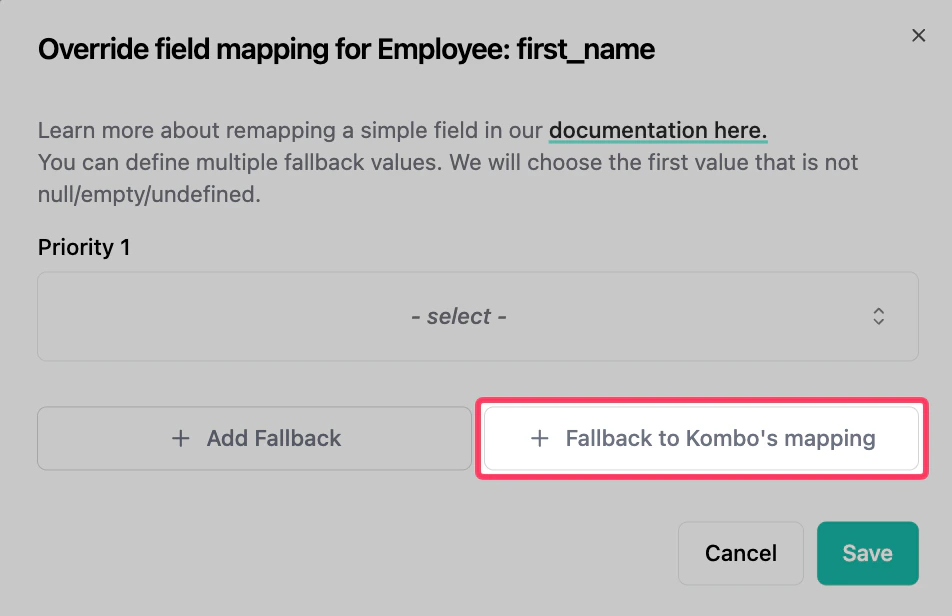
2. At the bottom of the modal, click the **Fallback to Kombo's mapping** button.
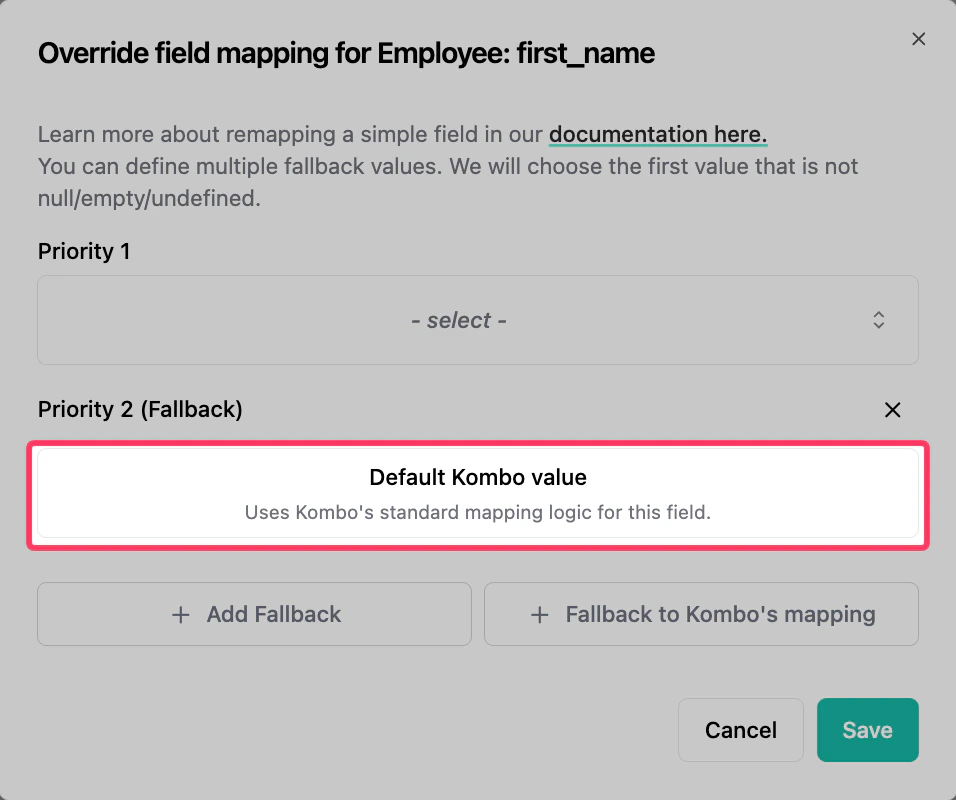
 3. A new priority entry will appear showing **"Default Kombo value"** with the description *"Uses Kombo's standard mapping logic for this field."*
 4. You can **reorder** priorities by removing and re-adding entries. The Kombo Default Fallback can be placed at any position in the fallback chain — it does not have to be last.
5. Click **Save** to apply the configuration. Remember that **a sync is required** for saved changes to take effect.
## Combining with other fallbacks
You can freely mix Kombo Default entries with custom integration field entries. For example, a three-level fallback chain for an enum field might look like:
| Priority | Source |
| -------- | ----------------------------------------------------------- |
| 1 | `custom_status_field` (integration field) with enum mapping |
| 2 | Default Kombo value |
| 3 | `legacy_status_field` (integration field) with enum mapping |
The engine will try `custom_status_field` first. If it's empty, it falls back to Kombo's default enum mapping. If even that produces `null`, it tries `legacy_status_field` as a last resort.
If the **only** entry in your fallback chain is a Kombo Default, the
configuration is equivalent to having no remapping at all. In this case, the
system will automatically clear the remapping configuration when you save.
## Supported field types
| Field type | Kombo Default Fallback supported |
| ------------------------------------------------------ | -------------------------------- |
| [Simple](./simple-remapping) (string, number, boolean) | Yes |
| [Enum](./enum-remapping) | Yes |
| [Date](./date-remapping) | Yes |
| [Address](./struct-remapping) | No |
| [Reference](./reference-remapping) | No |
| [Array](./array-remapping) | No |
4. You can **reorder** priorities by removing and re-adding entries. The Kombo Default Fallback can be placed at any position in the fallback chain — it does not have to be last.
5. Click **Save** to apply the configuration. Remember that **a sync is required** for saved changes to take effect.
## Combining with other fallbacks
You can freely mix Kombo Default entries with custom integration field entries. For example, a three-level fallback chain for an enum field might look like:
| Priority | Source |
| -------- | ----------------------------------------------------------- |
| 1 | `custom_status_field` (integration field) with enum mapping |
| 2 | Default Kombo value |
| 3 | `legacy_status_field` (integration field) with enum mapping |
The engine will try `custom_status_field` first. If it's empty, it falls back to Kombo's default enum mapping. If even that produces `null`, it tries `legacy_status_field` as a last resort.
If the **only** entry in your fallback chain is a Kombo Default, the
configuration is equivalent to having no remapping at all. In this case, the
system will automatically clear the remapping configuration when you save.
## Supported field types
| Field type | Kombo Default Fallback supported |
| ------------------------------------------------------ | -------------------------------- |
| [Simple](./simple-remapping) (string, number, boolean) | Yes |
| [Enum](./enum-remapping) | Yes |
| [Date](./date-remapping) | Yes |
| [Address](./struct-remapping) | No |
| [Reference](./reference-remapping) | No |
| [Array](./array-remapping) | No |