> ## Documentation Index
> Fetch the complete documentation index at: https://docs.kombo.dev/llms.txt
> Use this file to discover all available pages before exploring further.
# Performance data
> Performance data endpoints overview, data structure, types, cycles, ratings, and API usage.
# Overview
The performance data endpoints allow you to retrieve performance review and performance review cycle data from HRIS systems and convert them into a unified data model. Each performance review represents the feedback exchanged between a reviewer and the reviewee, delivered in a consistent data structure regardless of the underlying HRIS system.
## Key Use Cases
* Compensation Benchmarking
* Compare manager performance ratings with employee pay to ensure compensation is tied to performance and fairness.
* HR Analytics
* Link performance results with outcomes like employee turnover to uncover what drives attrition or retention.
* Talent Intelligence and Internal Mobility
* Measure whether internal moves, promotions, or hires actually lead to stronger performance.
* Assessment calibration
* Check if hiring or development assessments predict real performance, and use that insight to improve future decisions.
## Scope config and filtering recommendations
### Scope config
**Important**: Employee performance is employee-centric, so you must include `employees` in your scope config to properly sync performance data.
The reviewee and reviewer properties are foreign models. For example: if you have `employee.display_full_name` disabled in your scope config, both the reviewee and reviewer `display_full_name` will be `null`.
```jsx theme={null}
{
"reviewee": {
...
"display_full_name": null
},
"reviewer": {
...
"display_full_name": null
}
}
```
### Filtering
When employee filters are applied, only filtered employees’ reviews are synced. If the reviewer is filtered out their Kombo ID and remote\_id values will still be present, but the other properties will be nulled.
```jsx theme={null}
{
"reviewer": {
"id": "J3iiLb4k1PXfkFN1oF8Sv2LB",
"remote_id": "9ccd305a-6dde-49f6-9ad2-2e5c0f4fd7d4"
"first_name": null,
"last_name": null,
"display_full_name": null,
"work_email": null
}
}
```
# Understanding Performance Data Structure
## Performance Review Cycles
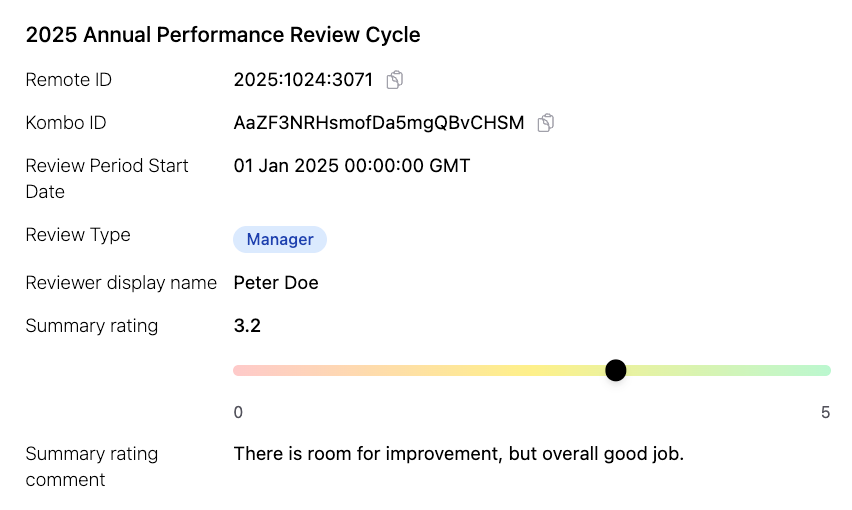
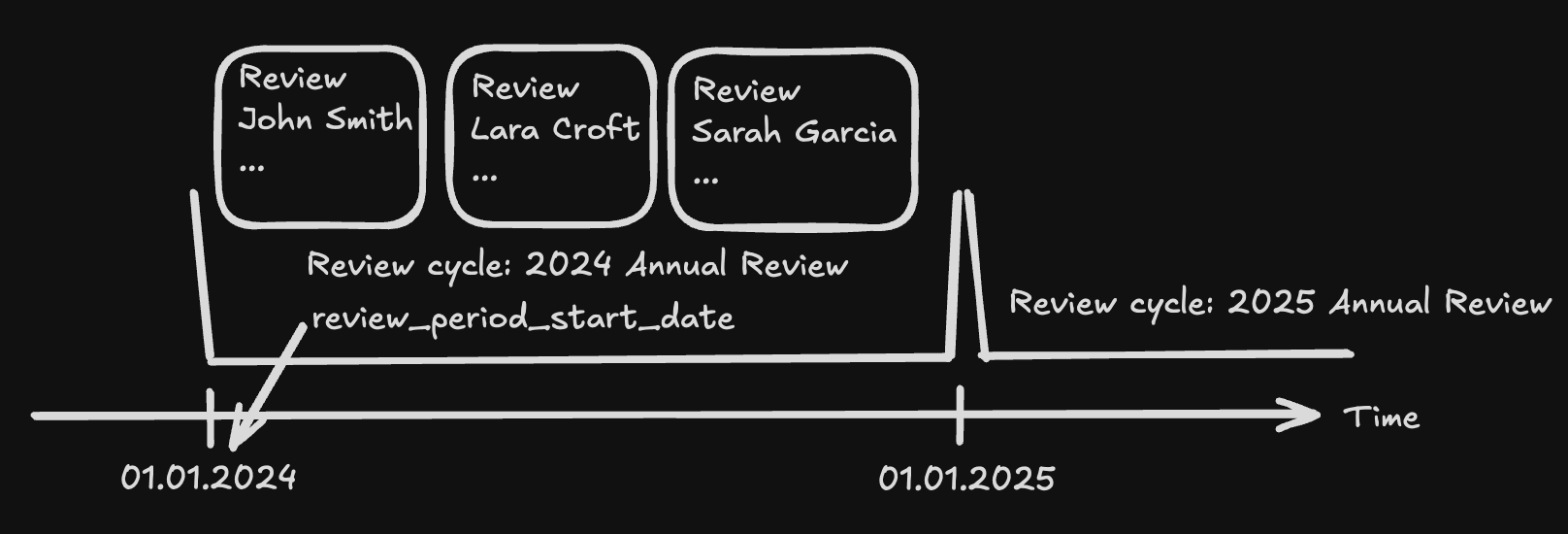 Performance Review Cycles are used to categorize individual performance reviews into logical buckets. They feature a `name` and `review_period_start_date` property. The `review_period_start_date` is the date when the review period for this cycle starts and it is the date from which on reviews can be submitted for this cycle. We recommend to use this date for sorting reviews within a single employee view and for a review cycles view.
```jsx theme={null}
{
"name": "2025 Annual Performance Review Cycle",
"review_period_start_date": "2025-01-01T00:00:00.000Z"
}
```
Some HRIS systems use different processes to schedule performance reviews and it can therefore happen that the `review_period_start_date` property is `null`. This will be marked as `UNSUPPORETED` on our coverage grid accordingly.
```jsx theme={null}
{
"name": "2025 Annual Performance Review Cycle",
"review_period_start_date": null,
}
```
## Performance Reviews
As explained in the **Scope config** section the performance review comes with reviewee and reviewer properties. Use the `display_full_name`, `first_name`, `last_name`, `work_email` to display a reviewee or reviewers identity in your application. Use the `id`, `remote_id` or `work_email` to implement hyperlinks to these entities within your application. You can also link to the review cycle via it’s `id`/`remote_id` property.
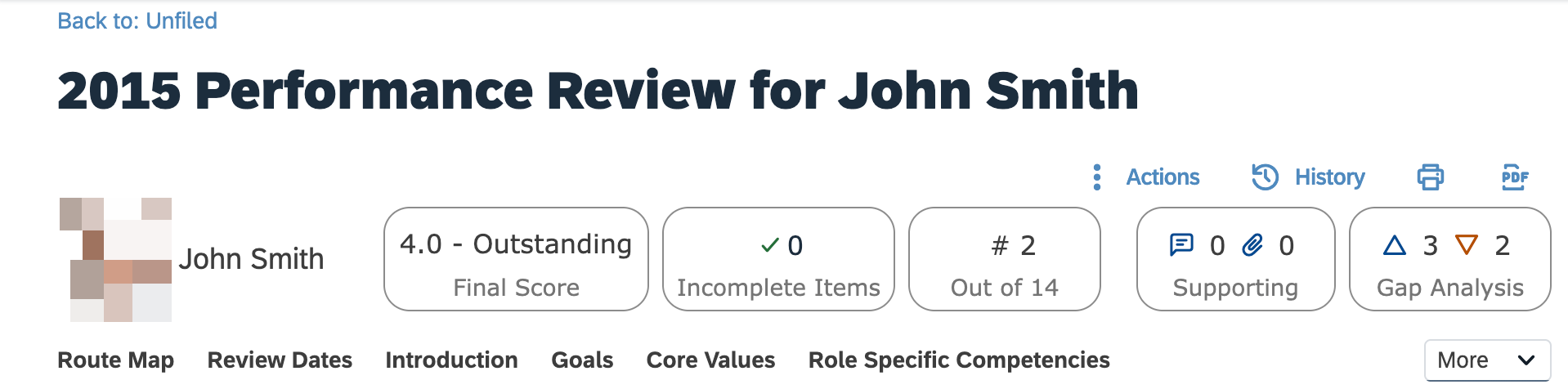
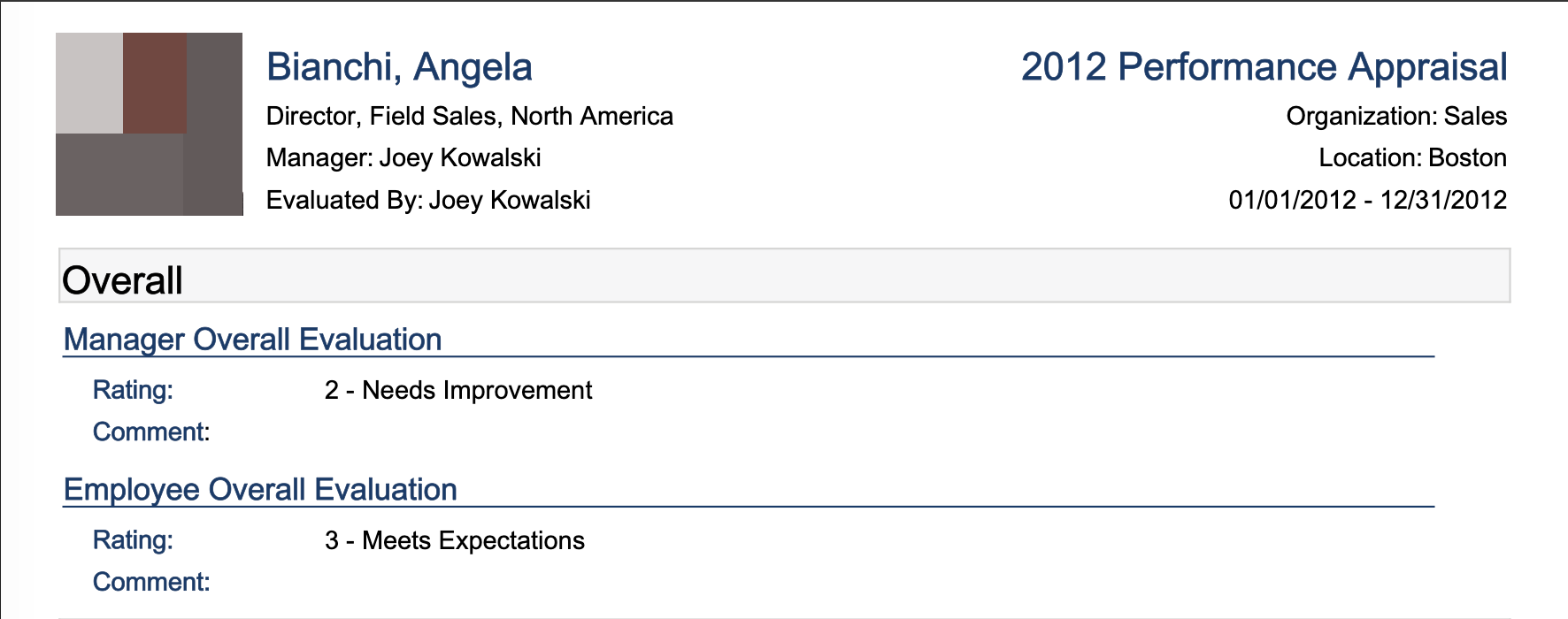
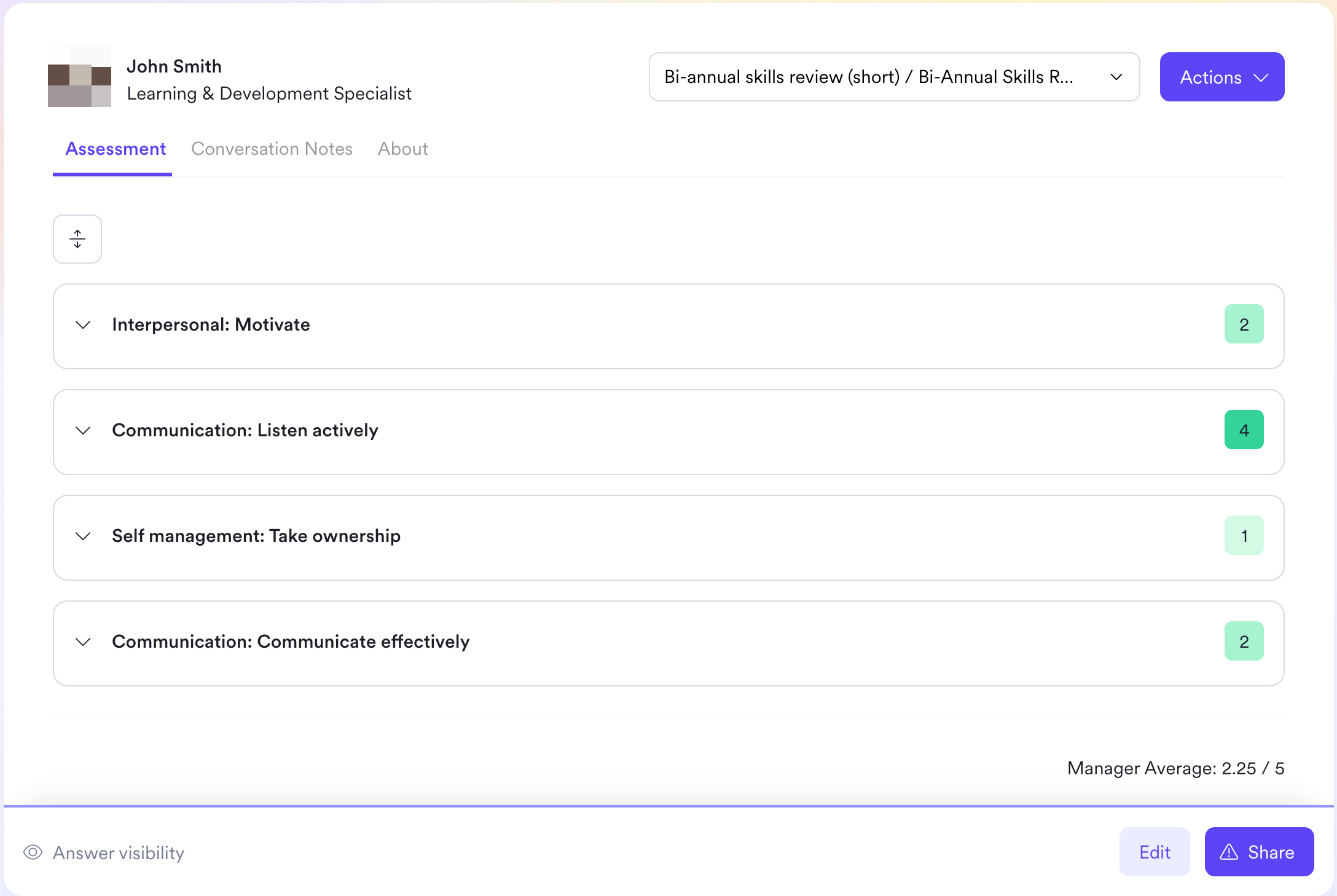
The `type` property describes the relationship between the reviewer and reviewee. The following values are possible: `MANAGER`, `DIRECT_REPORT`, `PEER` and `SELF`. If the relationship cannot be determined or the reviewer is missing it will be `null` instead. If your application is primarly consuming the type `MANAGER` but it is not available for a certain integration it can make sense to add a fallback to type `null` with a warning in your UI. The query parameter `types` can be used to filter our a API response for a single or multiple types.
The `summary_comment` gives the summary/overall comment of the reviewer.
```jsx theme={null}
{
"summary_comment": "Good job this year! Let's keep it up for 2024!"
}
```
The `summary_rating` gives you the summary/overall/average rating. It is never calculated by Kombo. It can have two different formats:
```jsx theme={null}
{
"summary_rating": {
"type": "SINGLE_SELECT",
"ordered_options": [
"Needs improvement",
"Below expectations",
"Meets expectations",
"Exceeds expectations",
"Exceptional"
],
"value": "Exceeds expectations"
}
}
```
```jsx theme={null}
{
"summary_rating": {
"type": "NUMERIC",
"value": 3.2,
"min": 0,
"max": 5
}
}
```
In the `SINGLE_SELECT` format `ordered_options` will be an array of available options (strings) ordered from bad to good. You can use the index of the `value` to display the range and where this review lands. For tools that do not expose all available options the `ordered_options` array will be `null`.
If the type is `NUMERIC` the value will be any floating point or integer between and including the given `min` and `max` value. `min` and `max` can be `null` if the tool does not expose the possible range.
# UI Examples
Performance Review Cycles are used to categorize individual performance reviews into logical buckets. They feature a `name` and `review_period_start_date` property. The `review_period_start_date` is the date when the review period for this cycle starts and it is the date from which on reviews can be submitted for this cycle. We recommend to use this date for sorting reviews within a single employee view and for a review cycles view.
```jsx theme={null}
{
"name": "2025 Annual Performance Review Cycle",
"review_period_start_date": "2025-01-01T00:00:00.000Z"
}
```
Some HRIS systems use different processes to schedule performance reviews and it can therefore happen that the `review_period_start_date` property is `null`. This will be marked as `UNSUPPORETED` on our coverage grid accordingly.
```jsx theme={null}
{
"name": "2025 Annual Performance Review Cycle",
"review_period_start_date": null,
}
```
## Performance Reviews
As explained in the **Scope config** section the performance review comes with reviewee and reviewer properties. Use the `display_full_name`, `first_name`, `last_name`, `work_email` to display a reviewee or reviewers identity in your application. Use the `id`, `remote_id` or `work_email` to implement hyperlinks to these entities within your application. You can also link to the review cycle via it’s `id`/`remote_id` property.
The `type` property describes the relationship between the reviewer and reviewee. The following values are possible: `MANAGER`, `DIRECT_REPORT`, `PEER` and `SELF`. If the relationship cannot be determined or the reviewer is missing it will be `null` instead. If your application is primarly consuming the type `MANAGER` but it is not available for a certain integration it can make sense to add a fallback to type `null` with a warning in your UI. The query parameter `types` can be used to filter our a API response for a single or multiple types.
The `summary_comment` gives the summary/overall comment of the reviewer.
```jsx theme={null}
{
"summary_comment": "Good job this year! Let's keep it up for 2024!"
}
```
The `summary_rating` gives you the summary/overall/average rating. It is never calculated by Kombo. It can have two different formats:
```jsx theme={null}
{
"summary_rating": {
"type": "SINGLE_SELECT",
"ordered_options": [
"Needs improvement",
"Below expectations",
"Meets expectations",
"Exceeds expectations",
"Exceptional"
],
"value": "Exceeds expectations"
}
}
```
```jsx theme={null}
{
"summary_rating": {
"type": "NUMERIC",
"value": 3.2,
"min": 0,
"max": 5
}
}
```
In the `SINGLE_SELECT` format `ordered_options` will be an array of available options (strings) ordered from bad to good. You can use the index of the `value` to display the range and where this review lands. For tools that do not expose all available options the `ordered_options` array will be `null`.
If the type is `NUMERIC` the value will be any floating point or integer between and including the given `min` and `max` value. `min` and `max` can be `null` if the tool does not expose the possible range.
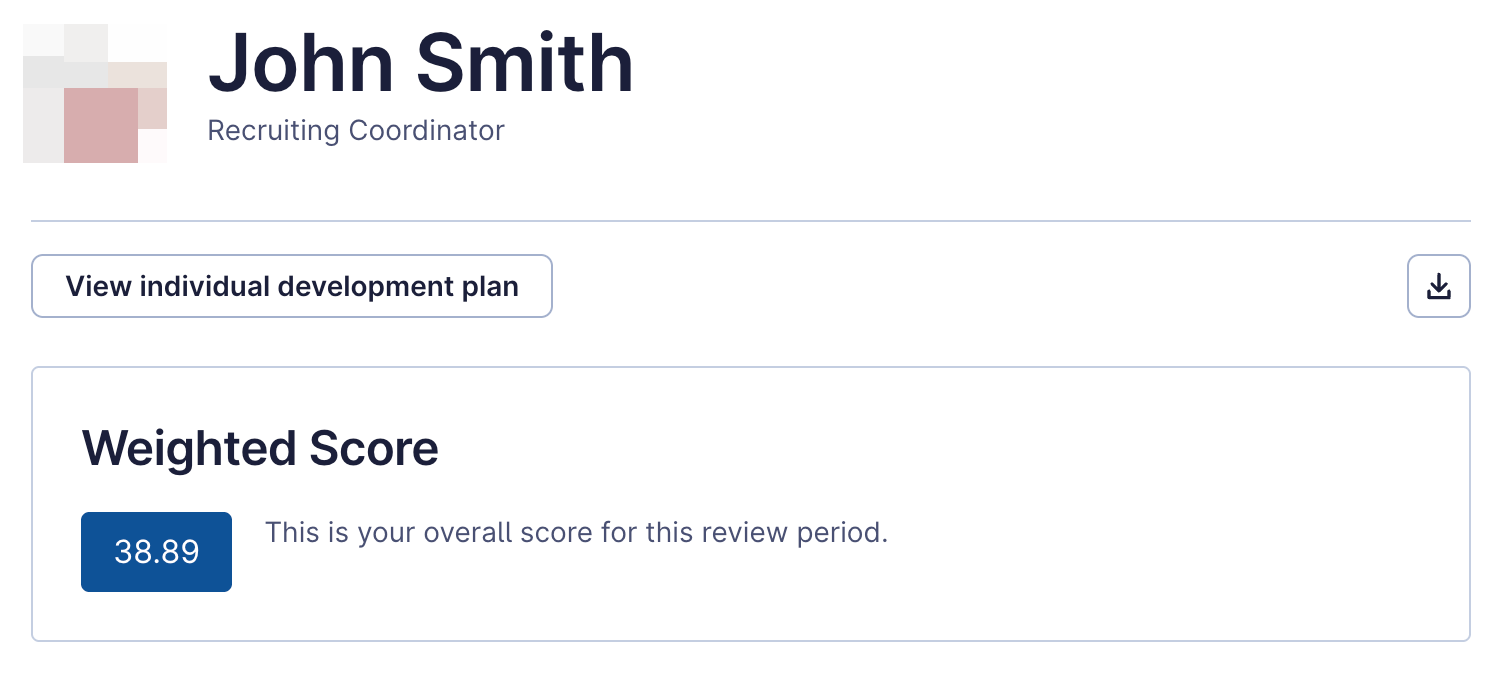
# UI Examples
 # Common Integration Scenarios
## Compensation Benchmarking
You can offer two distinct views in your UI:
### Reviewee View
1. Retrieve the Performance reviews for the individual employee (reviewee).
* GET /performance-reviews?types=MANAGER\&reviewee\_ids=\
2. Sort by `review_period_start_date` if available or take the latest.
3. Display the summary\_rating and summary\_comment of the manager review
### Performance Review Cycle View
1. Retrieve all Performance Review Cycles.
* GET /performance-review-cycles
2. After a user expands a Performance Review Cycle, retrieve the reviews for this cycle with the `review_cycle_ids` query parameter or load them from your database/cache.
* GET /performance-reviews??types=MANAGER\&review\_cycles=\
3. Display the reviewees name and their `summary_rating`
## HR Analytics
1. Get employee attrition or retention with our `employment_status`, `start_date`, `termination_date` properties from our employee model
2. Compare the data with the corresponding performance reviews
* GET /performance-reviews?types=MANAGER,SELF
* Discrepancies between the self and manager review might indicate dissatisfaction and flight-risk.
## Talent Intelligence and Internal Mobility
1. Get internal mobility and promotion data with `job_title`, `effective_date` and `employment_type` properties from our employment model
2. Compare the data with the corresponding performance review history
* GET /performance-reviews?types=MANAGER
* Use the `review_period_start_date` to sort the review scores by time
## Assessment calibration
1. Retrieve all Performance reviews and categorize them by type
* You can use the `reviewee_ids` query parameter to only get reviews for employees which were assessed.
2. Calibrate the self assessment with the `SELF` reviews
* GET /performance-reviews?types=SELF\&reviewee\_ids=\
3. Calibrate the social/leadership skills assessment with the `PEER`/`DIRECT_REPORT` reviews
* GET /performance-reviews?types=PEER,DIRECT\_REPORT\&reviewee\_ids=\
4. Calibrate the overall assessment performance indicator with the `MANAGER` reviews.
* GET /performance-reviews?types=MANAGER\&reviewee\_ids=\
# Common Integration Scenarios
## Compensation Benchmarking
You can offer two distinct views in your UI:
### Reviewee View
1. Retrieve the Performance reviews for the individual employee (reviewee).
* GET /performance-reviews?types=MANAGER\&reviewee\_ids=\
2. Sort by `review_period_start_date` if available or take the latest.
3. Display the summary\_rating and summary\_comment of the manager review
### Performance Review Cycle View
1. Retrieve all Performance Review Cycles.
* GET /performance-review-cycles
2. After a user expands a Performance Review Cycle, retrieve the reviews for this cycle with the `review_cycle_ids` query parameter or load them from your database/cache.
* GET /performance-reviews??types=MANAGER\&review\_cycles=\
3. Display the reviewees name and their `summary_rating`
## HR Analytics
1. Get employee attrition or retention with our `employment_status`, `start_date`, `termination_date` properties from our employee model
2. Compare the data with the corresponding performance reviews
* GET /performance-reviews?types=MANAGER,SELF
* Discrepancies between the self and manager review might indicate dissatisfaction and flight-risk.
## Talent Intelligence and Internal Mobility
1. Get internal mobility and promotion data with `job_title`, `effective_date` and `employment_type` properties from our employment model
2. Compare the data with the corresponding performance review history
* GET /performance-reviews?types=MANAGER
* Use the `review_period_start_date` to sort the review scores by time
## Assessment calibration
1. Retrieve all Performance reviews and categorize them by type
* You can use the `reviewee_ids` query parameter to only get reviews for employees which were assessed.
2. Calibrate the self assessment with the `SELF` reviews
* GET /performance-reviews?types=SELF\&reviewee\_ids=\
3. Calibrate the social/leadership skills assessment with the `PEER`/`DIRECT_REPORT` reviews
* GET /performance-reviews?types=PEER,DIRECT\_REPORT\&reviewee\_ids=\
4. Calibrate the overall assessment performance indicator with the `MANAGER` reviews.
* GET /performance-reviews?types=MANAGER\&reviewee\_ids=\