'
```
#### Example Response Snippet
```json Example Response Snippet [expandable] theme={null}
{
"status": "success",
"data": {
"next": "eyJwYWdlIjoxMiwibm90ZSI6InRoaXMgaXMganVzdCBhbiBleGFtcGxlIGFuZCBub3QgcmVwcmVzZW50YXRpdmUgZm9yIGEgcmVhbCBjdXJzb3IhIn0=",
"results": [
{
"id": "26vafvWSRmbhNcxJYqjCzuJg",
"remote_id": "32",
"name": "Backend Engineer",
...
"screening_questions": [
{
"id": "26vafvWSRmbhNcxJYqjCzuJg",
"remote_id": "48b4d36a-1d4b-4c50-ada7-9519078e65b4",
"title": "Which is your primary programming language?",
"description": "Please enter the language you are most comfortable with.",
"format": {
"display_type": "SINGLE_LINE",
"max_length": null,
"type": "TEXT"
},
"index": 0,
"required": true
}
]
}
]
}
}
```
> Note: Each job's `screening_questions` field can contain one or more questions. The order of these questions (defined by the `index` field) is recommended for display but not mandatory.
### 2. Displaying Screening Questions in Your UI
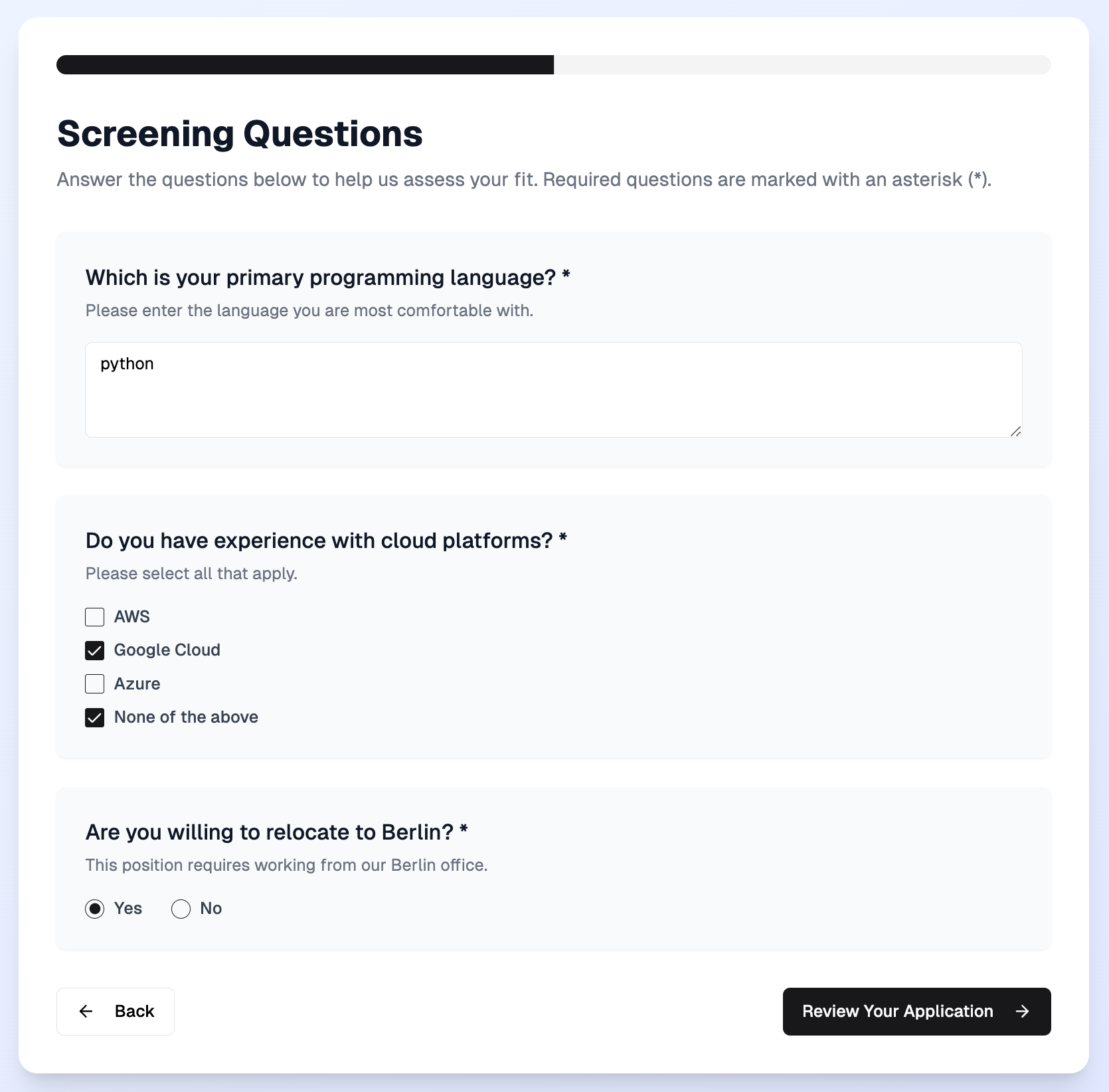 #### Guidelines
* **Render a Field per Question:**
Display a corresponding input element within your job application form for each screening question in the `screening_questions` array. Depending on your product's goal, you might consider only displaying required screening questions to minimize the candidate's input.
* **Match Field Type to Question Format:**
The type of input you display should correspond to the `format.type` and `format.display_type` provided. For example:
| **Type** | **Recommended Format** |
| ---------------------------------- | --------------------------------------------------- |
| **`TEXT / SINGLE_LINE`** | Text input |
| **`TEXT / MULTI_LINE`** | Text area |
| **`NUMBER`** | Numeric input field or slider |
| **`SINGLE_SELECT / MULTI_SELECT`** | Radio buttons, dropdown menus, or checkboxes |
| **`BOOLEAN`** | Toggle, checkbox, yes/no dropdown, or radio buttons |
| **`DATE`** | Date picker or input field with format validation |
| **`FILE`** | File upload control |
| **`INFORMATION`** | Display a static text |
| **`UNKNOWN`** | Handle custom logic as needed |
* **Indicate Required Fields:**
Clearly mark questions that are mandatory. For instance, add an asterisk “\*” next to the question title when the `required` field is `true`.
* **Display the description:**
Show the `description` below the question when present.
It is often a short sentence but can be a long block.
It may include HTML for formatting and Kombo returns it unchanged, so render HTML appropriately in your UI.
* **Follow the Recommended Order:**
It's recommended (though not required) to display the screening questions in the order they are provided in the API response to preserve any intentional flow.
#### Sample HTML Snippet
Below is an example snippet for displaying a single-line text question and a multi-select question:
```html Example HTML Snippet [expandable] theme={null}
```
> Tip: Adapt these examples to match your styling guidelines and frontend framework. Use real data from the API to populate questions dynamically.
### 3. Capturing and Validating Answers
#### Data Collection
* **Gather Answers:**
Ensure that each candidate's response is collected in a way that corresponds to the question's expected format. For example, if a question is a multi-select, capture the answer as an array of option IDs. If the question is a text input, capture the answer as a string.
* **Implement Data Validation:**
Validate user input on the client side:
* Check that required fields are not left empty.
* Ensure that input types match the expected format (e.g., numeric inputs for `NUMBER` questions).
* Enforce constraints like `max_length` for text fields.
#### Example JavaScript Validation
```jsx theme={null}
document
.getElementById('application-form')
.addEventListener('submit', function (event) {
const textInput = document.getElementById('question-1')
if (!textInput.value.trim()) {
alert('Please answer all required questions.')
event.preventDefault()
return
}
// Additional validations can be implemented here.
})
```
### 4. Submitting Screening Question Answers
Once all candidate responses are captured and validated, include them in the payload when creating an application using Kombo's [create application](/ats/v1/post-jobs-job-id-applications) endpoint.
#### Sample Screening Questions Array
```json Sample Screening Questions Array [expandable] theme={null}
{
...
"screening_question_answers": [
{
// For a text question
"question_id": "26vafvWSRmbhNcxJYqjCzuJg",
"answer": "TypeScript and a little bit of SQL"
},
{
// For a single-select question
"question_id" :"WA6SZ7R7YSo2C3WDLE5zmAJ",
"answer": "3WA6SZ7R7YSo2C3WDLE5zmAJ", // ID of the answer-option
},
{
// For a multi-select question
"question_id" :"WA6SZ7R7YSo2C3WDLE5zmAJ",
"answer": [
"3WA6SZ7R7YSo2C3WDLE5zmAJ", // IDs of the answer-options
"21KvMGS9Yhsbbsxfwqyb5dkF"
]
}
]
}
```
#### Sample API Request
```bash Sample API Request [expandable] theme={null}
curl --request POST \
--url https://api.kombo.dev/v1/ats/jobs/{job_id}/applications \
--header 'Authorization: Bearer ' \
--header 'Content-Type: application/json' \
--header 'X-Integration-Id: ' \
--data '{
"candidate": {
"first_name": "Frank",
"last_name": "Doe",
"company": "Acme Inc.",
"title": "Head of Integrations",
"email_address": "frank.doe@example.com",
"phone_number": "+1-541-754-3010",
"gender": "MALE",
"salary_expectations": {
"amount": 100000,
"period": "YEAR"
},
"availability_date": "2021-01-01",
"location": {
"city": "New York",
"country": "US"
}
},
"stage_id": "8x3YKRDcuRnwShdh96ShBNn1",
"attachments": [
{
"name": "Frank Doe CV.txt",
"data": "SGkgdGhlcmUsIEtvbWJvIGlzIGN1cnJlbnRseSBoaXJpbmcgZW5naW5lZXJzIHRoYXQgbG92ZSB0byB3b3JrIG9uIGRldmVsb3BlciBwcm9kdWN0cy4=",
"type": "CV",
"content_type": "text/plain"
}
],
"screening_question_answers": [
{
"question_id": "3phFBNXRweGnDmsU9o2vdPuQ",
"answer": "Yes"
},
{
"question_id": "EYJjhMQT3LtVKXnTbnRT8s6U",
"answer": [
"GUzE666zfyjeoCJX6A8n7wh6",
"5WPHzzKAv8cx97KtHRUV96U8",
"7yZfKGzWigXxxRTygqAfHvyE"
]
}
]
}'
```
> Error Handling:
>
> Implement robust error handling in your integration. For instance:
>
> * **400 Errors:** Likely indicate validation issues. Alert the candidate or log the error for review.
> * **500 Errors:** Signal server-side issues. In these cases, prompt users to try again later and contact Kombo support if the issue persists.
### 5. Consider Advanced Features + Edge Cases
While less common, there are some edge cases and additional features that you should consider.
#### Auto-answering required screening questions
Please reach out to Kombo support if you would like to use this feature – and
it is not already enabled for you.
If, by design, your product does not support screening questions, we provide you with the option to automatically answer these questions. This is necessary as some tools will validate and reject applications that do not have answers to the required questions.
When a candidate applies for a job, we will automatically answer any required screening questions that were not answered with default values. These default values are based on the question type and are as follows:
| **Type** | **Answer** |
| ------------------- | ---------------------------------------------------------------------------------------------------- |
| **`TEXT`** | **`-`** |
| **`NUMBER`** | **`0`** (unless min and/or max are described, in which case we take the minimum number in the range) |
| **`BOOLEAN`** | true |
| **`SINGLE_SELECT`** | The first option |
| **`MULTI_SELECT`** | The first option |
| **`DATE`** | The current date |
| **`FILE`** | An empty file |
#### Handling ATS-specific logic
Some ATS will include a score or disqualification value to a question. If these values can be read via API, we will ensure that the submitted answer does not disqualify the created candidate. Kombo will never try to manipulate or maximize a score.
#### Display type
The **`display_type`** for screening questions contain information about the display and validation. For example a screening question of type **`TEXT`** can have an these **`display_type`** properties: **`SINGLE_LINE`**, **`MULTI_LINE`**, **`EMAIL`** and **`URL`**. **`EMAIL`** and **`URL`** have additional validation rules.
#### Conditional screening questions
A conditional screening question is a question that should only appear based on the answer to another question. You will want to implement logic that only displays the conditional screening question to the applicant if this precondition is met. Answers to conditional screening questions may be required, although this requirement is only true if the precondition is met.
*An example of this could be:*
**Question 1:** Do you have a valid driver's license?
* **Yes**
* **No**
**Question 2:** How many years of driving experience do you have?
* **Less than 1 year**
* **1-2 years**
For this example, you would only want to show the second question if the applicant answered **Yes** to the first question.
Use Kombo's sandbox integration in your development environment to test
conditional screening questions and build your user interface.
Kombo would return these questions on the [GET jobs](/ats/v1/get-jobs) endpoint as shown below. On the second question, the value of `precondition_question_id` is the `id` of the first question, and `precondition_options` includes the **`id`** of the **Yes** option of the first question.
```bash Example Screening Questions With Preconditions [expandable] theme={null}
"screening_questions": [
{
"id": "26vafvWSRmbhNcxJYqjCzuJg",
"remote_id": "48b4d36a-1d4b-4c50-ada7-9519078e65b4",
"title": "Do you have a valid driver's license?",
"description": "Please state if you have a valid driver's license.",
"format": {
"display_type": "DROPDOWN",
"type": "SINGLE_SELECT",
"options": [
{
"id": "5KMj443ZBfzBkqFhDuvdoZJP",
"remote_id": "59c5d36a-1d4b-4c50-ada7-9519078e65b4",
"name": "Yes"
},
{
"id": "H5benHrFr66wh9wU3RQegRRN",
"remote_id": "61d6d36a-1d4b-4c50-ada7-9519078e65b4",
"name": "No"
}
]
},
"index": 0,
"required": true,
"precondition_question_id": null,
"precondition_options": null
},
{
"id": "9SmkUABUZnQdoPGeK83CdGnH",
"remote_id": "21b4d36a-1d4b-4c50-ada7-9519078e65b4",
"title": "How many years of driving experience do you have?",
"description": "Please state how many years of driving experience you have.",
"format": {
"display_type": "DROPDOWN",
"type": "SINGLE_SELECT",
"options": [
{
"id": "AFN58qWqutLt4ZMZgykD483W",
"remote_id": "11c5d36a-1d4b-4c50-ada7-9519078e65b4",
"name": "Less than 1 year"
},
{
"id": "6MHzLUCEaNmccbf6bP18466J",
"remote_id": "66d6d36a-1d4b-4c50-ada7-9519078e65b4",
"name": "1-2 years"
}
]
},
"index": 1,
"required": true,
"precondition_question_id": "26vafvWSRmbhNcxJYqjCzuJg",
"precondition_options": ["5KMj443ZBfzBkqFhDuvdoZJP"]
}
],
```
#### Guidelines
* **Render a Field per Question:**
Display a corresponding input element within your job application form for each screening question in the `screening_questions` array. Depending on your product's goal, you might consider only displaying required screening questions to minimize the candidate's input.
* **Match Field Type to Question Format:**
The type of input you display should correspond to the `format.type` and `format.display_type` provided. For example:
| **Type** | **Recommended Format** |
| ---------------------------------- | --------------------------------------------------- |
| **`TEXT / SINGLE_LINE`** | Text input |
| **`TEXT / MULTI_LINE`** | Text area |
| **`NUMBER`** | Numeric input field or slider |
| **`SINGLE_SELECT / MULTI_SELECT`** | Radio buttons, dropdown menus, or checkboxes |
| **`BOOLEAN`** | Toggle, checkbox, yes/no dropdown, or radio buttons |
| **`DATE`** | Date picker or input field with format validation |
| **`FILE`** | File upload control |
| **`INFORMATION`** | Display a static text |
| **`UNKNOWN`** | Handle custom logic as needed |
* **Indicate Required Fields:**
Clearly mark questions that are mandatory. For instance, add an asterisk “\*” next to the question title when the `required` field is `true`.
* **Display the description:**
Show the `description` below the question when present.
It is often a short sentence but can be a long block.
It may include HTML for formatting and Kombo returns it unchanged, so render HTML appropriately in your UI.
* **Follow the Recommended Order:**
It's recommended (though not required) to display the screening questions in the order they are provided in the API response to preserve any intentional flow.
#### Sample HTML Snippet
Below is an example snippet for displaying a single-line text question and a multi-select question:
```html Example HTML Snippet [expandable] theme={null}
```
> Tip: Adapt these examples to match your styling guidelines and frontend framework. Use real data from the API to populate questions dynamically.
### 3. Capturing and Validating Answers
#### Data Collection
* **Gather Answers:**
Ensure that each candidate's response is collected in a way that corresponds to the question's expected format. For example, if a question is a multi-select, capture the answer as an array of option IDs. If the question is a text input, capture the answer as a string.
* **Implement Data Validation:**
Validate user input on the client side:
* Check that required fields are not left empty.
* Ensure that input types match the expected format (e.g., numeric inputs for `NUMBER` questions).
* Enforce constraints like `max_length` for text fields.
#### Example JavaScript Validation
```jsx theme={null}
document
.getElementById('application-form')
.addEventListener('submit', function (event) {
const textInput = document.getElementById('question-1')
if (!textInput.value.trim()) {
alert('Please answer all required questions.')
event.preventDefault()
return
}
// Additional validations can be implemented here.
})
```
### 4. Submitting Screening Question Answers
Once all candidate responses are captured and validated, include them in the payload when creating an application using Kombo's [create application](/ats/v1/post-jobs-job-id-applications) endpoint.
#### Sample Screening Questions Array
```json Sample Screening Questions Array [expandable] theme={null}
{
...
"screening_question_answers": [
{
// For a text question
"question_id": "26vafvWSRmbhNcxJYqjCzuJg",
"answer": "TypeScript and a little bit of SQL"
},
{
// For a single-select question
"question_id" :"WA6SZ7R7YSo2C3WDLE5zmAJ",
"answer": "3WA6SZ7R7YSo2C3WDLE5zmAJ", // ID of the answer-option
},
{
// For a multi-select question
"question_id" :"WA6SZ7R7YSo2C3WDLE5zmAJ",
"answer": [
"3WA6SZ7R7YSo2C3WDLE5zmAJ", // IDs of the answer-options
"21KvMGS9Yhsbbsxfwqyb5dkF"
]
}
]
}
```
#### Sample API Request
```bash Sample API Request [expandable] theme={null}
curl --request POST \
--url https://api.kombo.dev/v1/ats/jobs/{job_id}/applications \
--header 'Authorization: Bearer ' \
--header 'Content-Type: application/json' \
--header 'X-Integration-Id: ' \
--data '{
"candidate": {
"first_name": "Frank",
"last_name": "Doe",
"company": "Acme Inc.",
"title": "Head of Integrations",
"email_address": "frank.doe@example.com",
"phone_number": "+1-541-754-3010",
"gender": "MALE",
"salary_expectations": {
"amount": 100000,
"period": "YEAR"
},
"availability_date": "2021-01-01",
"location": {
"city": "New York",
"country": "US"
}
},
"stage_id": "8x3YKRDcuRnwShdh96ShBNn1",
"attachments": [
{
"name": "Frank Doe CV.txt",
"data": "SGkgdGhlcmUsIEtvbWJvIGlzIGN1cnJlbnRseSBoaXJpbmcgZW5naW5lZXJzIHRoYXQgbG92ZSB0byB3b3JrIG9uIGRldmVsb3BlciBwcm9kdWN0cy4=",
"type": "CV",
"content_type": "text/plain"
}
],
"screening_question_answers": [
{
"question_id": "3phFBNXRweGnDmsU9o2vdPuQ",
"answer": "Yes"
},
{
"question_id": "EYJjhMQT3LtVKXnTbnRT8s6U",
"answer": [
"GUzE666zfyjeoCJX6A8n7wh6",
"5WPHzzKAv8cx97KtHRUV96U8",
"7yZfKGzWigXxxRTygqAfHvyE"
]
}
]
}'
```
> Error Handling:
>
> Implement robust error handling in your integration. For instance:
>
> * **400 Errors:** Likely indicate validation issues. Alert the candidate or log the error for review.
> * **500 Errors:** Signal server-side issues. In these cases, prompt users to try again later and contact Kombo support if the issue persists.
### 5. Consider Advanced Features + Edge Cases
While less common, there are some edge cases and additional features that you should consider.
#### Auto-answering required screening questions
Please reach out to Kombo support if you would like to use this feature – and
it is not already enabled for you.
If, by design, your product does not support screening questions, we provide you with the option to automatically answer these questions. This is necessary as some tools will validate and reject applications that do not have answers to the required questions.
When a candidate applies for a job, we will automatically answer any required screening questions that were not answered with default values. These default values are based on the question type and are as follows:
| **Type** | **Answer** |
| ------------------- | ---------------------------------------------------------------------------------------------------- |
| **`TEXT`** | **`-`** |
| **`NUMBER`** | **`0`** (unless min and/or max are described, in which case we take the minimum number in the range) |
| **`BOOLEAN`** | true |
| **`SINGLE_SELECT`** | The first option |
| **`MULTI_SELECT`** | The first option |
| **`DATE`** | The current date |
| **`FILE`** | An empty file |
#### Handling ATS-specific logic
Some ATS will include a score or disqualification value to a question. If these values can be read via API, we will ensure that the submitted answer does not disqualify the created candidate. Kombo will never try to manipulate or maximize a score.
#### Display type
The **`display_type`** for screening questions contain information about the display and validation. For example a screening question of type **`TEXT`** can have an these **`display_type`** properties: **`SINGLE_LINE`**, **`MULTI_LINE`**, **`EMAIL`** and **`URL`**. **`EMAIL`** and **`URL`** have additional validation rules.
#### Conditional screening questions
A conditional screening question is a question that should only appear based on the answer to another question. You will want to implement logic that only displays the conditional screening question to the applicant if this precondition is met. Answers to conditional screening questions may be required, although this requirement is only true if the precondition is met.
*An example of this could be:*
**Question 1:** Do you have a valid driver's license?
* **Yes**
* **No**
**Question 2:** How many years of driving experience do you have?
* **Less than 1 year**
* **1-2 years**
For this example, you would only want to show the second question if the applicant answered **Yes** to the first question.
Use Kombo's sandbox integration in your development environment to test
conditional screening questions and build your user interface.
Kombo would return these questions on the [GET jobs](/ats/v1/get-jobs) endpoint as shown below. On the second question, the value of `precondition_question_id` is the `id` of the first question, and `precondition_options` includes the **`id`** of the **Yes** option of the first question.
```bash Example Screening Questions With Preconditions [expandable] theme={null}
"screening_questions": [
{
"id": "26vafvWSRmbhNcxJYqjCzuJg",
"remote_id": "48b4d36a-1d4b-4c50-ada7-9519078e65b4",
"title": "Do you have a valid driver's license?",
"description": "Please state if you have a valid driver's license.",
"format": {
"display_type": "DROPDOWN",
"type": "SINGLE_SELECT",
"options": [
{
"id": "5KMj443ZBfzBkqFhDuvdoZJP",
"remote_id": "59c5d36a-1d4b-4c50-ada7-9519078e65b4",
"name": "Yes"
},
{
"id": "H5benHrFr66wh9wU3RQegRRN",
"remote_id": "61d6d36a-1d4b-4c50-ada7-9519078e65b4",
"name": "No"
}
]
},
"index": 0,
"required": true,
"precondition_question_id": null,
"precondition_options": null
},
{
"id": "9SmkUABUZnQdoPGeK83CdGnH",
"remote_id": "21b4d36a-1d4b-4c50-ada7-9519078e65b4",
"title": "How many years of driving experience do you have?",
"description": "Please state how many years of driving experience you have.",
"format": {
"display_type": "DROPDOWN",
"type": "SINGLE_SELECT",
"options": [
{
"id": "AFN58qWqutLt4ZMZgykD483W",
"remote_id": "11c5d36a-1d4b-4c50-ada7-9519078e65b4",
"name": "Less than 1 year"
},
{
"id": "6MHzLUCEaNmccbf6bP18466J",
"remote_id": "66d6d36a-1d4b-4c50-ada7-9519078e65b4",
"name": "1-2 years"
}
]
},
"index": 1,
"required": true,
"precondition_question_id": "26vafvWSRmbhNcxJYqjCzuJg",
"precondition_options": ["5KMj443ZBfzBkqFhDuvdoZJP"]
}
],
```
 Screening questions are included as part of the job data, and can be fetched from the [GET jobs](/ats/v1/get-jobs) endpoint.
#### Sample API Request
```bash theme={null}
curl --request GET \
--url https://api.kombo.dev/v1/ats/jobs \
--header 'Authorization: Bearer
Screening questions are included as part of the job data, and can be fetched from the [GET jobs](/ats/v1/get-jobs) endpoint.
#### Sample API Request
```bash theme={null}
curl --request GET \
--url https://api.kombo.dev/v1/ats/jobs \
--header 'Authorization: Bearer