> ## Documentation Index
> Fetch the complete documentation index at: https://docs.kombo.dev/llms.txt
> Use this file to discover all available pages before exploring further.
# Reading jobs
We are not syncing the data from your customer’s ATS in real-time but on a periodic basis (if you are curious, we describe the reasoning for this [here](/ats/guides/sync)).
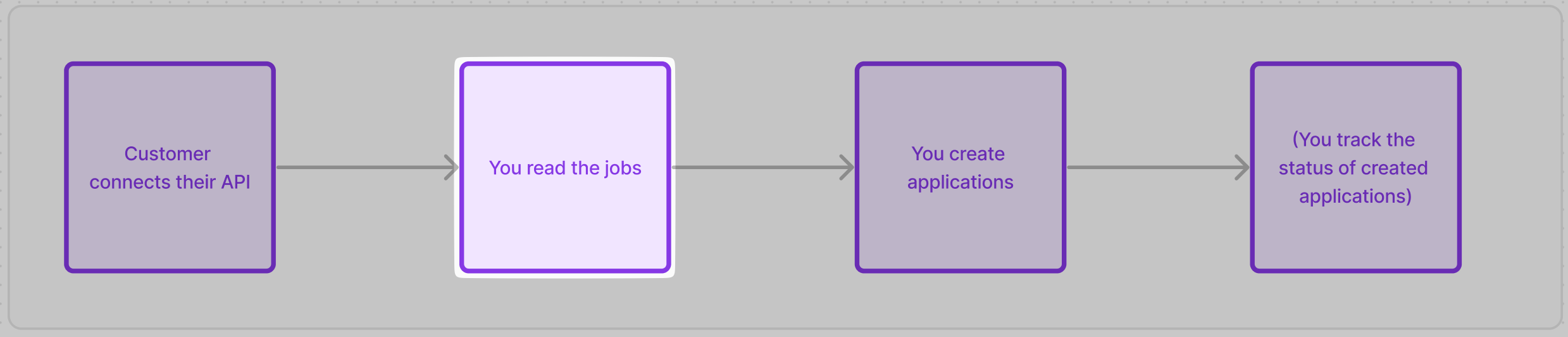 When your customer first connects their ATS, we immediately start syncing the data.
To prevent returning incomplete data while it's still running, you will not get any data until the *first sync* completes.
If you send a request before that, the API responds with an [error `code`](/guides/errors) like `INTEGRATION.SETUP_SYNC_PENDING`:
```json theme={null}
{
"status": "error",
"error": {
"code": "INTEGRATION.SETUP_SYNC_PENDING",
"title": "The integration's setup sync is still running.",
"message": "The first sync of this integration didn't finish successfully yet! You can keep polling this until you get a successful response or react to our webhooks."
}
}
```
| Code | When it appears | What to do |
| --------------------------------------------------------------------------------- | -------------------------------------------- | --------------------------------------------------------------------------- |
| [`INTEGRATION.SETUP_SYNC_PENDING`](/guides/errors#integration-setup-sync-pending) | Initial sync is still running. | Keep polling or listen to data-changed. |
| [`INTEGRATION.SETUP_INCOMPLETE`](/guides/errors#integration-setup-incomplete) | Some steps have not been completed yet. | Please finish the setup. Then keep polling or listen to data-changed. |
| [`INTEGRATION.QA_FAILED`](/guides/errors#integration-qa-failed) | Incomplete data triggered Quality Assurance. | Wait for Kombo support to fix this. Keep polling or listen to data-changed. |
If you receive one of these error `code`s keep requesting the endpoint until you get a successful response.
Alternatively listen to our [`data-changed` webhook](/ats/guides/webhooks#data-changed).
```json theme={null}
{
"id": "FhghqjnCi9WuAoLT8Z75CFcs",
"type": "data-changed",
"data": {
"integration_id": "personio:CBNMt7dSNCzBdnRTx87dev4E",
"integration_tool": "personio",
"integration_category": "ATS",
"changed_models": [{ "name": "ats_jobs" }]
}
}
```
🦉 The first syncing of data could **take a few seconds up to multiple hours**, depending on your scope config, the system itself (some are heavily rate-limited) and how much data is in the system of your customer.
The UX for your customer should therefore be designed around some delay/waiting time.
Once the first sync is finished, you must [pull the data](/ats/getting-started/querying-api) from the Kombo API and store it in your system so that you can show it to your customer without having to call the API again.
[Get jobs - Kombo](/ats/v1/get-jobs)
When querying data from the Kombo API, you should consider the following things:
* we recommend setting the `page_size` query param to the maximum batching (250 elements) to minimize number of API calls and maximize API response size.
* Our API is optimized to serve a few calls with large payloads at comparatively low latencies. That makes our API perfect for batch-requesting large amounts of data in a few seconds.
* unless you want to get jobs that are not currently open, you should set the `statuses` filter to `OPEN`
The possible options here are `OPEN`, `CLOSED`, `DRAFT`, `ARCHIVED`
* make sure to implement **[pagination](/ats/getting-started/querying-api#pagination)**, by using the `next` key in our API response and passing it in the `cursor` query param
*
if you are searching for only specific jobs, you can use any of our filters to
search for them more easily using the endpoint-specific filters, such as
`remote_ids`, `job_codes`, `name_contains`, `post_url` . Here it is important
to once again batch requests. Instead of sending 20 individual requests
containing one ID each, send one request with comma-separated IDs.
* the `job_code` field on jobs corresponds to the human-readable code that HR
teams assign in the ATS. In many systems, this is referred to as the
"Requisition Code" or "Requisition ID". The `remote_id` field, by contrast,
is the ATS system's internal identifier and is typically not visible to
recruiters.
A request to the “get jobs” endpoint could therefore look like this:
```bash theme={null}
curl --request GET \
--url 'https://api.kombo.dev/v1/ats/jobs?page_size=250&statuses=OPEN&cursor=eyJwYWdlIjoxMiwibm90ZSI6InRoaXMgaXMganVzdCBhbiBleGFtcGxlIGFuZCBub3QgcmVwcmVzZW50YXRpdmUgZm9yIGEgcmVhbCBjdXJzb3IhIn0' \
--header 'Authorization: ' \
--header 'X-Integration-Id: join:HWUTwvyx2wLoSUHphiWVrp28'
```
## **Getting updates on the data**
To get updates on the data, we discourage re-reading the entire dataset every time you want to update something. We have implemented change tracking for you so that you can just process the records that have changed.
The change-tracking of Kombo (which you can learn more about [here](/ats/getting-started/fetching-data)) centers around the `updated_after` query parameter, which you can use in the following way:
1. Store the timestamp at which you start ingesting the data from the first fetch in your own database. This field should probably be called something like this:
| customer\_id | kombo\_integration\_id | last\_fetched\_from\_kombo\_at |
| ---------------------- | ----------------------------------- | ------------------------------ |
| `` | `personio:8d1hpPsbjxUkoCoa1veLZGe5` | `1970-01-01T00:00:00.000Z` |
| `` | `hibob:B1hu5NGyhdjSq5X3hxEz4bAN` | `1970-01-01T01:13:24.000Z` |
2. Whenever Kombo detects a change, we send you a `data-changed` [webhook](/ats/guides/webhooks#data-changed) that looks like this:
```json theme={null}
{
"id": "FhghqjnCi9WuAoLT8Z75CFcs",
"type": "data-changed",
"data": {
"integration_id": "personio:8d1hpPsbjxUkoCoa1veLZGe5",
"integration_tool": "personio",
"integration_category": "ATS",
"changed_models": [{ "name": "ats_jobs" }]
}
}
```
3. You should make a lookup in your database, finding the `last_fetched_from_kombo_at` for this specific integration and then pass it again in the `updated_after` query param of the get endpoint, like this:
```bash theme={null}
curl --request GET \
--url 'https://api.kombo.dev/v1/ats/jobs?page_size=200&statuses=OPEN&cursor=eyJwYWdlIjoxMiwibm90ZSI6InRoaXMgaXMganVzdCBhbiBleGFtcGxlIGFuZCBub3QgcmVwcmVzZW50YXRpdmUgZm9yIGEgcmVhbCBjdXJzb3IhIn0&updated_after=1970-01-01T00:00:00.000Z&included_deleted=true' \
--header 'Authorization: ' \
--header 'X-Integration-Id: join:HWUTwvyx2wLoSUHphiWVrp28'
```
Please be aware that when updating jobs, you want to set the param `include_deleted` to `true` so that you can be notified of jobs that were deleted. You can learn more about how to handle those jobs [here](#reacting-to-deleted-closed-jobs).
4. We will return all records that have been altered in one of the following ways:
* property changed (i.e. `status` property of a job)
* relation property changed (`description` of a `screening_question` related to a job)
5. If you want to see **which** property of a record has changed, you have to compare the current data to the data you have stored in your own database. Kombo does not provide you with a “previous” value for the data points.
## **Handling failing syncs**
It is possible that a sync fails, and if that happens, you will still be able to access the data based on the latest successful sync. Once the sync succeeds again, you will be able to get all updates that have happened since the last time.
When a sync fails, the `sync-finished` webhook has a `data.sync_state` property that is not `"SUCCEEDED"`:
```json theme={null}
{
"id": "5gjAtURLPbnTiwgkaBfiA3WJ",
"type": "sync-finished",
"data": {
"sync_id": "B89SCXXho7Yw8PGo8AKJxLn4",
"sync_state": "AUTHENTICATION_FAILED",
"sync_started_at": "2021-09-01T12:00:00.000Z",
"sync_ended_at": "2021-09-01T12:30:00.000Z",
"sync_duration_seconds": 1800,
"integration_id": "personio:CBNMt7dSNCzBdnRTx87dev4E",
"integration_tool": "personio",
"integration_category": "ATS",
"log_url": "https://app.kombo.dev/env/production/logs/C3xUo6XAsB2sbKC7M1gyXaRX"
}
}
```
If you receive these values it means the **sync went through** and you’ll get updates of the data
| `sync_state` | Explanation | How to fix |
| ------------------ | ---------------------------------- | -------------------------- |
| `SUCCEEDED` | Everything went fine | |
| `PARTIALLY_FAILED` | Succeeded but had non-fatal errors | Kombo will take care of it |
These values mean the sync failed and the **problem is only fixable by Kombo**
| `sync_state` | Explanation | How to fix |
| ------------ | ----------------------------------------------------------------------- | -------------------------------------------------------------------------------------------------------------------------------------- |
| `CANCELLED` | The sync was actively canceled by Kombo | This happens very rarely, has no negative side-effects, and if it does happen, we will schedule a new sync shortly after |
| `FAILED` | There was a critical error during the sync and the sync did not finish. | If this happens, we get an alert and will look into the issue to fix it ASAP |
| `TIMED_OUT` | The sync timed out before completion | This happens rarely and will cause an immediate and automatic restart of the sync. Kombo will be notified and look into the issue ASAP |
These values mean the sync failed and the **problem is only fixable by you**/your customers
| `sync_state` | Explanation | How to fix |
| ----------------------- | -------------------------------------------------------------------------------------------------------------------------- | ------------------------------------------------------------------------------------------------------------------------------- |
| `AUTHENTICATION_FAILED` | The sync couldn’t complete because the API credentials are invalid or don’t allow requesting all data points in your scope | This can only be fixed by your customer adding additional permissions to the credentials or updating the credentials altogether |
## Let your customer choose which jobs to expose to you
In a lot of cases, your customer won’t want you to supply candidates for all jobs in their ATS but only for some jobs. Unfortunately, that means you have to implement some additional logic after you have synced all jobs from the ATS.
🦉 How to solve this is really dependent on the way your product works. You and your team will have to decide what’s best for you - we can just share the solutions we have seen with other customers so far.
**Your customer manually creates jobs in your back-office**
The customer can just create a new job record in your UI. In that case, there must be a corresponding job in the ATS of your customer so that you can create applications for it.
Caution: With this approach, you’ll have to [match the jobs in your database
with those in the ATS](#match-jobs-in-your-database-to-ats-jobs)
**Your customer sends you the job via email**
This is the low-tech approach of sharing the necessary jobs. Your customer will have to copy the job post URL, title, job code, or job ID from their system and share them with you. You can then get those jobs via the [query param filters of the get jobs endpoint.](#query-param-filters)
**You have an import UI for your customer**
Here, you have a dedicated settings page that lists all jobs from the customers ATS. Your customer can then go ahead and select the ones you should generate applications for.
**Receiving the jobs via a multi-poster**
Some of your customers (usually the larger ones) will use multiposters to distribute jobs to different job boards. This is an easy solution for your customer to choose specific jobs and “send” them to you. The only thing to be aware of is that you need to somehow [match the job you receive from the multiposter to the job in the ATS](#multiposters).
## Match jobs in your database to ATS jobs
In order to [create applications for a job](#creating-applications) you will always need to have the ID of your job in your database.
| id | title | customer\_id | kombo\_job\_id |
| -------------------------- | --------------------------- | ---------------------- | -------------------------- |
| `3WA6SZ7R7YSo2C3WDLE5zmAJ` | Senior integration engineer | `` | `21KvMGS9Yhsbbsxfwqyb5dkF` |
| `FhsTj1impXjFGzdG6QZuDnaW` | Customer success manager | `` | `WA6SZ7R7YSo2C3WDLE5zmAJ` |
This is not a problem if you just fetch all jobs via Kombo and then display them to customers or applicants. But in a lot of cases, you will have to match jobs that got into your database with existing records or records you get from a multiposter.
### Manually created jobs
If you have some jobs in your system before the customer connects their ATS, you’ll have to find the jobs in the ATS that correspond to the ones you have.
Ideally, you’ll use a unique identifier such as the ID/job code or perhaps even the URL.
In cases where you don’t have those data points, you can use the job title to find the most likely match in the ATS. If you have to use this approach, someone needs to check whether the job was linked correctly (either you or your customer).
We recommend showing your customer a dropdown list of jobs that you fetched from the ATS. The customer can then just search for the right one and click on it.
### Multiposters
If your customers are multiposting jobs to your platform you have to match the incoming jobs in a similar way. We strongly recommend requiring multiposters to share the job code or some other unique identifier about the job with you so that you can easily identify the job.
If you don’t have a unique identifier you could try to match the job based on it’s title but then you must have a human verifying the correctness of the link.
## **Reacting to deleted/closed jobs**
A common way to take jobs offline in an ATS is to close or archive them. In this case we will set the job status to `ARCHIVED` or `CLOSED`.
Some ATS's allow the complete deletion of jobs, in which case we will stop receiving that job on the ATS API. When that happens we set the `remote_deleted_at` timestamp for that record to let you know that this entry does not exist anymore. We will, however, not update the job status to be `CLOSED`. After 14 days we will completely remove the record from our system.
By default, we will exclude deleted jobs from our API response, so that you don’t ingest any deleted records into your system. To get notified about deleted entries you can set the query param `?include_deleted=true`. If you don’t do this, your applications will most likely fail because it’s not possible to apply for a deleted job.
```bash theme={null}
curl --request GET \
--url 'https://api.kombo.dev/v1/ats/jobs?include_deleted=true' \
--header 'Authorization: ' \
--header 'X-Integration-Id: join:HWUTwvyx2wLoSUHphiWVrp28'
```
Once you find that a job has been deleted, archived or closed, you should stop creating new applications for it and ideally communicate in the UI of your back-office that this job is no longer active because it has been deactivated in the ATS.
When your customer first connects their ATS, we immediately start syncing the data.
To prevent returning incomplete data while it's still running, you will not get any data until the *first sync* completes.
If you send a request before that, the API responds with an [error `code`](/guides/errors) like `INTEGRATION.SETUP_SYNC_PENDING`:
```json theme={null}
{
"status": "error",
"error": {
"code": "INTEGRATION.SETUP_SYNC_PENDING",
"title": "The integration's setup sync is still running.",
"message": "The first sync of this integration didn't finish successfully yet! You can keep polling this until you get a successful response or react to our webhooks."
}
}
```
| Code | When it appears | What to do |
| --------------------------------------------------------------------------------- | -------------------------------------------- | --------------------------------------------------------------------------- |
| [`INTEGRATION.SETUP_SYNC_PENDING`](/guides/errors#integration-setup-sync-pending) | Initial sync is still running. | Keep polling or listen to data-changed. |
| [`INTEGRATION.SETUP_INCOMPLETE`](/guides/errors#integration-setup-incomplete) | Some steps have not been completed yet. | Please finish the setup. Then keep polling or listen to data-changed. |
| [`INTEGRATION.QA_FAILED`](/guides/errors#integration-qa-failed) | Incomplete data triggered Quality Assurance. | Wait for Kombo support to fix this. Keep polling or listen to data-changed. |
If you receive one of these error `code`s keep requesting the endpoint until you get a successful response.
Alternatively listen to our [`data-changed` webhook](/ats/guides/webhooks#data-changed).
```json theme={null}
{
"id": "FhghqjnCi9WuAoLT8Z75CFcs",
"type": "data-changed",
"data": {
"integration_id": "personio:CBNMt7dSNCzBdnRTx87dev4E",
"integration_tool": "personio",
"integration_category": "ATS",
"changed_models": [{ "name": "ats_jobs" }]
}
}
```
🦉 The first syncing of data could **take a few seconds up to multiple hours**, depending on your scope config, the system itself (some are heavily rate-limited) and how much data is in the system of your customer.
The UX for your customer should therefore be designed around some delay/waiting time.
Once the first sync is finished, you must [pull the data](/ats/getting-started/querying-api) from the Kombo API and store it in your system so that you can show it to your customer without having to call the API again.
[Get jobs - Kombo](/ats/v1/get-jobs)
When querying data from the Kombo API, you should consider the following things:
* we recommend setting the `page_size` query param to the maximum batching (250 elements) to minimize number of API calls and maximize API response size.
* Our API is optimized to serve a few calls with large payloads at comparatively low latencies. That makes our API perfect for batch-requesting large amounts of data in a few seconds.
* unless you want to get jobs that are not currently open, you should set the `statuses` filter to `OPEN`
The possible options here are `OPEN`, `CLOSED`, `DRAFT`, `ARCHIVED`
* make sure to implement **[pagination](/ats/getting-started/querying-api#pagination)**, by using the `next` key in our API response and passing it in the `cursor` query param
*
if you are searching for only specific jobs, you can use any of our filters to
search for them more easily using the endpoint-specific filters, such as
`remote_ids`, `job_codes`, `name_contains`, `post_url` . Here it is important
to once again batch requests. Instead of sending 20 individual requests
containing one ID each, send one request with comma-separated IDs.
* the `job_code` field on jobs corresponds to the human-readable code that HR
teams assign in the ATS. In many systems, this is referred to as the
"Requisition Code" or "Requisition ID". The `remote_id` field, by contrast,
is the ATS system's internal identifier and is typically not visible to
recruiters.
A request to the “get jobs” endpoint could therefore look like this:
```bash theme={null}
curl --request GET \
--url 'https://api.kombo.dev/v1/ats/jobs?page_size=250&statuses=OPEN&cursor=eyJwYWdlIjoxMiwibm90ZSI6InRoaXMgaXMganVzdCBhbiBleGFtcGxlIGFuZCBub3QgcmVwcmVzZW50YXRpdmUgZm9yIGEgcmVhbCBjdXJzb3IhIn0' \
--header 'Authorization: ' \
--header 'X-Integration-Id: join:HWUTwvyx2wLoSUHphiWVrp28'
```
## **Getting updates on the data**
To get updates on the data, we discourage re-reading the entire dataset every time you want to update something. We have implemented change tracking for you so that you can just process the records that have changed.
The change-tracking of Kombo (which you can learn more about [here](/ats/getting-started/fetching-data)) centers around the `updated_after` query parameter, which you can use in the following way:
1. Store the timestamp at which you start ingesting the data from the first fetch in your own database. This field should probably be called something like this:
| customer\_id | kombo\_integration\_id | last\_fetched\_from\_kombo\_at |
| ---------------------- | ----------------------------------- | ------------------------------ |
| `` | `personio:8d1hpPsbjxUkoCoa1veLZGe5` | `1970-01-01T00:00:00.000Z` |
| `` | `hibob:B1hu5NGyhdjSq5X3hxEz4bAN` | `1970-01-01T01:13:24.000Z` |
2. Whenever Kombo detects a change, we send you a `data-changed` [webhook](/ats/guides/webhooks#data-changed) that looks like this:
```json theme={null}
{
"id": "FhghqjnCi9WuAoLT8Z75CFcs",
"type": "data-changed",
"data": {
"integration_id": "personio:8d1hpPsbjxUkoCoa1veLZGe5",
"integration_tool": "personio",
"integration_category": "ATS",
"changed_models": [{ "name": "ats_jobs" }]
}
}
```
3. You should make a lookup in your database, finding the `last_fetched_from_kombo_at` for this specific integration and then pass it again in the `updated_after` query param of the get endpoint, like this:
```bash theme={null}
curl --request GET \
--url 'https://api.kombo.dev/v1/ats/jobs?page_size=200&statuses=OPEN&cursor=eyJwYWdlIjoxMiwibm90ZSI6InRoaXMgaXMganVzdCBhbiBleGFtcGxlIGFuZCBub3QgcmVwcmVzZW50YXRpdmUgZm9yIGEgcmVhbCBjdXJzb3IhIn0&updated_after=1970-01-01T00:00:00.000Z&included_deleted=true' \
--header 'Authorization: ' \
--header 'X-Integration-Id: join:HWUTwvyx2wLoSUHphiWVrp28'
```
Please be aware that when updating jobs, you want to set the param `include_deleted` to `true` so that you can be notified of jobs that were deleted. You can learn more about how to handle those jobs [here](#reacting-to-deleted-closed-jobs).
4. We will return all records that have been altered in one of the following ways:
* property changed (i.e. `status` property of a job)
* relation property changed (`description` of a `screening_question` related to a job)
5. If you want to see **which** property of a record has changed, you have to compare the current data to the data you have stored in your own database. Kombo does not provide you with a “previous” value for the data points.
## **Handling failing syncs**
It is possible that a sync fails, and if that happens, you will still be able to access the data based on the latest successful sync. Once the sync succeeds again, you will be able to get all updates that have happened since the last time.
When a sync fails, the `sync-finished` webhook has a `data.sync_state` property that is not `"SUCCEEDED"`:
```json theme={null}
{
"id": "5gjAtURLPbnTiwgkaBfiA3WJ",
"type": "sync-finished",
"data": {
"sync_id": "B89SCXXho7Yw8PGo8AKJxLn4",
"sync_state": "AUTHENTICATION_FAILED",
"sync_started_at": "2021-09-01T12:00:00.000Z",
"sync_ended_at": "2021-09-01T12:30:00.000Z",
"sync_duration_seconds": 1800,
"integration_id": "personio:CBNMt7dSNCzBdnRTx87dev4E",
"integration_tool": "personio",
"integration_category": "ATS",
"log_url": "https://app.kombo.dev/env/production/logs/C3xUo6XAsB2sbKC7M1gyXaRX"
}
}
```
If you receive these values it means the **sync went through** and you’ll get updates of the data
| `sync_state` | Explanation | How to fix |
| ------------------ | ---------------------------------- | -------------------------- |
| `SUCCEEDED` | Everything went fine | |
| `PARTIALLY_FAILED` | Succeeded but had non-fatal errors | Kombo will take care of it |
These values mean the sync failed and the **problem is only fixable by Kombo**
| `sync_state` | Explanation | How to fix |
| ------------ | ----------------------------------------------------------------------- | -------------------------------------------------------------------------------------------------------------------------------------- |
| `CANCELLED` | The sync was actively canceled by Kombo | This happens very rarely, has no negative side-effects, and if it does happen, we will schedule a new sync shortly after |
| `FAILED` | There was a critical error during the sync and the sync did not finish. | If this happens, we get an alert and will look into the issue to fix it ASAP |
| `TIMED_OUT` | The sync timed out before completion | This happens rarely and will cause an immediate and automatic restart of the sync. Kombo will be notified and look into the issue ASAP |
These values mean the sync failed and the **problem is only fixable by you**/your customers
| `sync_state` | Explanation | How to fix |
| ----------------------- | -------------------------------------------------------------------------------------------------------------------------- | ------------------------------------------------------------------------------------------------------------------------------- |
| `AUTHENTICATION_FAILED` | The sync couldn’t complete because the API credentials are invalid or don’t allow requesting all data points in your scope | This can only be fixed by your customer adding additional permissions to the credentials or updating the credentials altogether |
## Let your customer choose which jobs to expose to you
In a lot of cases, your customer won’t want you to supply candidates for all jobs in their ATS but only for some jobs. Unfortunately, that means you have to implement some additional logic after you have synced all jobs from the ATS.
🦉 How to solve this is really dependent on the way your product works. You and your team will have to decide what’s best for you - we can just share the solutions we have seen with other customers so far.
**Your customer manually creates jobs in your back-office**
The customer can just create a new job record in your UI. In that case, there must be a corresponding job in the ATS of your customer so that you can create applications for it.
Caution: With this approach, you’ll have to [match the jobs in your database
with those in the ATS](#match-jobs-in-your-database-to-ats-jobs)
**Your customer sends you the job via email**
This is the low-tech approach of sharing the necessary jobs. Your customer will have to copy the job post URL, title, job code, or job ID from their system and share them with you. You can then get those jobs via the [query param filters of the get jobs endpoint.](#query-param-filters)
**You have an import UI for your customer**
Here, you have a dedicated settings page that lists all jobs from the customers ATS. Your customer can then go ahead and select the ones you should generate applications for.
**Receiving the jobs via a multi-poster**
Some of your customers (usually the larger ones) will use multiposters to distribute jobs to different job boards. This is an easy solution for your customer to choose specific jobs and “send” them to you. The only thing to be aware of is that you need to somehow [match the job you receive from the multiposter to the job in the ATS](#multiposters).
## Match jobs in your database to ATS jobs
In order to [create applications for a job](#creating-applications) you will always need to have the ID of your job in your database.
| id | title | customer\_id | kombo\_job\_id |
| -------------------------- | --------------------------- | ---------------------- | -------------------------- |
| `3WA6SZ7R7YSo2C3WDLE5zmAJ` | Senior integration engineer | `` | `21KvMGS9Yhsbbsxfwqyb5dkF` |
| `FhsTj1impXjFGzdG6QZuDnaW` | Customer success manager | `` | `WA6SZ7R7YSo2C3WDLE5zmAJ` |
This is not a problem if you just fetch all jobs via Kombo and then display them to customers or applicants. But in a lot of cases, you will have to match jobs that got into your database with existing records or records you get from a multiposter.
### Manually created jobs
If you have some jobs in your system before the customer connects their ATS, you’ll have to find the jobs in the ATS that correspond to the ones you have.
Ideally, you’ll use a unique identifier such as the ID/job code or perhaps even the URL.
In cases where you don’t have those data points, you can use the job title to find the most likely match in the ATS. If you have to use this approach, someone needs to check whether the job was linked correctly (either you or your customer).
We recommend showing your customer a dropdown list of jobs that you fetched from the ATS. The customer can then just search for the right one and click on it.
### Multiposters
If your customers are multiposting jobs to your platform you have to match the incoming jobs in a similar way. We strongly recommend requiring multiposters to share the job code or some other unique identifier about the job with you so that you can easily identify the job.
If you don’t have a unique identifier you could try to match the job based on it’s title but then you must have a human verifying the correctness of the link.
## **Reacting to deleted/closed jobs**
A common way to take jobs offline in an ATS is to close or archive them. In this case we will set the job status to `ARCHIVED` or `CLOSED`.
Some ATS's allow the complete deletion of jobs, in which case we will stop receiving that job on the ATS API. When that happens we set the `remote_deleted_at` timestamp for that record to let you know that this entry does not exist anymore. We will, however, not update the job status to be `CLOSED`. After 14 days we will completely remove the record from our system.
By default, we will exclude deleted jobs from our API response, so that you don’t ingest any deleted records into your system. To get notified about deleted entries you can set the query param `?include_deleted=true`. If you don’t do this, your applications will most likely fail because it’s not possible to apply for a deleted job.
```bash theme={null}
curl --request GET \
--url 'https://api.kombo.dev/v1/ats/jobs?include_deleted=true' \
--header 'Authorization: ' \
--header 'X-Integration-Id: join:HWUTwvyx2wLoSUHphiWVrp28'
```
Once you find that a job has been deleted, archived or closed, you should stop creating new applications for it and ideally communicate in the UI of your back-office that this job is no longer active because it has been deactivated in the ATS.