> ## Documentation Index
> Fetch the complete documentation index at: https://docs.kombo.dev/llms.txt
> Use this file to discover all available pages before exploring further.
# Upstream filtering
> Filter candidate and application sync to recent data only for improved performance.
As an AI screening provider or assessment platform, you typically only need
current and up-to-date candidate applications, not historical data that
accumulates in ATS systems over time. Kombo's upstream filtering feature allows
you to significantly reduce sync times and data processing overhead by filtering
candidates and applications to only those updated within a specific timeframe.
This solution is a "best effort" solution. We do not guarantee that all data
will match the filters exactly. Not all integrations support the nessesary
filtering granularity. If you are building workflows on your side that rely on
specific filters, please filter on our API or during processing in your system
as well.
## Performance benefits
Upstream filtering provides substantial performance improvements:
* **Faster sync times**: Dramatically reduce the time needed to synchronize data
from large ATS systems
* **Reduced data volume**: Process only relevant, recent applications instead of
entire historical datasets
* **Improved reliability**: Smaller datasets reduce the likelihood of sync
timeouts and failures
This is especially valuable when working with enterprise customers whose ATS
systems may contain thousands of historical applications that are irrelevant for
current assessment workflows.
## Filtering options
You can configure upstream filtering using two approaches:
### Cutoff date
Set a specific date after which candidates and applications should be
synchronized. Only records updated after this date will be included in syncs.
**Use case**: You want to start fresh from a specific point in time, ignoring
all historical data before a certain date.
### Rolling duration
Specify a number of days to look back from the current date. Only candidates and
applications updated within this rolling window will be synchronized.
**Use case**: You want to maintain a consistent window of recent data (e.g.,
always sync applications with activities from the last 90 days).
## Configuration
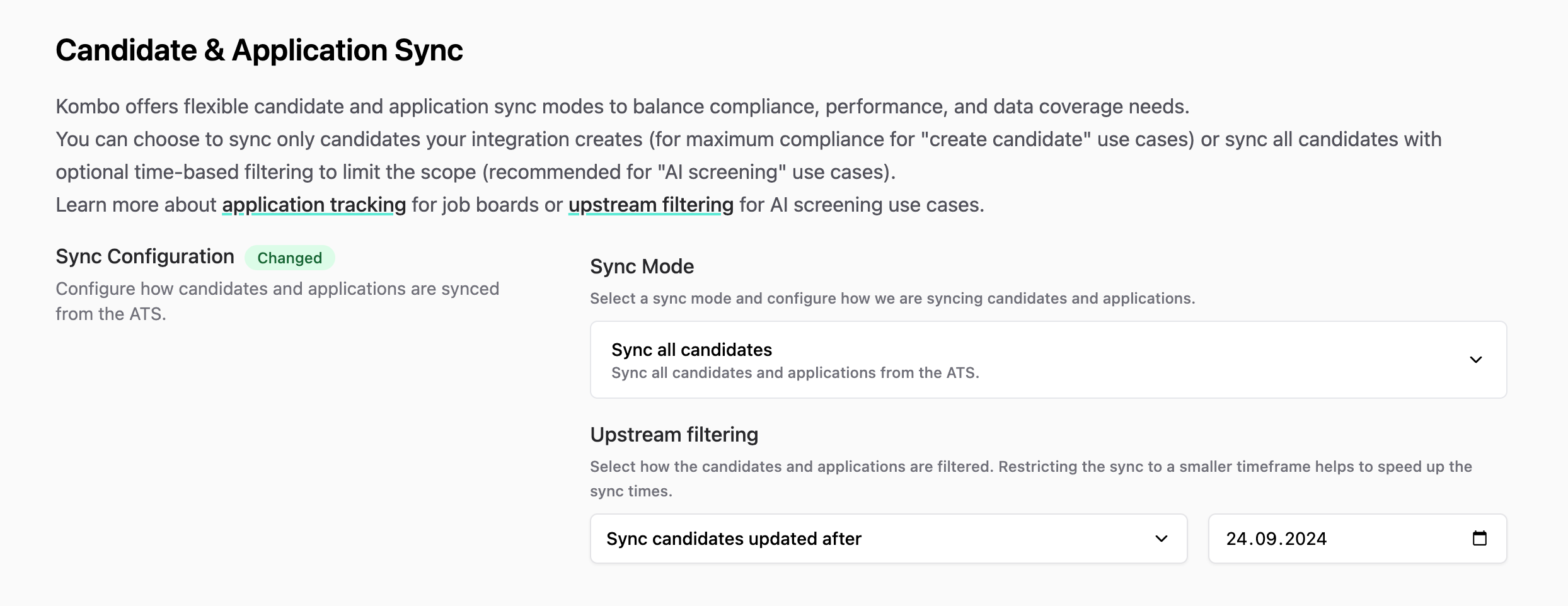 Navigate to your integration settings and configure the sync mode to "Sync all
candidates" with upstream filtering enabled.
Upstream filtering is not compatible with the [Sync created candidates
only](/ats/features/application-status-tracking#syncing-only-created-candidates)
sync mode.
## Implementation considerations
When using upstream filtering:
* **Only filtered data**: We apply the filters while syncing data from the ATS.
If you modify the filter, previously synced data outside the filter window
will get deleted from our system after 14 days.
* **Filter changes**: Adjusting filter parameters may cause some applications to
fall outside the sync scope.
* **Integration compatibility**: Most ATS integrations support upstream
filtering, though the exact implementation may vary
* **Webhook compatibility**: Upstream filters only apply to get recently changed
data, so anything that would trigger a webhook on the ATS, will usually bring
back the candidate and application to be synced as well.
Navigate to your integration settings and configure the sync mode to "Sync all
candidates" with upstream filtering enabled.
Upstream filtering is not compatible with the [Sync created candidates
only](/ats/features/application-status-tracking#syncing-only-created-candidates)
sync mode.
## Implementation considerations
When using upstream filtering:
* **Only filtered data**: We apply the filters while syncing data from the ATS.
If you modify the filter, previously synced data outside the filter window
will get deleted from our system after 14 days.
* **Filter changes**: Adjusting filter parameters may cause some applications to
fall outside the sync scope.
* **Integration compatibility**: Most ATS integrations support upstream
filtering, though the exact implementation may vary
* **Webhook compatibility**: Upstream filters only apply to get recently changed
data, so anything that would trigger a webhook on the ATS, will usually bring
back the candidate and application to be synced as well.