> ## Documentation Index
> Fetch the complete documentation index at: https://docs.kombo.dev/llms.txt
> Use this file to discover all available pages before exploring further.
# Notes & Scorecards
> Getting deeper context about candidates in your ATS
## What are notes?
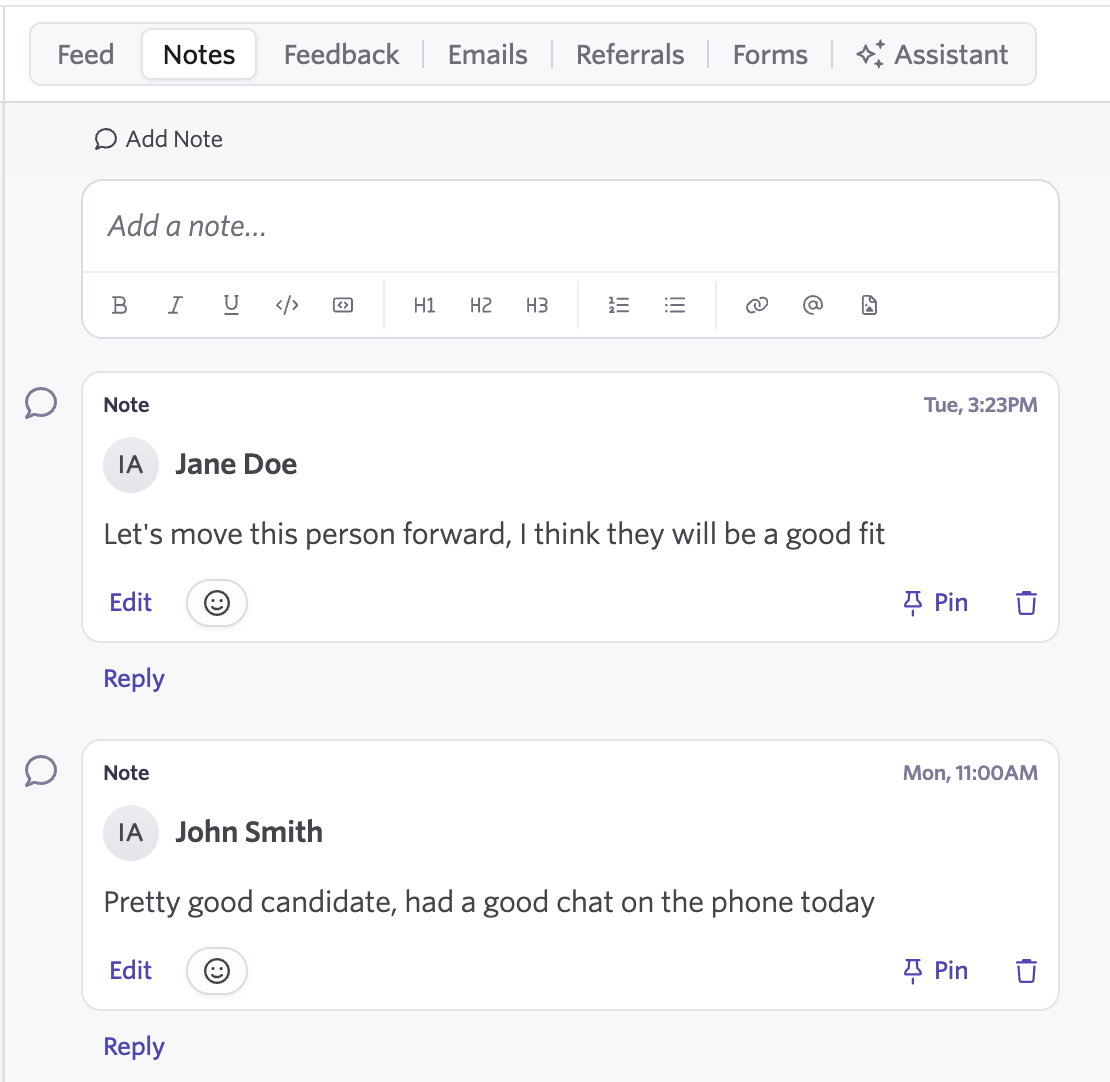
A **Note** is some free-form text left against a candidate profile or their application.
Recruiters, hiring managers and others with access to the candidate can freely leave notes throughout the recruitment process.
In the Kombo product, we surface the notes related to the application, but
not other workflow activities such as emails.
 ```json theme={null}
// GET /ats/notes
{
"status": "success",
"data": {
"next": null,
"results": [
{
"id": "H77fDF8uvEzGNPRubiz5DvQ7",
"remote_id": "32",
"candidate_id": "26vafvWSRmbhNcxJYqjCzuJg",
"application_id": "H5daSm8e85Dmvmne3wLeCPhX",
"author_id": "5J7L4b48wBfffYwek9Az9pkM",
"author": {
"id": "5J7L4b48wBfffYwek9Az9pkM",
"remote_id": "user_1",
"first_name": "Jane",
"last_name": "Doe",
"email": "jane@example.com"
},
"title": "Screening call",
"content_html": "Available from March, looking for a hybrid role in Berlin.",
"is_private": true,
"remote_created_at": "2022-08-07T14:01:29.196Z",
"remote_updated_at": "2022-08-07T14:01:29.196Z",
"remote_data": null,
"changed_at": "2022-08-07T14:01:29.196Z",
"remote_deleted_at": null
}
]
}
}
```
You can fetch notes from [`GET /ats/notes`](/ats/v1/get-notes).
## What are scorecards?
A **Scorecard** is structured feedback, filled via a form, that is most often completed after an interview.
Depending on the ATS, the hiring team can also submit scorecards without linking them to a specific interview.
Scorecards enable you to collect in depth feedback, and run a structured hiring process, while comparing the opinions of different hiring team members from a single perspective.
A lot of scorecards contain an overall summary, and a separate rating.
Where these are available, you will find them first in the array of answers found on the `responses` property of a scorecard.
```json theme={null}
// GET /ats/scorecards
{
"status": "success",
"data": {
"next": null,
"results": [
{
"id": "H77fDF8uvEzGNPRubiz5DvQ7",
"remote_id": "32",
"candidate_id": "26vafvWSRmbhNcxJYqjCzuJg",
"application_id": "H5daSm8e85Dmvmne3wLeCPhX",
"interview_id": "5J7L4b48wBfffYwek9Az9pkM",
"author_id": "6Wq4mDpYz3vBnh8Xk2Lr9TfA",
"author": {
"id": "6Wq4mDpYz3vBnh8Xk2Lr9TfA",
"remote_id": "user_2",
"first_name": "John",
"last_name": "Smith",
"email": "john@example.com"
},
"responses": [
{
"remote_id": null,
"label": "Overall rating",
"description": "How you feel the interview went",
"required": false,
"type": "SINGLE_SELECT",
"options": [
{ "remote_id": "1", "label": "Definitely not" },
{ "remote_id": "2", "label": "No" },
{ "remote_id": "3", "label": "Mixed" },
{ "remote_id": "4", "label": "Yes" },
{ "remote_id": "5", "label": "Strong yes" },
{ "remote_id": "6", "label": "No decision" }
],
"answer": { "remote_id": "4", "label": "Yes" }
},
{
"remote_id": null,
"label": "Summary",
"description": "Main notes about the interview",
"required": true,
"type": "TEXT",
"answer": "Excellent system design, strong communication throughout."
},
{
"remote_id": "attribute:8123",
"label": "System design",
"description": null,
"required": null,
"type": "SINGLE_SELECT",
"options": [
{ "remote_id": "1", "label": "Definitely not" },
{ "remote_id": "2", "label": "No" },
{ "remote_id": "3", "label": "Mixed" },
{ "remote_id": "4", "label": "Yes" },
{ "remote_id": "5", "label": "Strong yes" },
{ "remote_id": "6", "label": "No decision" }
],
"answer": { "remote_id": "5", "label": "Strong yes" }
}
],
"remote_created_at": "2022-08-07T14:01:29.196Z",
"remote_updated_at": "2022-08-07T14:01:29.196Z",
"remote_data": null,
"changed_at": "2022-08-07T14:01:29.196Z",
"remote_deleted_at": null
}
]
}
}
```
You can fetch scorecards from [`GET /ats/scorecards`](/ats/v1/get-scorecards).
## How are scorecards configured?
Scorecards are most frequently part of the interview setup process.
For a specific step, you will define questions that should be asked, or attributes you are checking for.
```json theme={null}
// GET /ats/notes
{
"status": "success",
"data": {
"next": null,
"results": [
{
"id": "H77fDF8uvEzGNPRubiz5DvQ7",
"remote_id": "32",
"candidate_id": "26vafvWSRmbhNcxJYqjCzuJg",
"application_id": "H5daSm8e85Dmvmne3wLeCPhX",
"author_id": "5J7L4b48wBfffYwek9Az9pkM",
"author": {
"id": "5J7L4b48wBfffYwek9Az9pkM",
"remote_id": "user_1",
"first_name": "Jane",
"last_name": "Doe",
"email": "jane@example.com"
},
"title": "Screening call",
"content_html": "Available from March, looking for a hybrid role in Berlin.",
"is_private": true,
"remote_created_at": "2022-08-07T14:01:29.196Z",
"remote_updated_at": "2022-08-07T14:01:29.196Z",
"remote_data": null,
"changed_at": "2022-08-07T14:01:29.196Z",
"remote_deleted_at": null
}
]
}
}
```
You can fetch notes from [`GET /ats/notes`](/ats/v1/get-notes).
## What are scorecards?
A **Scorecard** is structured feedback, filled via a form, that is most often completed after an interview.
Depending on the ATS, the hiring team can also submit scorecards without linking them to a specific interview.
Scorecards enable you to collect in depth feedback, and run a structured hiring process, while comparing the opinions of different hiring team members from a single perspective.
A lot of scorecards contain an overall summary, and a separate rating.
Where these are available, you will find them first in the array of answers found on the `responses` property of a scorecard.
```json theme={null}
// GET /ats/scorecards
{
"status": "success",
"data": {
"next": null,
"results": [
{
"id": "H77fDF8uvEzGNPRubiz5DvQ7",
"remote_id": "32",
"candidate_id": "26vafvWSRmbhNcxJYqjCzuJg",
"application_id": "H5daSm8e85Dmvmne3wLeCPhX",
"interview_id": "5J7L4b48wBfffYwek9Az9pkM",
"author_id": "6Wq4mDpYz3vBnh8Xk2Lr9TfA",
"author": {
"id": "6Wq4mDpYz3vBnh8Xk2Lr9TfA",
"remote_id": "user_2",
"first_name": "John",
"last_name": "Smith",
"email": "john@example.com"
},
"responses": [
{
"remote_id": null,
"label": "Overall rating",
"description": "How you feel the interview went",
"required": false,
"type": "SINGLE_SELECT",
"options": [
{ "remote_id": "1", "label": "Definitely not" },
{ "remote_id": "2", "label": "No" },
{ "remote_id": "3", "label": "Mixed" },
{ "remote_id": "4", "label": "Yes" },
{ "remote_id": "5", "label": "Strong yes" },
{ "remote_id": "6", "label": "No decision" }
],
"answer": { "remote_id": "4", "label": "Yes" }
},
{
"remote_id": null,
"label": "Summary",
"description": "Main notes about the interview",
"required": true,
"type": "TEXT",
"answer": "Excellent system design, strong communication throughout."
},
{
"remote_id": "attribute:8123",
"label": "System design",
"description": null,
"required": null,
"type": "SINGLE_SELECT",
"options": [
{ "remote_id": "1", "label": "Definitely not" },
{ "remote_id": "2", "label": "No" },
{ "remote_id": "3", "label": "Mixed" },
{ "remote_id": "4", "label": "Yes" },
{ "remote_id": "5", "label": "Strong yes" },
{ "remote_id": "6", "label": "No decision" }
],
"answer": { "remote_id": "5", "label": "Strong yes" }
}
],
"remote_created_at": "2022-08-07T14:01:29.196Z",
"remote_updated_at": "2022-08-07T14:01:29.196Z",
"remote_data": null,
"changed_at": "2022-08-07T14:01:29.196Z",
"remote_deleted_at": null
}
]
}
}
```
You can fetch scorecards from [`GET /ats/scorecards`](/ats/v1/get-scorecards).
## How are scorecards configured?
Scorecards are most frequently part of the interview setup process.
For a specific step, you will define questions that should be asked, or attributes you are checking for.
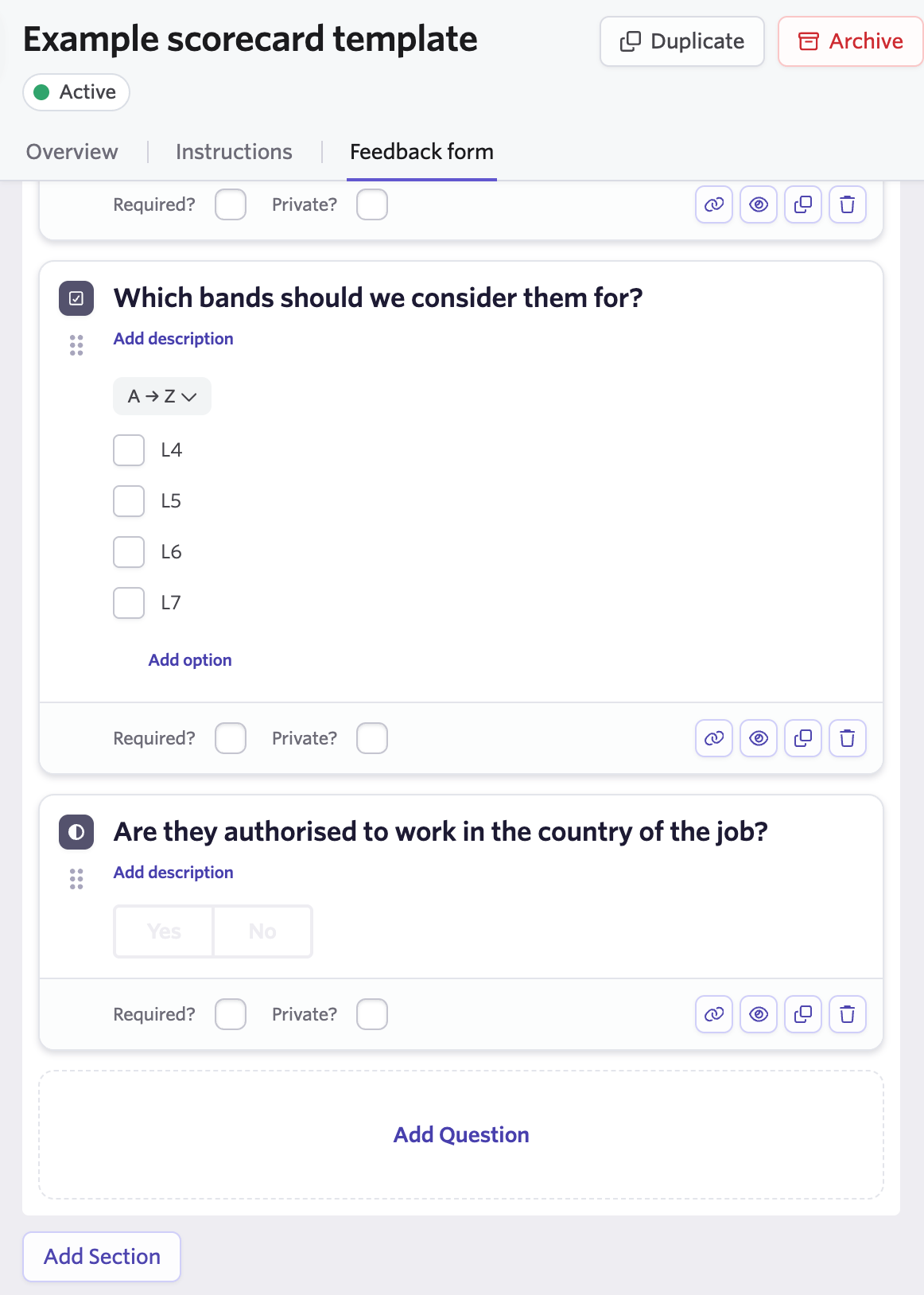 Along with the job stages pipeline, configure interview templates for each job.
Choose what are the essential questions that the interview should answer, so that each participant in the process has a clear understanding of their expected output.
After the interview, the interviewer goes through the scorecard, and fills out their assessment of the candidate. A scorecard might also be filled out by someone who is reviewing a recording of the interview, and is not strictly an interviewer.
In some ATS, a scorecard can be submitted by someone other than the person expressing their opinion. For example, this could be a recruiter following up with the interviewers, and collecting their feedback in an email.
Where the API distinguishes between the `submitter` of the feedback, and the `opinion-holder` we always map the `author` of the scorecard to the person whose opinion it is.
Define the questions or attributes that hiring team members should fill in.
A hiring team member can submit the scorecard without linking it to a scheduled interview.
## What tools are supported?
You can find a detailed overview of supported ATS platforms in the [ATS coverage grid](https://app.kombo.dev/coverage/ats?model=read:ats_notes,read:ats_scorecards) on your dashboard.
If you need support for an additional ATS, please contact us to request coverage.
Along with the job stages pipeline, configure interview templates for each job.
Choose what are the essential questions that the interview should answer, so that each participant in the process has a clear understanding of their expected output.
After the interview, the interviewer goes through the scorecard, and fills out their assessment of the candidate. A scorecard might also be filled out by someone who is reviewing a recording of the interview, and is not strictly an interviewer.
In some ATS, a scorecard can be submitted by someone other than the person expressing their opinion. For example, this could be a recruiter following up with the interviewers, and collecting their feedback in an email.
Where the API distinguishes between the `submitter` of the feedback, and the `opinion-holder` we always map the `author` of the scorecard to the person whose opinion it is.
Define the questions or attributes that hiring team members should fill in.
A hiring team member can submit the scorecard without linking it to a scheduled interview.
## What tools are supported?
You can find a detailed overview of supported ATS platforms in the [ATS coverage grid](https://app.kombo.dev/coverage/ats?model=read:ats_notes,read:ats_scorecards) on your dashboard.
If you need support for an additional ATS, please contact us to request coverage.